











Virtual Reality Vs Augmented Reality: Key Differences, Examples, Benefits, and Uses - EuphoriaXR

Virtual Reality Vs Augmented Reality: Key Differences, Examples, Benefits, and Uses

Share Article:
Virtual Reality Vs Augmented Reality: Key Differences, Examples, Benefits, and Uses - EuphoriaXR
Picture of Amelia Rose / Content Strategist & Copywriter
Amelia Rose / Content Strategist & Copywriter
Summarize with:
Table of Contents
Table of Contents
Share Article:

TL;DR

Augmented reality (AR) adds digital content to physical surroundings, while virtual reality (VR) immerses users in a simulated environment. AR is useful for product visualization and interactive exhibits, while VR is suited to virtual tours and training simulations. The best choice depends on your project goals, audience, and hardware requirements. 

Key Takeaways

  • AR enhances the physical world, while VR creates a simulated environment. Both can be interactive, but they offer different levels of immersion.

  • Hardware requirements vary. Many AR experiences work on compatible smartphones, while immersive VR typically uses headsets. Some modern headsets support both types of experience.

  • Both technologies have practical business applications. AR supports product visualization, exhibitions, and interactive storytelling. VR is useful for simulated training, virtual tours, and spatial visualization.

  • MR and XR are related but different terms. Mixed reality connects digital content with physical surroundings, while extended reality is the broader category covering AR, VR, and MR.

  • The best technology depends on the experience you want to create. Device compatibility, accessibility, development requirements, and user interaction should guide the decision.

Imagine visiting a history museum. With AR, you could point your smartphone at an exhibit and see a digital reconstruction of how it looked centuries ago. With VR, you could put on a headset and explore a simulated version of the entire historical setting.

Both experiences can be interactive, but they serve different purposes. AR is useful when digital information needs to connect with a real location, object, or activity. VR is useful when people need to experience an environment or situation that would be difficult, expensive, or impractical to recreate physically.

Understanding these differences helps businesses, educators, museums, and creative agencies select technology that fits their audience and objectives.


AR Vs VR: Key Differences at a Glance

The difference between augmented reality and virtual reality becomes clearer when comparing how people access, interact with, and experience each technology.

Feature Augmented Reality (AR) Virtual Reality (VR)
Environment Adds digital content to a view of physical surroundings Replaces the user's ordinary view with an immersive digital environment
Immersion Keeps the physical world visible Creates a stronger sense of being inside a simulated environment
Common Devices Smartphones, tablets, AR glasses, and compatible headsets Standalone or computer-connected VR headsets
Tracking Tracks device movement and, depending on the application, physical surfaces, images, or locations Tracks headset movement and may track hands or controllers
Interaction Touchscreens, gestures, movement, and other supported inputs Head movements, controllers, hand tracking, and other supported inputs
Accessibility Many experiences can use compatible smartphones, although advanced features have device restrictions Immersive experiences generally require compatible headset hardware
Typical Applications Product visualization, museum exhibits, navigation, location-based experiences, and marketing Training simulations, virtual tours, immersive education, design reviews, and entertainment
Common Challenges Tracking reliability, lighting, device compatibility, and camera permissions Hardware distribution, physical space, user comfort, and accessibility
Development Considerations Real-world tracking, digital object placement, device support, and environmental testing Virtual environment creation, interaction design, performance, and movement comfort

These are typical differences rather than fixed technical rules.

Some modern headsets can deliver AR-like, mixed reality, and fully immersive VR experiences using the same hardware. Microsoft’s Mixed Reality Documentation describes these experiences along a spectrum rather than as completely separate hardware categories. 

Planning an AR or VR experience for your business? Discuss your idea, technical requirements, and the approach that fits your project.

What is Augmented Reality (AR)?

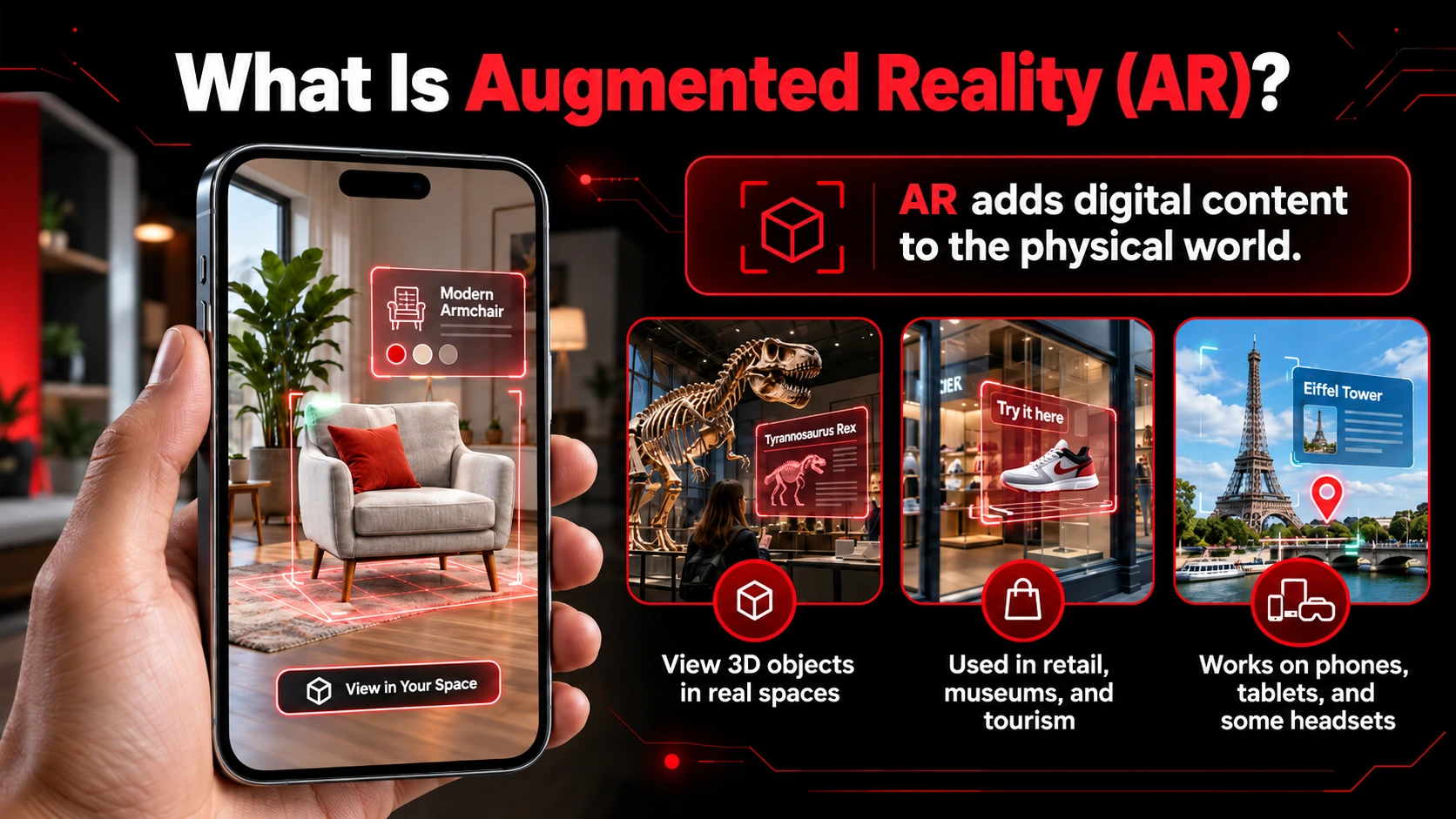
Augmented reality is technology that places digital information, images, animations, or 3D objects into a view of the physical environment.
 

What is Augmented Reality (AR)-EuphoriaXR


Instead of transporting users somewhere else, AR adds information to the space they already occupy.

For example, a furniture retailer can let shoppers visualize a digital product in their room. A museum can display historical reconstructions near an exhibit, while a tourism application can show location-specific information as visitors explore a destination.

As users move their devices, they can view digital objects from different angles. More advanced experiences can also account for nearby surfaces and objects.

AR does not always require specialized glasses. Smartphones and tablets are common access points, although compatible headsets can also present digital content alongside physical surroundings.

How Does Augmented Reality Work?

AR applications use tracking and rendering technologies to position digital content relative to the user’s surroundings.

Google’s ARCore documentation explains several important capabilities. 

  • Motion tracking: The system estimates the device’s position and orientation as it moves. ARCore combines visual information from camera images with measurements from the device’s motion sensors. This helps digital objects remain aligned with their intended positions as the user changes their viewpoint.

  • Environmental understanding: Supported AR applications can identify surfaces such as floors, walls, and tables. For example, a virtual chair can appear anchored to the floor as the user moves around it.

  • Depth understanding: Some applications estimate the distance between the camera and objects in the environment. Depth information can help digital content appear in front of or behind physical objects, making the experience more convincing. However, depth capabilities vary across devices and applications.

  • Light estimation: AR systems can use information about surrounding lighting to adjust the appearance of virtual objects. Matching digital lighting more closely to the physical environment can help an object look as though it belongs in the scene. Not every AR application uses all these capabilities. A simple image-triggered experience may work differently from a location-based application or an advanced spatial experience.

For organizations planning interactive exhibits, product visualizations, or location-based experiences, EuphoriaXR’s Augmented Reality Development Services cover experience design, 3D content, development, and device testing.

Types of Augmented Reality

AR experiences differ in how they recognize and respond to their surroundings. Some recognize images or markers, others detect physical surfaces, and location-based applications connect digital content with specific places. 

  • Image-based AR: Recognizes a printed image, illustration, or other visual target to display related content.

  • Surface-based AR: Places digital objects on detected physical surfaces.

  • Location-based AR: Associates digital content with geographic locations using positioning technologies.

  • Face and body AR: Uses supported tracking capabilities to position effects or digital elements relative to a person.

Location-based experiences can have additional requirements.

For example, Google’s ARCore Geospatial API combines device sensors, GPS, and visual positioning to support geographically anchored content. Their accuracy and availability depend on the location and the positioning data available to the system.


What is Virtual Reality (VR)?

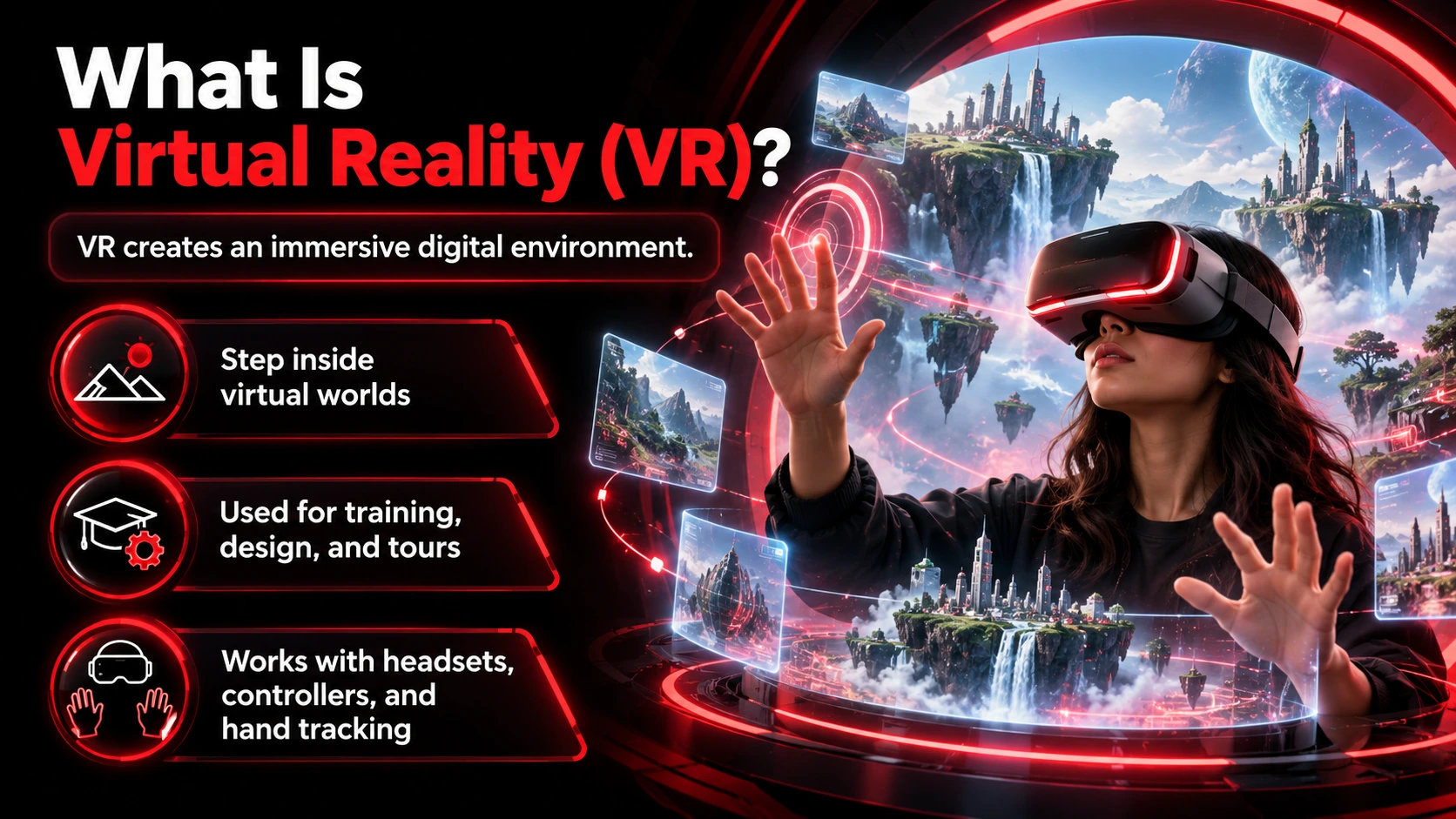
Virtual reality is technology that creates an immersive digital environment, usually experienced through a headset.

Instead of placing an object in someone’s living room, VR can make that person feel as though they are standing inside a completely different space.
 

What is Virtual Reality (VR)-EuphoiraXR


That environment might be a reconstructed historical site, a virtual factory, a training facility, or a building that has not yet been constructed.

As users move their heads, the system updates the displayed scene to match their perspective 

Depending on the application and hardware, they may also be able to walk within a defined area, interact with virtual objects, or complete activities using controllers or hand tracking.

This ability to experience and interact with simulated environments makes VR useful beyond gaming.


How Does Virtual Reality Work?

VR systems combine several technologies to create an immersive experience.

  • Head-mounted displays: A VR headset presents visual content to the user, commonly providing separate images for each eye to create a sense of depth.

  • Motion tracking: Sensors and tracking systems estimate how the user’s head moves. When someone turns their head, the application updates the rendered scene so the view changes accordingly.

  • Interaction systems: Supported devices allow users to interact through controllers, tracked hands, or other input methods. For example, an employee using a VR maintenance simulation might select tools, inspect equipment, and follow a training sequence.

  • Spatial audio: Some VR applications use directional audio to make sounds appear to originate from particular positions in the virtual environment. Together, these systems can create a sense of presence, although the quality of the experience depends on the application, device, and tracking performance.


What is the Difference Between 3DoF and 6DoF VR?

VR experiences vary in how much physical movement they can track.

The terms 3DoF and 6DoF refer to three and six degrees of freedom.

With 3DoF tracking, the system follows rotational head movements, such as looking left, right, up, or down.

With 6DoF tracking, the system can also follow positional movements, such as leaning forward, stepping sideways, or moving closer to an object.

Google’s degrees of freedom documentation explains this technical distinction. 

For a virtual property walkthrough or interactive training simulation, positional tracking can be especially useful because people may need to inspect objects from different locations.

However, not every experience requires that level of movement.


Is 360-Degree Video the Same as Virtual Reality?

Not exactly.

A 360-degree video lets viewers look in different directions within recorded footage.

When viewed through a headset, it can provide an immersive experience. However, the viewer generally cannot move freely through the recorded scene as they can in an interactive 3D environment.

Some 360-degree experiences include interactive hotspots, menus, or branching choices. Even then, the underlying footage does not automatically become a fully navigable virtual environment.

This distinction matters when planning a project.

A destination marketing campaign might only need an immersive 360-degree tour. An equipment maintenance simulation may require interactive 3D objects, positional tracking, and more extensive application development.


AR vs VR: Advantages and Disadvantages 

Neither technology is automatically better. Each offers advantages under particular conditions, along with limitations that can affect the user’s experience.

Advantages of Augmented Reality

Connects digital information to physical surroundings

AR can provide information where someone is already working, shopping, or exploring.

For example, an educational experience can place a digital reconstruction beside a historical object rather than requiring visitors to leave the exhibit.

Supports experiences on familiar devices

Many AR applications can run on compatible smartphones or tablets.

This can reduce the need to distribute dedicated hardware, particularly for public-facing experiences.

Makes products easier to visualize in context

AR can help users examine the appearance, placement, or scale of digital products alongside their surroundings.

The usefulness of that visualization depends on the accuracy of the models and the capabilities of the application.

Supports location-specific storytelling

AR can connect digital content to a physical place, allowing people to explore additional information without leaving their surroundings. 


Limitations of Augmented Reality

AR depends on more than attractive 3D content.

Tracking quality can suffer when lighting is poor, or the environment lacks recognizable visual features.

Apple’s ARKit world-tracking documentation specifically identifies dark environments, featureless surfaces, and excessive camera movement as conditions that can reduce tracking reliability. 

Device compatibility is another important consideration.

Google maintains an official ARCore-supported device list, and advanced features such as depth understanding have additional requirements. A feature supported on one smartphone may not be available on another. 

AR applications may also need camera, location, or other permissions, depending on their functionality.

For public experiences, these technical considerations should be evaluated before development rather than discovered during launch.


Advantages of Virtual Reality

Creates environments without physically reproducing them

VR can simulate locations and situations that would otherwise be difficult to access. This allows organizations to create experiences that would otherwise require access to a physical location or specially prepared training environment. 

Supports controlled practice

Organizations can design repeatable simulations in which participants encounter defined tasks or situations.

The experience can be structured around specific decisions, procedures, or learning objectives.

Simulation does not guarantee better learning outcomes, but it gives instructional designers another way to provide structured practice 

Encourages focused participation

In a fully immersive VR experience, users see the simulated environment rather than the physical space around them.

This can be helpful when an activity depends on understanding a setting or completing tasks within it.

Makes proposed environments explorable

Architects, designers, and real estate teams can use VR to help stakeholders examine digital representations of spaces before construction or physical visits.

Limitations of Virtual Reality

Immersive VR usually requires compatible headset hardware.

For businesses running events, exhibitions, or training programs, this introduces operational considerations such as device preparation, participant onboarding, cleaning, maintenance, and supervision.

Physical space also matters. Users need a suitable area for the experience, especially when movement is involved.

Comfort is another important factor.

PlayStation’s official health warnings identify possible symptoms including motion sickness, nausea, disorientation, and blurred vision during VR use. 

Experiences should provide appropriate movement options and allow users to stop whenever they experience discomfort.

Accessibility also needs to be considered from the beginning.

The World Wide Web Consortium’s XR Accessibility User Requirements document discusses alternative interaction methods, captions, adjustable interaction speeds, and reducing triggers for motion sickness.


Real-World Examples and Applications of AR and VR 

The practical applications of augmented reality and virtual reality extend across retail, museums, education, employee training, marketing, and entertainment.

Looking at documented examples helps explain when each technology is useful.

Augmented Reality in Retail and Product Visualization

AR can help customers examine digital representations of products before making purchasing decisions.

This can be particularly useful when a product’s appearance, dimensions, or relationship to surrounding objects matters.

One example of digital product visualization is IKEA Kreativ.

According to IKEA’s documentation, customers can use room photographs or supported scanning features to arrange furniture digitally within representations of their spaces.

IKEA Kreativ combines photo-based room design with supported 3D scanning features, allowing customers to visualize furniture arrangements before purchasing. The available features depend on the device and selected workflow. 

EuphoriaXR developed a browser-based AR sizing tool for Harbinger that helps customers measure their hands and find an appropriate workout glove size using a smartphone. The project demonstrates how WebAR can support a specific shopping task without requiring a dedicated mobile app. 

Project insight: The Harbinger experience required customers to measure their hands using their existing phones. EuphoriaXR’s case study describes a browser-based approach, custom measurement algorithms, and the use of a quarter as a physical sizing reference. It illustrates how the requirements of a practical task can shape both the technology and the user experience. 

The application demonstrates how camera-based technology can support a practical shopping task rather than simply displaying decorative digital content.

Augmented Reality in Museums and Tourism

Museums can use AR to add visual or interactive information to physical exhibits while allowing visitors to remain connected to their surroundings.

The Smithsonian Institution, for example, offers mobile AR experiences that let users bring digital representations of collection objects into their own spaces. 

AR can also help historical locations connect visitors with stories associated with particular places.

At the Francis Land House in Virginia Beach, augmented reality experiences have been introduced to support visitors’ exploration of the historic property.

The City of Virginia Beach announced AR experiences as part of the historic site’s November 16, 2025 reopening. The museum’s own website also describes AR experiences throughout the house, grounds, and nearby walkway. 

EuphoriaXR documents its involvement in the project through its Virginia Beach AR case study.

The example illustrates why location matters in AR storytelling. Visitors can explore digital content while remaining physically connected to the historical site.

Virtual Reality in Training and Simulations

VR can provide an environment in which users rehearse procedures or encounter simulated situations without reproducing every condition physically.

NASA offers a documented example.

Its Virtual Reality Training Lab supports astronaut training for extravehicular activities and robotics operations.

The facility uses simulation technologies to help astronauts rehearse scenarios associated with work in space. 

The same simulation principles can support more familiar workplace activities, including equipment familiarization, procedural training, and safety exercises. 

The underlying principle can also apply to industrial training, equipment familiarization, safety exercises, or procedural instruction.

A virtual environment can present scenarios in a controlled setting, allowing participants to practice specific tasks. 
Developing these experiences requires careful planning around user interaction, tracking, and hardware compatibility. EuphoriaXR’s VR Development Services cover custom simulations, immersive training, and interactive virtual environments.

Virtual Reality in Public Awareness Campaigns

VR can also support educational campaigns intended for public audiences.

In April 2024, the Metropolitan Washington Council of Governments announced a traveling VR experience as part of its Street Smart road-safety campaign.

Participants encountered simulated traffic situations associated with dangers to pedestrians and cyclists.

The experience was designed to help audiences consider road-safety decisions in an interactive setting.

For marketing and public education teams, this demonstrates a different application of VR.

Instead of presenting a product or location, the technology can place participants within a situation and ask them to respond.

Its effectiveness depends on the experience design, the intended audience, and how outcomes are measured.

AR and VR in Education

Both technologies can support educational experiences, but they approach learning differently.

AR can place digital learning materials alongside physical objects.

For example, students examining a physical model could use AR to view additional layers, annotations, or animated explanations.

VR can instead provide access to simulated environments.

Students might explore a historical reconstruction, examine a virtual laboratory, or participate in an interactive scenario.

The better choice depends on the learning objective.

If the lesson benefits from examining the surrounding environment, AR may be appropriate. If students need to experience a setting that is difficult to visit or reproduce, VR may be more useful.

Neither technology should be assumed to improve learning outcomes automatically. Content quality, instructional design, accessibility, and assessment remain important.


WebAR vs App-Based AR: Does Augmented Reality Require an App?

Not every AR experience requires users to download a dedicated mobile application.

Some experiences can be delivered through web technologies, while others use native applications or operating-system features.

WebAR

WebAR allows supported AR experiences to be accessed through web-based delivery methods.

For example, a business might provide a QR code or link that visitors can use to open a compatible experience.

This approach can be useful for marketing campaigns, product demonstrations, or public exhibitions where asking visitors to install an application would create additional friction.

However, browser support varies.

Mozilla’s WebXR Device API documentation identifies limited availability across major browsers and notes that supported WebXR functionality requires a secure context, typically HTTPS. 

Not every browser-based AR experience uses WebXR directly. Platform-specific viewing features and other web technologies can also be involved.

Apple, for example, provides AR Quick Look for viewing supported 3D objects in physical surroundings on compatible iPhones and iPads. 

App-Based AR

Native AR applications are installed on supported devices.

They may be more suitable when a project requires extensive device integration, specialized functionality, or a more complex experience.

A dedicated application can also provide greater control over the user interface and supported features.

However, installation requirements and application maintenance introduce additional considerations.

For businesses choosing between WebAR and native AR, the important factors are the target devices, required functionality, browser support, and how easily people need to access the experience.

For organizations considering browser-based immersive experiences, EuphoriaXR’s WebAR and WebVR development services provide options for delivering interactive content through supported devices and browsers.

AR vs VR vs MR vs XR: What’s the Difference?

Augmented reality and virtual reality are often discussed alongside two related terms: mixed reality and Extended Reality.

Although the terminology overlaps, the distinctions are useful.

Technology Meaning Example
AR: Augmented Reality Adds digital content to a view of physical surroundings Viewing a digital object in a room
VR: Virtual Reality Replaces the ordinary physical view with an immersive digital environment Exploring a simulated building through a headset
MR: Mixed Reality Blends physical and digital environments, often supporting spatially aware interactions Manipulating a digital object that responds to the surrounding room
XR: Extended Reality An umbrella term encompassing AR, VR, and MR A general category for immersive technologies

The Khronos OpenXR specification explicitly includes AR, VR, and MR within the broader XR category. 

How Is Mixed Reality Different From Augmented Reality?

The distinction is not always absolute because different platforms use overlapping terminology.

In common usage, AR emphasizes adding digital content to a view of the physical world.

MR often emphasizes digital content that is spatially connected to, or can interact with, the surrounding environment.

For example, displaying a digital model over a camera view is a straightforward AR experience.

Allowing a virtual object to respond to the geometry of a physical room illustrates a more spatially integrated experience that may be described as MR.

Can the Same Headset Support AR and VR?

Yes, some devices support multiple levels of immersion.

Apple’s visionOS design documentation describes mixed, progressive, and fully immersive experiences.

Its passthrough technology allows users to view their surroundings through camera imagery while digital content appears alongside them.

The system can also display immersive environments that replace the surrounding view. 

This highlights an important distinction.

AR, VR, and MR describe types of experiences, not necessarily separate categories of hardware.


Virtual Reality vs Augmented Reality: Which is Right for Your Project?

The right choice depends less on which technology appears more advanced and more on what the audience needs to accomplish.

A business designing a museum exhibit faces different requirements from a company developing employee training simulations.

Before choosing AR or VR, consider the following factors.

Project Objective Technology to Consider Why
Add digital storytelling to a physical museum AR Keeps the actual exhibits visible
Practice procedures in a simulated environment VR Provides a controlled training setting
Let customers visualize furniture in a room AR Connects a digital object with a physical space
Explore a proposed building immersively VR Allows examination of a simulated space
Add information to a destination walking tour AR Connects information with physical locations
Create an immersive trade show demonstration AR or VR Depends on the audience, interaction, and hardware

What Should the User Experience?

Start with the purpose of the experience.

Choose AR when users need digital information connected to physical objects, surroundings, or locations.

Choose VR when users need to experience a different environment or participate in a controlled simulation.

For example, AR may be better suited to adding historical information to a museum exhibit. VR may be more suitable for allowing visitors to explore a reconstructed building that no longer exists.

What Devices Will the Audience Have?

An experience designed for thousands of consumers must account for different smartphones, operating systems, and levels of device compatibility.

A managed employee training program may have more control over the equipment participants use.

This difference can influence the choice of technology and how it is delivered.

For a public AR campaign, it is worth checking whether the required features work across the devices commonly used by the intended audience.

For a VR deployment, consider how participants will access headsets and whether the experience requires standalone or computer-connected hardware.

Where Will People Use the Experience?

The physical location matters.

An AR exhibit may depend on reliable lighting, sufficient visual detail, and the availability of location-specific information.

A VR installation may require a designated area where participants can use headsets without encountering obstacles.

An experience intended for home use will have different practical requirements from one operated by staff at a museum or trade show.

Testing in the actual deployment environment is therefore important.

How Much Interaction Is Necessary?

Not every project needs complex interaction.

A product demonstration may only require users to rotate and inspect a digital object.

A VR safety simulation might require users to identify hazards, make decisions, manipulate controls, and receive feedback.

These requirements affect the content, application design, and development effort.

Define the necessary interactions before deciding on the technology.

What Are the Budget and Maintenance Requirements?

There is no reliable rule that AR is always cheaper than VR.

A relatively simple mobile AR experience may require fewer resources than a complex VR simulation. However, an advanced AR application with custom tracking, extensive 3D content, and multiple device integrations may also be expensive to develop.

The costs depend on factors such as:

  • 3D modeling and content production

  • Interaction complexity

  • Supported platforms and devices

  • Software development and integration

  • Hardware purchasing or rental

  • Testing and accessibility requirements

  • Deployment, updates, and ongoing support

For VR projects, headset availability and operational requirements may influence the budget.

For AR projects, compatibility testing and the complexity of physical-world tracking may have a greater impact.

The most useful comparison is between solutions designed to achieve the same business objective, not between AR and VR as broad categories.

How Will You Measure Success?

The project should have a measurable purpose beyond attracting attention.

A retail experience might be evaluated through product interaction, completed sizing sessions, or customer feedback.

A training simulation might be assessed through task completion, decision accuracy, or performance on a subsequent assessment.

A museum installation might focus on participation, accessibility, visitor understanding, or feedback.

Choose measures that reflect the actual objective.

An experience with impressive graphics is not necessarily successful if it fails to help people complete the intended task.


Frequently Asked Questions (FAQs)

The biggest difference is how each technology presents the environment.

AR adds digital content to a view of physical surroundings, allowing users to remain visually connected to the space around them.

VR presents an immersive digital environment that replaces the user’s ordinary view of the physical world.

No. Many AR experiences work on compatible smartphones and tablets.

Some use specialized glasses or headsets, but dedicated wearable hardware is not a universal requirement.

Advanced AR features may still require particular cameras, sensors, processors, or software support.

Not always.

Standalone VR headsets can run supported applications without a separate gaming computer.

Other systems use a connected computer or console, depending on the device and experience.

The hardware requirements should be determined by the application rather than by a general assumption about VR.

Some AR and VR applications can operate without a continuous internet connection when their content and required functionality are available locally.

However, online features may require connectivity.

For example, cloud-based shared AR anchors, streamed content, multiplayer functionality, account services, and some location-based features can depend on internet access.

Offline operation should be treated as a specific application requirement and tested accordingly.

It depends on the task.

AR can be useful when workers need digital information while viewing physical equipment or carrying out activities in their actual workplace.

VR can be useful when employees need to practice procedures in a simulated environment.

The choice should account for the training objective, available equipment, accessibility needs, and how performance will be assessed.

Final Thoughts

The difference between virtual reality and augmented reality comes down to how users experience digital content. AR works alongside the physical environment, while VR lets people explore and interact within a simulated one.

For museums and tourism organizations, AR can add information and storytelling to existing locations. For corporate training, real estate presentations, and immersive demonstrations, VR may be more suitable when the experience requires a fully digital setting.

Neither technology is the better option for every project. What matters is choosing an approach that fits the audience, the intended interaction, and the available resources.

If you’re planning an immersive experience but aren’t sure which technology fits, discuss your project with EuphoriaXR. The team can help assess your requirements and explore an appropriate approach.

Get Started With Euphoria XR
• Award-Winning AR/VR/AI Development & Consulting Services
• Flexible Business Models – Project Based or Dedicated Hiring
• 10+ Years of Industry Experience with Global Clientele
• Globally Recognized by Clutch, GoodFirms & DesignRush

Picture of Amelia Rose / Content Strategist & Copywriter
Amelia Rose / Content Strategist & Copywriter
I’m Amelia Rose, a Content Writer and Copywriter with 7+ years of experience creating research-driven, SEO-focused content. I stay updated with Google algorithm changes, search intent trends, and E-E-A-T principles to ensure my content remains useful, credible, and search-friendly. I specialize in simplifying complex topics across AR, VR, AI, software development, and emerging technologies for both readers and search engines.

Recent Posts

Company's Stats

300+

Successful Projects

98%

Success Rate

90+

Pro Team Members

10+

Years of Experience

Let's talk about your project

We are here to turn your ideas into reality