













Augmented Reality Book How AR Is Changing the Reading Experience - Euphoria XR

Augmented Reality Book: How AR is Changing the Reading Experience

Share Article:
Augmented Reality Book How AR Is Changing the Reading Experience - Euphoria XR
Picture of Amelia Rose / Content Strategist & Copywriter
Amelia Rose / Content Strategist & Copywriter
Summarize with:
Table of Contents
Table of Contents
Share Article:

TL;DR

An augmented reality book uses print to augment the content with digital elements that are displayed through an AR device such as a smartphone, a tablet, or another AR device. The 3D models, animations, videos, sounds, games, and other interactive downloads can be triggered by any page, illustration, image, or code. AR books are utilized for kids’ stories, education, coloring books, books for learning, training manuals, accessible books for the community, and branded content. They can go through a designated application or, in a few instances, a WebAR experience through a browser. The best AR books aren’t just stuffed with technology just so they can attract the reader’s attention. Using AR can help explain, show, or even allow readers to engage with something that can’t be communicated through print. 

What if a dinosaur could climb out of a science book?

Or you could point your phone at the human heart and watch it beat in 3D?

That’s what an augmented reality book can do. It preserves the physical pages people already recognise, and enriches them with digital content like 3D models, animation, sound, video, games, quizzes and more.

It’s still a real book. However, some pages will show additional details if accessed on a smartphone or tablet device.

This opens up new avenues for publishers, teachers, authors, training institutions, museums, and brands. AR can provide capabilities for printed or written information that paper can’t otherwise contain. 


What Is an Augmented Reality Book?

An augmented reality book is a book with digital content that overlays the printed page via a device like a smartphone, tablet, or AR-ready device. The images, markers, or pages can be scanned while the reader reads through the book and sees 3D Models, animations, videos, audio, narration, quizzes, games, or other interactive features in the book.

AR books are not to be used as a replacement for the physical book. It is a layer of the printed page that is added digitally. This enables the viewer to interact with the presented information that would be hard to convey in print, hear a sound, watch movement, and view objects from various angles.

In mediums such as education, textbooks, children’s stories, coloring books, technical training, art publications, branded content, museums, children’s stories, technical training, and coloring books are often targeted by augmented reality books. 

Do you want to turn real pages into interactive AR experiences? 

How Do Augmented Reality Books Work?

Augmented reality books make use of specific image recognition, markers, QR codes, or AR tracking technologies to bring digital elements into the book alongside printed text.

The typical AR book experience is as follows:

  • The reader launches an AR app or AR experience in the browser.

  • The camera reads a page, image, or marker.

  • AR software recognizes printed content.

  • The proper digital asset is loaded.

  • The material overlays or surrounds the book’s structure. 

  • The reader may watch, listen, rotate, tap, or interact with it.

A scan of the picture of the solar system might present the revolving 3D planets floating on top of the page. A language book might be able to play pronunciation, and a training manual might be able to display a repaired animated process.

Using AR images to anchor digital objects on the book has been used in some AR books. Some AR markerless systems, for example, can position 3D elements on surrounding surfaces. 


What Does Augmented Reality Reading Actually Look Like?

Augmented reality reading blends regular reading and brief digital interactions.

The reader reads printed text normally. They then scan an AR-enabled page with a phone or tablet when they arrive at such a page. The sight of digital information displayed on the screen then adds to the information on the page.

Students, for instance, can learn about the human heart and scan the illustration to view a 3D representation of the actual beating heart. They could rotate it, see various chambers, hear narration, or tap on labels for additional information.

Typically, the experience runs as follows:

Read → Scan → View → Interact → Continue reading 

When the digital content enhances the reading, AR has the greatest chance of being effective as an instructional tool. It should clarify, demonstrate, or illustrate something that cannot be clearly communicated on a static page.


Types of Augmented Reality Books

Augmented reality books can be created for storytelling, learning, training, art, and interactive activities. There are several broad categories of digital types, depending upon the type of digital layer applied to the printed materials. 
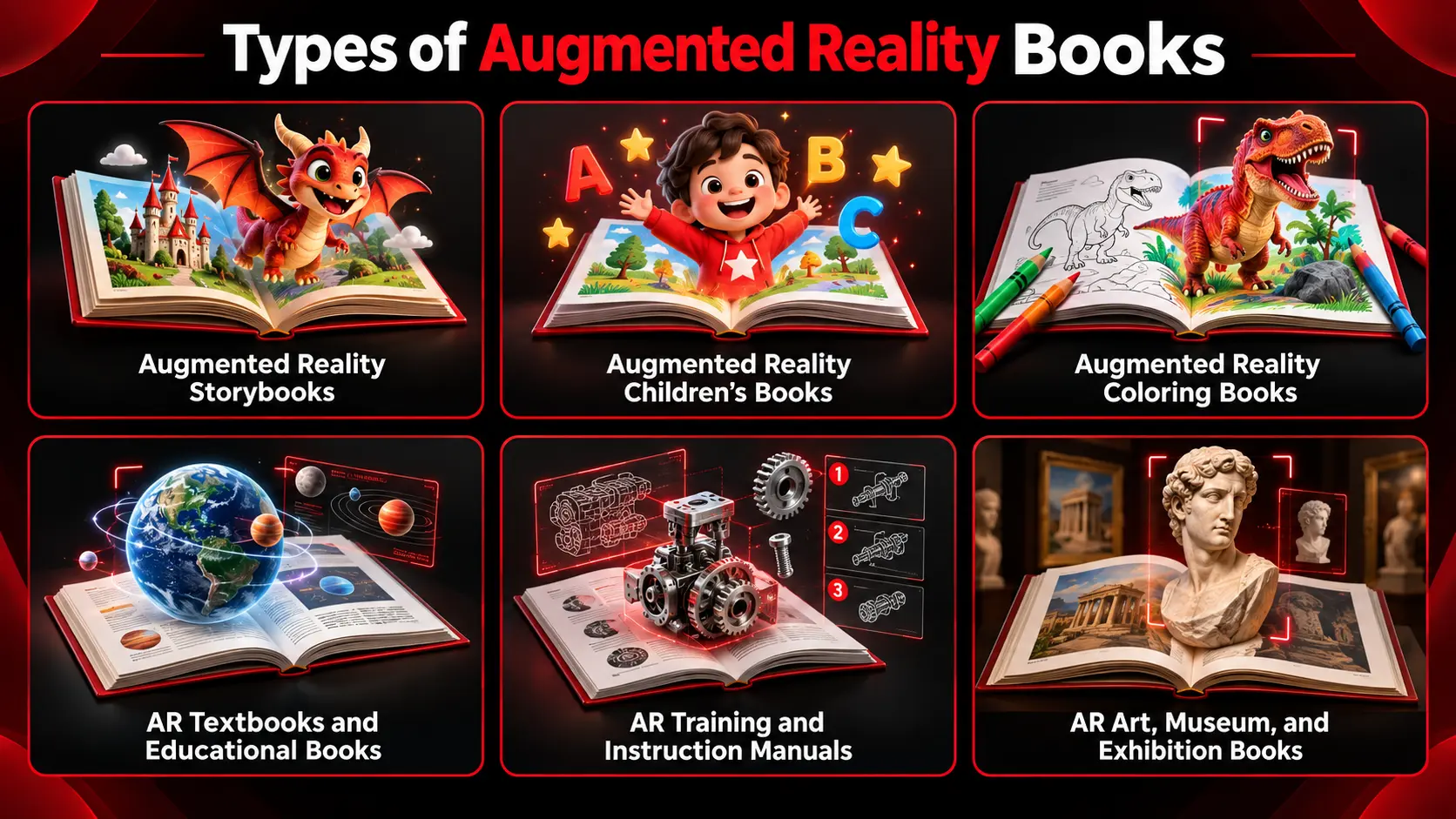
Types of Augmented Reality Books-EuphoriaXR


Augmented Reality Storybooks

Augmented reality storybooks introduce digital characters, animation, narration, and sound effects to printed stories, and introduce interactions that bring them to life interactively.

A reader could scan through a page, see a character move, hear speech, visit a 3D scene, solve a puzzle, or gain access to a portion of the story. These features will be of most help when they are in service to the story instead of detracting from it.

Augmented Reality Children’s Books

Augmented reality children’s books combine simple text and illustrations with age-appropriate digital activities.

They can include:

  •  Animated characters

  •  Animal sounds

  •  Read-aloud narration

  •  Letter and word pronunciation

  •  3D learning objects

  •  Questions and quizzes

  •  Simple games

Used for early learning, storytelling, vocabulary, science, animals, and minimal learning concepts. 

Augmented Reality Coloring Books

The augmented reality coloring book is a virtualization of the physical coloring book and animation.

A child is coloring a printed page, then scanning the page using their smartphone or tablet. The system can transform the artwork into a scaled image of the child’s face or 3D scenes with their selected color palette.

Some AR coloring experiences also allow the user to rotate the character to create and trigger animation, play games, or interact with the digital scene. 

AR Textbooks and Educational Books

AR textbooks are designed to provide students with a more immersive and engaging learning experience by incorporating real-world details that are not typically conveyed in traditional textbooks.

They can display:

  •  Human anatomy

  •  Molecules

  •  Planets

  •  Historical objects

  •  Machines

  •  Geographic features

  •  Scientific processes

  •  3D diagrams

In a biology textbook, for instance, there could be a 3D beating heart, and in an astronomy book, there could be one for students to have a look at and explore a model of the solar system. 

AR Training and Instruction Manuals

Digital overlays are used in AR training books and instruction manuals to illustrate steps, equipment, procedures, etc. These are digital overlays that are used in AR training books and instruction manuals to show steps, equipment, procedures, etc.

A graphic is a picture drawn by a reader who might have examined a machine diagram and observed the following:

  •  Which component to remove

  •  Where parts are located

  •  How an assembly moves

  •  What is the next step?

  •  How the final process will appear

The following is a list of AR books that can be utilized for manufacturing purposes, automotive training, health care education, equipment maintenance, safety training, technical instruction, and more.

AR Art, Museum, and Exhibition Books

The AR art and museum books provide additional information (digital cues) with a printed piece of art or artifact, catalogue, or an exhibition guide.

Scanning a page could reveal:

  •  Artist interviews

  •  Audio commentary

  •  3D artifact models

  •  Restoration footage 

  • Historical reconstructions

  • Behind-the-scenes videos

  • Animated artwork

  • Additional exhibition information

These can be utilized to provide readers with greater context and enrich the experience for museums, galleries, cultural organizations, and artists without overloading the printed page. 

Work with a reputable AR development company to create interactive books with WebAR, 3D graphics, movement, movies, and sounds. 

How to Create an Augmented Reality Book

Designing an augmented reality book begins with what digital content should be integrated with the paper book. This process involves customizing pages, covering them with AR content, determining the reader’s accessibility to the content, preparing tracking, designing the experience, testing, and planning further maintenance. 

Decide What AR Should Add to the Book

First, determine what the printed page cannot communicate clearly on its own. The AR can serve to visualize a 3D model, observe a process, hear narration, explore a scene, or interact with information.

Each AR feature needs to have a clear purpose. A 3D model is appropriate when the shape is significant (such as an industrial object, a bird, an insect), and when it’s the motion or process that is significant, animation should be considered. 

Choose the Pages That Need AR

It is not necessary for every page to have an AR experience. Select pages where digital content provides additional useful information or helps to clarify a complex idea.

Complex diagrams and main characters, important illustrations, learning points, and step-by-step processes are good options. Additionally, limiting AR to when it matters helps avoid disturbing the flow of the reading process. 

Select the AR Content

Select digital media to meet the needs of each page. A feature of an AR book can be 3D models, animation, videos, narration, sound effects, interactive labels, quizzes, games, or clickable elements.

The form follows the function. Use 3D models when readers need to examine an object, animation for movement, video for real demonstrations, or audio for narration/pronunciation. 

Choose How the AR Experience Will Launch

Readers should be able to easily access the AR experience. It can be delivered via mobile app, existing AR platform, WebAR, QR code, or image recognition.

A dedicated app may be used in a more frequent or sophisticated manner. There may be friction reduction in WebAR as readers can access the experience via their supported browser instead of having to download another app first. 

Prepare the Printed Pages for Tracking

When image recognition is utilized in the book, its pages should include sufficient visual information for the system to accurately recognize them.

Good images, special shapes, detailed artwork, and clear visual features tend to be more effective than expansive blank spaces or pervasive patterns. Tracking may also be influenced by glossy surfaces, lack of light quality, blur, and poor printing quality. 

Always test the finished printed pages before publication on a large scale. 

Develop the AR Experience

The next phase is to link the printed pages with the online material. The development may include features such as image tracking, 3D models, animation, audio, touch, design of the interface, camera access, analytics, and content management.

AR books may show a video or animation when scanned. An advanced experience will feature more interactive 3D maps, mini-games, progress, or different languages. 

Test the Book Across Devices and Environments

Check the experience on target phones and tablets that readers are likely to be playing with. It should also operate at various lighting angles and distances, camera angles and speeds, and Internet connection speeds.

If possible, use the final printed book when testing. The AR content needs to load seamlessly, feature steady loading, and know pages without forcing the reader to change their camera over and over. 

Publish and Maintain the Experience

When both print and digital come into correct balance, the augmented reality book can be published.

There may still need to be work done for the digital side following the release. When it comes to apps, browsers, operating systems, or hosting services and supported devices, things evolve and grow. In addition, corrections or updates to digital assets may be necessary.

Planning for maintenance from the outset can be used to ensure that the AR experience remains viable for a long time after the physical book has been printed. 


How Augmented Reality Enhances Books 

Augmented Reality makes books better by superimposing content that is not available in the books themselves. It can drive interaction, video, sound, and movement, and maintain the physical book at the heart of the experience. 
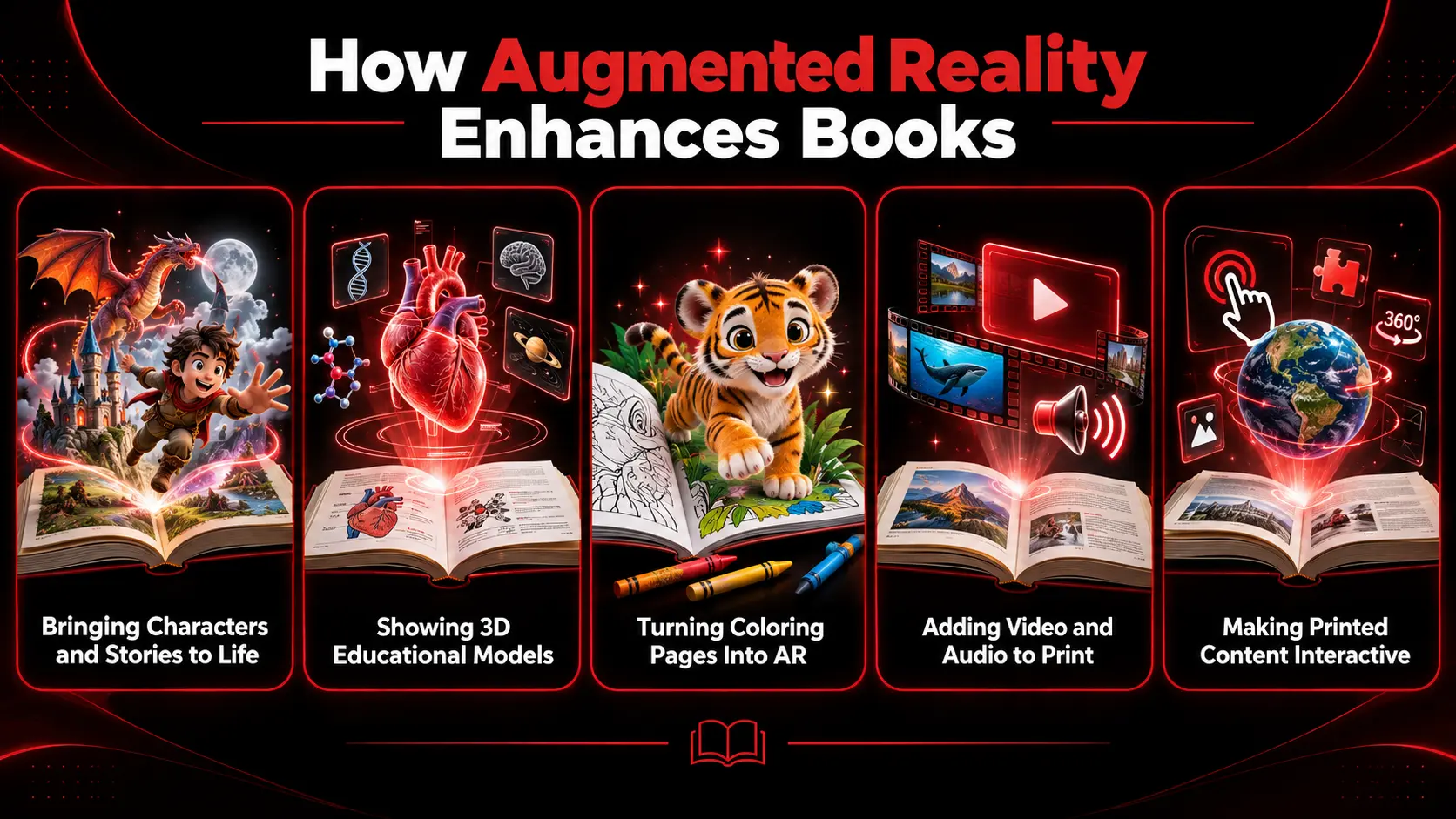
How Augmented Reality enhances books-EuphoriaXR


Bringing Characters and Stories to Life

Through AR, characters come to life, narrating and conversing with the reader. An illustrated environment could turn into an interactive scene, and a printed character could be a 3D animation.

With augmented reality stories, narration, sound effects, character animation, and motions for small activities can supplement the printed word. 

Showing 3D Educational Models

Animations can transform 2D drawings into 3D models readers can interact with by rotating, zooming, and viewing from various angles.

A science book could have a beating heart on the front, a molecule in a chemistry book, and a moving solar system on top of a book of astronomy. This is particularly helpful when it comes to topics of shape and form, or motion. 

Turning Coloring Pages Into AR

An AR coloring book can merge the physical coloring activity with digital content. A printed character or object is then coloured by a reader, who then scans it with a mobile phone or tablet.

The color pattern might be a digital character, computer animation, or a three-dimensional image. That enables the players to decide what the AR experience will be like instead of seeing preset content. 

Adding Video and Audio to Print

With AR, you can play video, music, narration, pronunciation, interviews, etc. with printed pages.

A language book might play the correct pronunciation of a word. Cooking can be demonstrated in a cookbook. An art book might include an interview with an artist; a training book might demonstrate a real procedure. 

Making Printed Content Interactive

Augmented reality can provide readers with means of interaction other than viewing. They can spin a 3D object, click on labels, provide answers, activate animations, find solutions to puzzles, or investigate various aspects of a scene.

Interactions must enhance the purpose of the book. More buttons or effects do not necessarily mean an AR book is more useful. 


Where Are Augmented Reality Books Used?

Augmented reality books are utilized in education, publishing, training, museums, tourism, healthcare, advertising, and other areas where print information can be enhanced by elevated visual or interactive digital material. 
Industry How Augmented Reality Books Are Used
Education Interactive textbooks, science books, language learning, history, and classroom materials
Children's Publishing Animated stories, activity books, vocabulary learning, and early education
Training Equipment manuals, repair guides, safety instructions, and step-by-step demonstrations
Museums & Galleries Exhibition catalogs, 3D artifacts, historical reconstructions, and artist content
Tourism Destination guides, cultural stories, historical locations, and interactive maps
Healthcare Anatomy books, medical training materials, and patient education
Manufacturing Assembly guides, maintenance manuals, and technical documentation
Advertising & Marketing Product catalogs, branded books, interactive campaigns, and product demonstrations
Corporate Training Training manuals connected with videos, quizzes, and interactive instructions

Benefits of Augmented Reality Books

Augmented reality books are a blend of physical reading and augmented reality components like interaction, video, audio, animation, and 3D models. They are primarily useful for conveying information that a traditional print medium may not convey as easily

Key benefits include:

  •  Readers can view 3D objects from various perspectives without depending on illustrations that are just two-dimensional.

  •  Animations can help to explain movement, scientific processes, assembly steps, and other changing information.

  •  Audio can include narration, pronunciation, music, interviews, and sound effects for printed pages.

  •  Users can turn objects, solve questions, view labels, and do interactive activities.

  •  Digital content can supplement print content without spoiling the reading experience.

  •  Readers can enjoy the feel of a book and still have the convenience of useful digital capabilities.

  •  The difficult concepts of anatomy, astronomy, engineering, and machinery can become more visual.

  •  Some AR systems enable digital videos, models, and other digital content to be updated without having to reprint the book.

  •  Games, quizzes, and interactive objects can help encourage readers to have a more active learning experience.

The best thing that AR can bring is when it actually helps to solve a real communication issue. When some content is already clearly explained on paper, adding AR might make it more complex without enhancing the reading experience. 

 Would you want to include augmented reality in your work?  Hire AR developers to produce WebAR experiences, apps, 3D content, and picture tracking systems. 

What Makes a Good AR Book Experience?

An AR book should be quick, easy to access, and simple to use. The AR content is supposed to complement and enhance the printed page but also include something useful in terms of movement, sound, interaction, or 3D visualization.

Clarity and trust in the instructions, digital content, devices, and reliability are also significant. 


Do Augmented Reality Books Need an App?

No. Augmented reality books can be implemented via a dedicated mobile app, an existing AR site, or WebAR.

If a project has additional requirements or needs to be repeated, a custom app might be required. With WebAR, you can alleviate friction by enabling users to enjoy the experience without having to install an app.

This should be dependent on the audience, content, and technical requirements. 


How Much Does It Cost to Create an Augmented Reality Book?

There is no fixed cost for creating an augmented reality book. The pricing model varies based on the number of AR pages, the nature of digital content, the platform, and the level of interactions.

The following sections outline the main cost factors:

  •  Number of AR-enabled pages

  •  2D or 3D asset creation

  •  Animation

  •  Video and audio

  •  Games or interactions

  •  App or WebAR development

  •  Image tracking

  •  Device testing

  •  Hosting and maintenance

Custom 3D models, games, and advanced interactions will typically require more work than a simple video-based AR book. 


How Publishers and Brands Can Use AR With Printed Books

Publishers are able to put AR into their children’s books, textbooks, activity books, travel guides, and educational books.

AR can be used within brands for product catalogs, instructions, training guides, branded stories, and promotional publications.

A furniture catalogue might enable users to look through a piece of furniture; a travel guide might feature 3D virtual reconstruction of historical scenes or interactive views of highlights.

The best use cases emphasize content that print can’t explain or illustrate as well. 


Limitations and Challenges of AR Books

There are technical and usability issues with AR books as well.

Common limitations include:

  •  Support for various smartphones and tablets

  •  Identifying issues related to glare, inadequate lighting, or weak page designs

  • Longer loading times for large 3D assets or videos 

  •  Internet requirements for some experiences

  •  More expensive to develop more advanced features

  •  Continuous upkeep of the application, browser, and device.

  •  Reader distraction when too much AR is added

  •  Issues of usability if instructions are not understandable in the scan

The best way to use AR is to have a clear purpose for the digital layer and not confuse the usage of reading.

Planning an interactive book, printed campaign, or textbook? 

Key Takeaways

  • An augmented reality book is a physical book enhanced with interactive digital features.

  • AR can include 3D models, animation, video, audio, games, and quizzes.

  • AR books can use apps, AR platforms, or WebAR.

  • They are utilized in instructional, publishing, training, tourism, museums, medical, and marketing fields.

  •  Image recognition technology is routinely used to associate printed pages with digital content.

  •  The development cost varies according to the content, interaction, platform, and the size of the project.

  •  Good AR experiences are quick, easy, fresh, and stable.

  •  AR should add value that the printed page cannot provide on its own.


Wrapping Up

An augmented reality book is an enhanced print book along with digital features like 3D models, animation, audio, video, and interaction.

The technology would work best if it is based on a clear purpose. Publishers, educators, and brands should only use AR when it helps to enable digital documents to clarify, illustrate, or demonstrate information that cannot be easily conveyed in print. 


Frequently Asked Questions (FAQs)

If there are images, videos, or other recognizable triggers within the pages of a print book, most of them can be scanned with AR. 

Yes. AR content can be printed in a book without replacing existing illustrations or page designs, using them as image targets.

Yes. QR codes aren’t always necessary, since image recognition systems can recognize a printed page or illustration directly. 

Yes. When developed and tested for Android and iPhone, AR books can work on both platforms.

No. The majority of AR books are used on a smartphone or tablet. 

Yes. If digital content is managed online, the videos and 3D models, audio, or other assets can often be updated without any modifications to the print book. 

Yes. Every page can be different and show a video, 3D model, animation, or quiz. 

Yes. AR books enable students to play games, answer quizzes, complete puzzles, and other interactive solutions. 

Some AR features may operate without requiring an internet connection, as the necessary content can be stored on the device. Streaming, updates, analytics, etc. may still require a connection to the internet to be used. 

Get Started With Euphoria XR
• Award-Winning AR/VR/AI Development & Consulting Services
• Flexible Business Models – Project Based or Dedicated Hiring
• 10+ Years of Industry Experience with Global Clientele
• Globally Recognized by Clutch, GoodFirms & DesignRush

Picture of Amelia Rose / Content Strategist & Copywriter
Amelia Rose / Content Strategist & Copywriter
I’m Amelia Rose, a Content Writer and Copywriter with 7+ years of experience creating research-driven, SEO-focused content. I stay updated with Google algorithm changes, search intent trends, and E-E-A-T principles to ensure my content remains useful, credible, and search-friendly. I specialize in simplifying complex topics across AR, VR, AI, software development, and emerging technologies for both readers and search engines.

Recent Posts

Company's Stats

300+

Successful Projects

98%

Success Rate

90+

Pro Team Members

10+

Years of Experience

Let's talk about your project

We are here to turn your ideas into reality