













TL;DR
A phone VR headset employs a cell phone to act as its screen, processor, speaker, and motion tracker. All kinds of Android mobile phones and iPhones can operate with compatible mobile VR viewers.
Android phones typically have a wider range of options for devices, flexibility in programs available, and lower entry costs. The iPhone can provide similarly dependable sensors and performance, though there may be some VR content suitable for it.
Before purchasing, consider the following features:
Phone dimensions
Headset size limits
Screen resolution
Gyroscope availability
Operating system support
App compatibility
Lens adjustment
Ventilation and comfort
Phone VR is suitable for 360-degree videos, virtual tours, simple games, and educational material. A standalone controller and headset are ideal for room-scale movement and tracked controllers, as well as advanced games.
Your phone has a sharp screen, sensitive motion sensors, a good speaker, and a powerful processor already. Can you then fit it in a headset and enjoy virtual reality?
Yes, but the experience will vary greatly based on the phone.
It might be more flexible on an Android device, and different hardware options are available. The performance might be more consistent with an iPhone. But both platforms do not support all players, apps, or VR games.
Having the wrong phone VR headset can lead to a mediocre image display, uncomfortable attachment, movement control limitations, or programs that simply won’t run. The first step is to know what mobile VR is and what kind of phones it is compatible with.Â
Â
What Is a VR Headset for a Phone?
The VR headset for phone is a device that uses a mobile phone to be worn on the face or head to allow the viewer to see their phone. The phone shows two ‘distantly different’ pictures on the headset. The brain merges all those pictures to produce “depth.
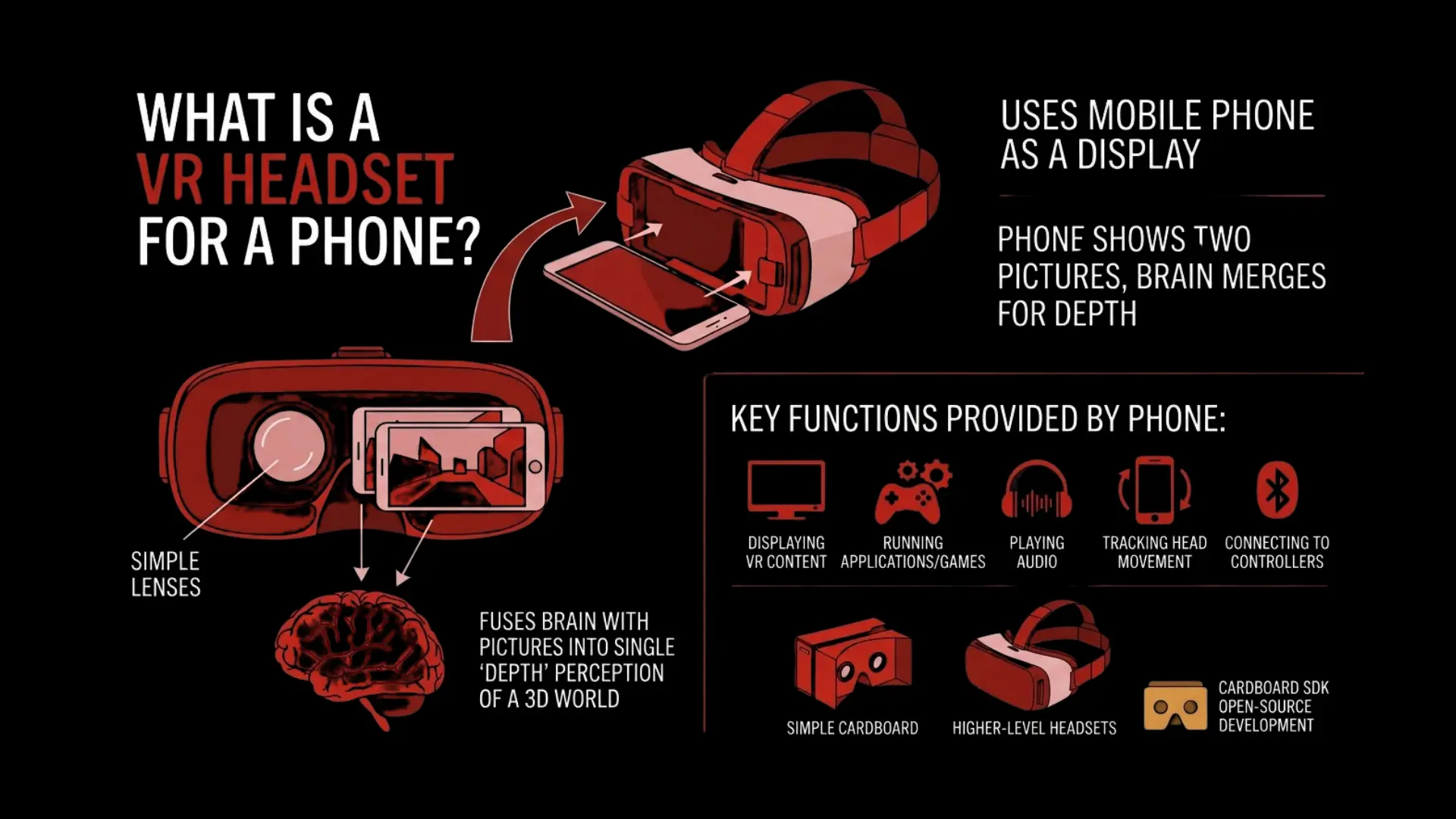
A mobile VR viewer is typically different from a standalone headset, as it does not include a screen or processor. It depends on the phone for:
Displaying VR content
Running applications or games
Playing audio
Tracking head movement
Connecting to Bluetooth controllers
Accessing online content
Simple cardboard viewers employ simple lenses and folded material. Higher-level mobile VR headsets can provide straps, padding, variable lenses, ventilation, and controller support.
The Cardboard SDK is still an open-source tool that permits cross-platform progress in VR programming on both Android and iOS gadgets. It allows for motion tracking, stereoscopic 3D rendering, and simple user interaction.
Interested in developing a mobile VR app that is compatible with both Android and iPhone?
How Does a Phone VR Headset Work?
One of the key components of a smartphone VR headset is that it splits the screen into two screens. There are two pictures, one in each eye.
These images are enlarged and slightly altered by the lenses on the headset. This gives a three-dimensional appearance.
The basic process is as follows:
Launch a VR app or 360-degree video that is compatible.
Put your cell phone in the headphones.
Place the screen in line with the headset lens.
Put on the headset and adjust the straps.
Rotate your head to look at virtual space.
The built-in gyroscope and accelerometer sensors can sense when you move the phone. Now the app will switch to a different screen when your head rotates.
So, Cardboard software makes a simple VR platform using a smartphone, says Google. The phone shows 3D scenes and moves in response to the user’s head movements.
The majority of VR phones support a hand rotation feature. May view to the left, right, up, and down. But the system is typically not able to track you as you walk in a room.
This is called 3 degrees of freedom (3DoF). Many advanced standalone headsets also have six degrees of freedom (6DoF), or 6DoF.Â
Â
Do You Need a Phone for a VR Headset?
It only requires a phone when using a phone-based VR viewer. Standalone headsets and headsets connected to a PC are different.
| Headset Type | Requires a Phone Inside? | Main Processing Device |
|---|---|---|
| Phone-Based VR | Yes | Smartphone |
| Standalone VR | No | Built-In Processor |
| PC VR | No | Gaming Computer |
| Console VR | No | Game Console |
Can Any Phone Work With a VR Headset?
No, not all phones offer a quality VR experience. This should fit within the headset and have the correct apps included, sensors, and display options.
Here are some things to look out for before purchasing:
Supported phone size and thickness
Gyroscope and motion sensor availability
The resolution and the density of the display screen.
Processor performance
Operating system compatibility
VR app support
Locate bump and buttons.
Battery life and overheating riskÂ
Â
Using a VR Headset With an Android Phone
Android phones have more options on devices, and are also flexible with VR. The performance may differ, however, because different devices run on Android platforms with different screens, sensors, and processors.Â
Android Headset Compatibility
Several VR headsets can be used on Android devices, but depending on the device, the size of the phone can vary. Particularly, the fit can be impacted by large phones, thick cases, raised cameras, and side buttons.
Android VR Apps and Content
You can download:
360-degree videos
Google Cardboard experiences
Virtual tours
Educational VR apps
Browser-based VR content
Simple mobile VR gamesÂ
Advantages of Android for Phone VR
More phone models and price ranges
Wider choice of mobile VR headsets
Flexible access to files and apps
Low budget beginners’ options
Support more setups when testing.Â
Limitations of Android for Phone VR
Each phone model has its own application features and performance.
Some gadgets don’t have a Gyroscope.
App support can be inconsistent
Each brand has a unique screen of its own.
Older phone models could overheat or bog down.Â
Â
Using a VR Headset With an iPhone
With a suitable phone VR headset, videos, tours, education, and basic VR apps can be played on an iPhone. Users should verify both the physical fit and software support.
iPhone Headset Compatibility
Before putting an iPhone inside the headset, verify its dimensions to see if it fits. Thick cases, raised camera modules, and larger models can prevent the phone from fitting well.Â
VR Apps and Content on iPhone
iPhone users may access:
360-degree videos
Virtual travel experiences
Educational VR content
Cardboard-compatible apps
Web-based immersive experiences
Simple VR games and tours.Â
Advantages of iPhone for Phone VR
Consistent hardware performance
Reliable motion sensors
Sharp Displays on new models
Simple app installation
Smooth casual viewing experienceÂ
Limitations of iPhone for Phone VR
Less VR available via the phone.
Availability of Apps can be restricted
Larger models might not fit older viewers
Limited ability to record files and make settings changes
No advanced hand or room tracking
Android makes flexibility and low-cost setups more likely to be a reality. Apple is better for people who already have a compatible iPhone and desire a uniform experience.Â
Develop engaging VR experiences for mobile, standalone, and enterprise by collaborating with an experienced VR development company.Â
Android Vs Apple for a Phone VR Headset
Android phones and iPhones offer compatibility with both the VR headset for phone and hardware, but it will depend on the iPhone app support and hardware. Android has the flexibility and choice of devices, while iPhone has things covered in terms of consistent performance of the devices it supports.Â
| Feature | Android | Apple iPhone |
|---|---|---|
| Device Choices | Wide Range of Models and Prices | Limited but Consistent Lineup |
| Headset Compatibility | Broad, Varies by Phone Size | Easier to Verify by iPhone Model |
| Budget Options | More Affordable Choices | Generally More Expensive |
| VR Apps & Content | Wider Variety of Mobile VR Content | More Limited Phone-Based VR Content |
| Display Quality | Depends on the Phone Model | Consistent on Newer iPhones |
| Motion Sensors | Varies by Device | Generally Reliable |
| Performance | Depends on Hardware Specifications | Consistent Across Supported Models |
| File & App Flexibility | More Open Ecosystem | More Controlled Ecosystem |
| Best For | Budget Users and VR Experimentation | Casual VR Viewing with an Existing iPhone |
| Main Limitation | Hardware Fragmentation | Smaller Mobile VR Ecosystem |
What Is the Best Phone for a VR Headset?
Phones that are suitable for a VR Headset should have a high-resolution screen and accurate motion sensors, possess high performance, and have the proper size for the viewer.
Check out these features
High screen resolution
Strong pixel density
Built-in gyroscope
Reliable accelerometer
Fast processor
Suitable amount of memory to support VR applications.Â
Â
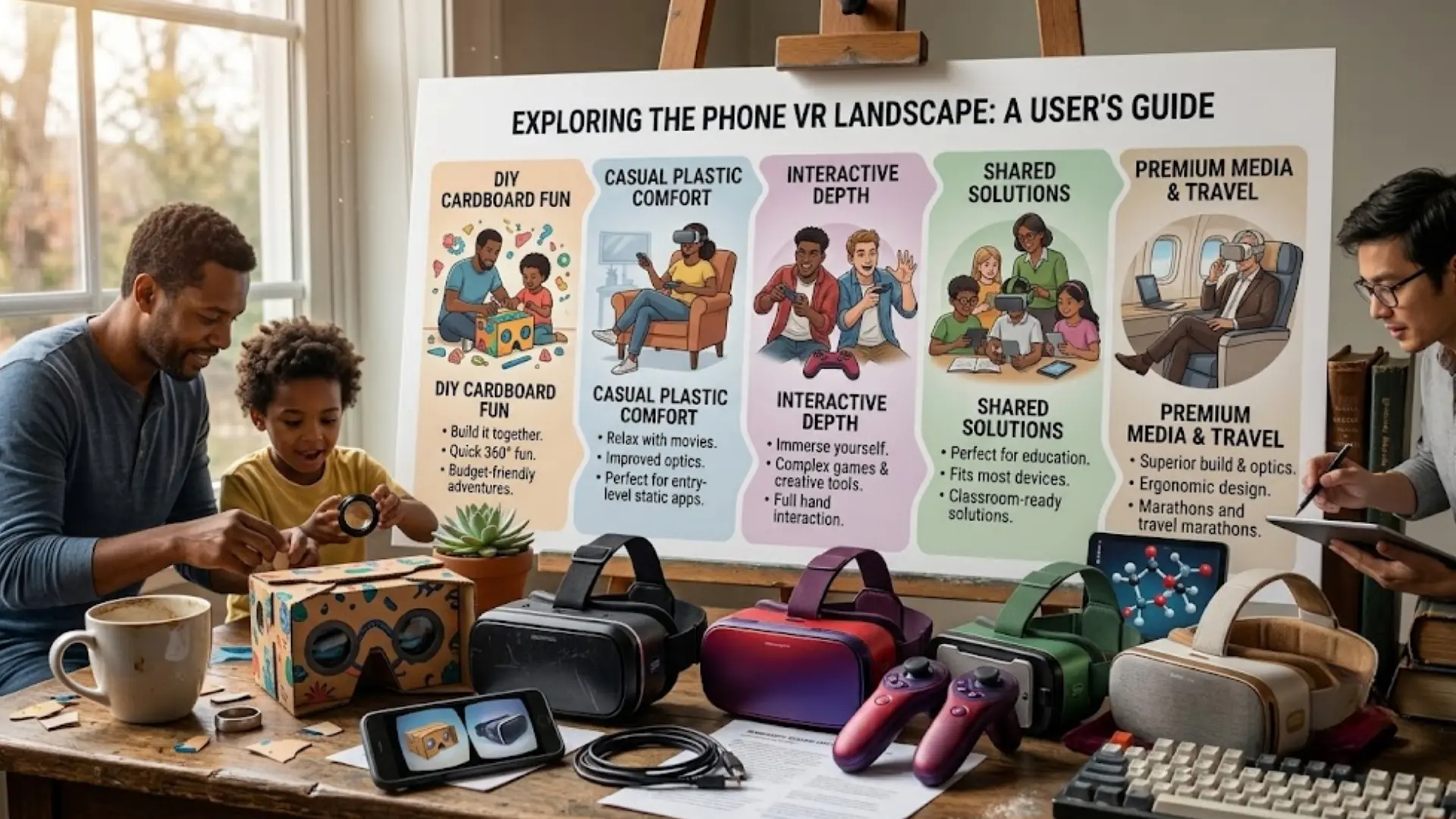
Types of Virtual Reality (VR) Headsets for Phones
The VR headsets for phones come in various forms. It all comes down to your budget, phone size, comfort, and controller support interests.Â
Cardboard VR Viewers
Cardboard viewers are very easy and inexpensive to make. They are good for short VR videos, for class activities, and for new buyers.Â
Plastic Smartphone VR Headsets
Plastic headsets have enhanced straps, face padding, adjustable lenses, and improved comfort. They are more appropriate for domestic applications.Â
Phone VR Headsets With Controllers
Some headsets control navigation as well as allow for simple games via Bluetooth. This is dependent on the phone operating system and the app.
Universal Phone VR Headsets
The universal models are made for various phones and phone sizes. Users should also check the suitability of thickness and size limits, however.Â
Premium Phone VR Viewers
Premium viewers provide superior lenses, the most durable materials, cushioning, and adjustment range. They help to improve user comfort without sacrificing the phone’s display and processor.Â
Â
How Much Is a VR Headset for a Phone?
Typically, the simplest cardboard viewer is the most economical. Buying separate plastic headsets, adjustable viewers, and controller sets is more expensive. Premium models can feature more adjustment features and better padding, stronger straps, or better lenses.
The price is primarily influenced by build quality, lens quality, comfort, controller support, phone compatibility, shipping, and location.Â
Â
What Can You Do With a Phone VR Headset?
The most ideal VR device setup for the short term and simple VR experience is the use of a phone VR headset. You can view 360- degree videos, inaccessible physical world tours, simple mobile VR games, learn about education, visit digital museums, preview properties, travel experiences, and open browser-based VR experiences.
Â
Are Phone VR Headsets Still Worth Buying?
Indeed, phone VR headsets are still useful for having a virtual reality experience at a low cost. These are perfect for 360-degree video viewing, 360 virtual tours, educational experiences, and playing simple VR games. They can’t compete with the graphics, tracking, or performance of today’s stand-alone VR headsets, however.Â
Â
Should You Choose Android or Apple for Mobile VR?
If you have more options for devices, flexibility, and a low price, select Android. If you have an iPhone and enjoy using the phone for casual VR games, you won’t want to switch to an Android device. A standalone VR headset makes a more valuable purchase if you would like to play advanced VR titles or if you prefer a system capable of supporting tracking in the entire room.Â
Looking for a custom VR solution?Â
Key Takeaways
Phone VR headsets are based on a smartphone display and processor.
Dedicated mobile VR headsets can be used with both Android and iPhone devices.
Android has a wider variety of hardware selections and cheaper alternatives.
iPhones have a more uniform experience on respective models.
A gyroscope is essential for the correct tracking of the head.
Make sure you read phone size, compatibility, and app support.
Use Phone VR to view videos, virtual tours, education, and for basic games.
Standalone VR headsets offer a more advanced and immersive experience.Â
Â
Final Verdict
A VR headset for a phone is a great choice for anyone looking to experience virtual reality without spending a lot of money. A user will be better off with Android if they want more device freedom and flexibility, and an iPhone if they want something simpler and more reliable. When it comes to purchasing your headset Phone, you should confirm that it is compatible with your mobile phone to get the best VR experience for your device.Â
Â
Frequently Asked Questions (FAQs)
Can I Use Any Android Phone With a VR Headset?
No. Your Android device should be small enough to fit inside the headset, include a gyroscope sensor, display an appropriate screen, and be powerful enough to support VR apps without lagging.Â
Does an iPhone Work With a VR Headset?
Yes. Many phone VR headsets are compatible with iPhones. However, it is important to research the size compatibility of the headset and ensure that the VR app is compatible with the iPhone you have.Â
Do I Need a Gyroscope for Phone VR?
Yes. It is greatly recommended to carry a gyroscope, as it can accurately track the movements of your head. If not, the VR experience might look as though it’s lagging or may not function correctly.Â
Â
Can I Play VR Games on My Phone?
Yes. Supported phone VR headsets allow players to play compatible mobile VR games. The majority of VR games that can be played on your mobile device are simpler compared to those offered on standalone VR or PC VR systems.Â
Can I Watch VR Videos Without a Headset?
Yes. You can go through the video on your phone and rotate the screen; as if you moved from side to side with your phone, you are moving side to side in the video. VR Headset is just a more immersive viewing experience.Â
Is Apple Vision Pro a VR Headset for an iPhone?
No. Apple Vision Pro has its own spatial computing headset, display, processor, and operating system. It does not use an iPhone as its screen.Â
Can a Phone VR Headset Connect to a PC?
Yes, there are third-party applications that will enable a phone VR headset to show content streamed from a PC. But it can’t boast the tracking capabilities or performance that a specialized PC VR headset will.Â