












How to Build a Product Configurator for Your Project in 2026 - Euphoria XR

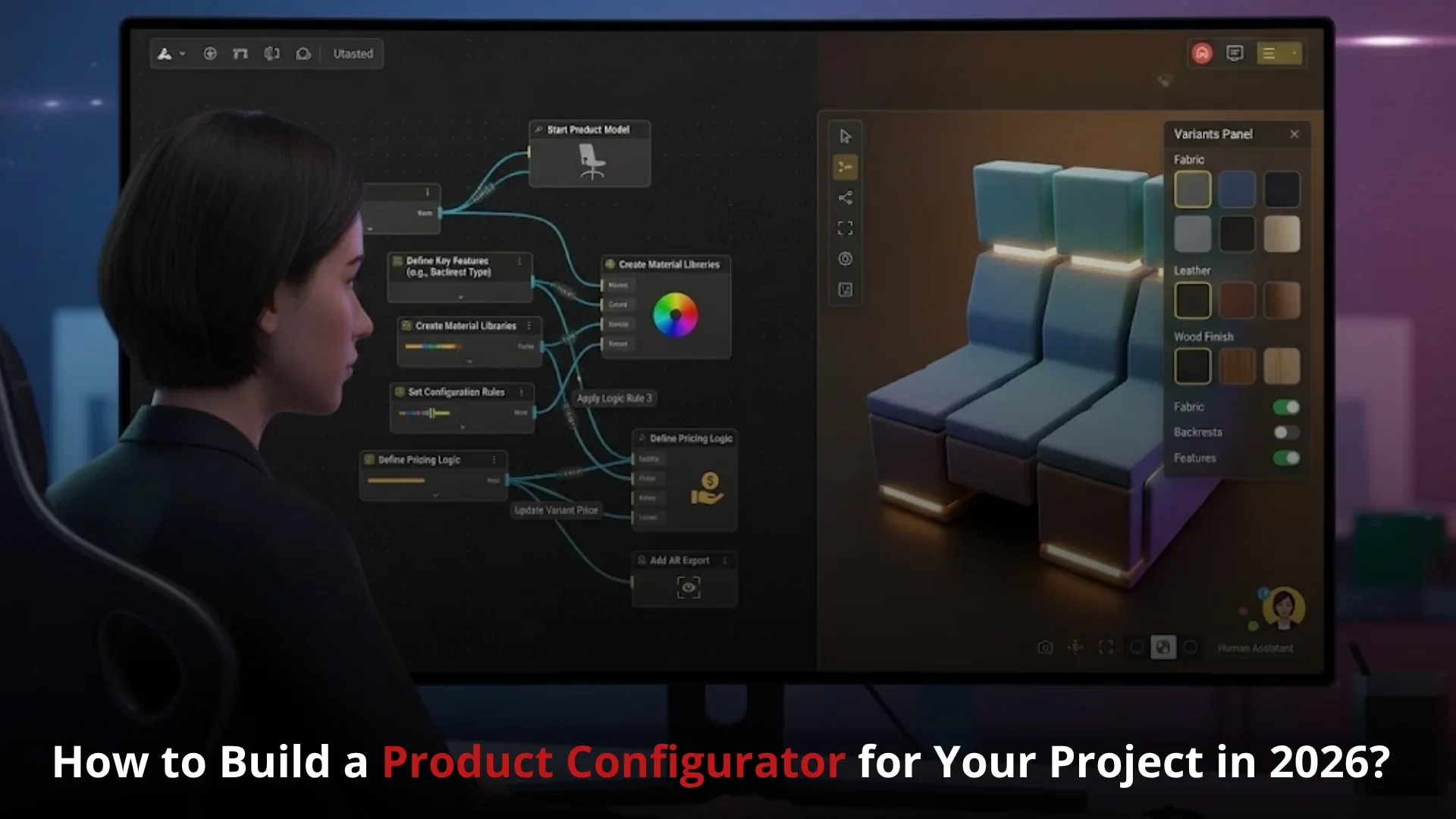
How to Build a Product Configurator for Your Project in 2026?

Share Article:
How to Build a Product Configurator for Your Project in 2026 - Euphoria XR
Picture of Amelia Rose Content Strategist & Copywriter
Amelia Rose Content Strategist & Copywriter
Content Strategist & Copywriter
Summarize with:
Table of Contents
Table of Contents
Share Article:

TL;DR

A product configurator allows customers to modify any product characteristics and get a preview before purchase. Through one interactive experience, they can choose colors, materials, parts, finishes, and accessories. Furthermore, a 3D product configurator can visually demonstrate each change in real time. Creating one entails accessing data products to ensure they’re accurate, defining configuration rules to ensure they make sense, optimizing visual assets, ensuring an easy-to-use interface, and maintaining connections with e-commerce, CRM, inventory, pricing, and production systems. 

Have you ever wanted to purchase a product online but felt that you wouldn’t know what it would look like once you arrived at the client’s doorstep?

Perhaps the distinction of colour was unclear. Or maybe you weren’t sure if the various components would connect well. You could even have requested a quote and didn’t want to wait for a sales response.

This is often an issue if you’re a business with a lot of product choices.

Some versions are illustrated in static images; to see the others, you must print the book. The buying process becomes more difficult with long drop-down menus. Manual quotes cause delays. It is possible to select the wrong one, which will result in an incorrect order.

A product configurator alleviates this dilemma.

It provides a point of interaction to create the product desired by the customer. They’re able to look at choices, contemplate the adjustments, test compatibility, obtain rates, and approach an order with more confidence.

The same system is used for your sales, ecommerce, engineering, and production teams. But an appealing 3D model is not enough for the configurator to be successful in its work.

It requires a product structure, a well-defined set of rules, some useful integrations, and an easy customer journey. 


What Is a Product Configurator?

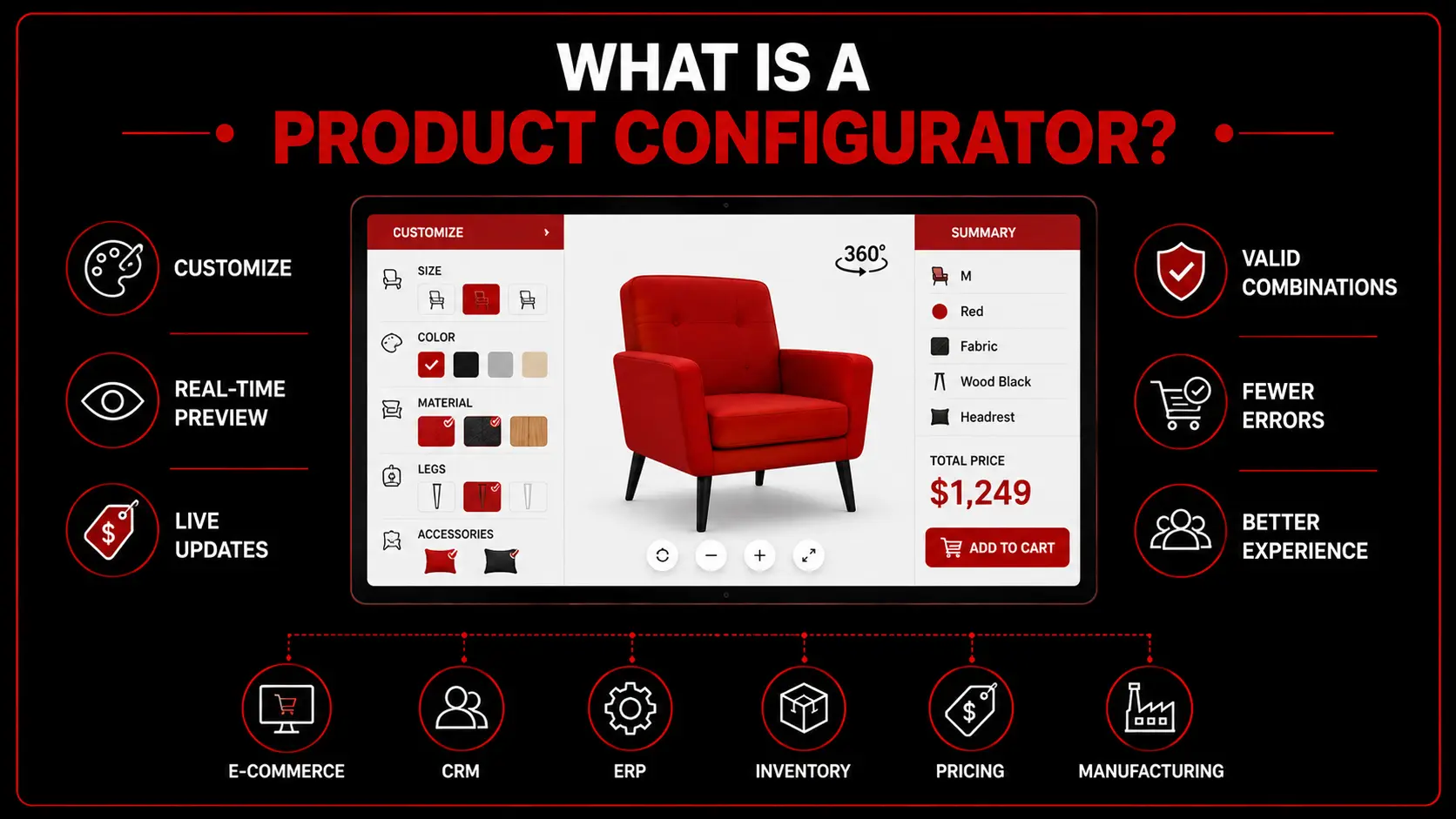
A product configurator is an interactive e-tool that allows users to select options like size, colour, material, components, finishes, and accessories to customize a product. It relies on pre-defined product rules to make sure that any combination that is selected is legal.
What is a Product Configurator -EuphoriaXR

The configurator can update the product in real time with a variety of options for the user during build, including the picture (still or in 3D), pricing, specifications, and availability. Product configurators can be used by businesses as a method to handle complex decisions in their business, minimize order errors, and ensure that customers know what their product will look like before purchase. 

A product configurator is available for installation on an ecommerce site, sales platform, mobile application, order counter, or a store window display. It can also integrate with ecommerce, CRM, ERP, inventory, pricing, and manufacturing systems. 

Looking to create a custom configurator of your products?

How Does a Product Configurator Work?

A product configurator integrates product data, product customization attributes, visual information, pricing information, and product configuration rules in a single configuration interface.

Typically, it follows this kind of procedure:

  • The user chooses a base product: The customer begins by using the standard model, product type, or recommended configuration.

  • The configurator shows available choices: These can be a colour, material, size, part, finish, feature, accessory, or any other thing.

  • The user customizes the product: A selection is saved as a product attribute or a product configuration value.

  • The system checks the configuration rules: The configurator lets you know if creating it is possible with the options you selected. May block, recommend, or require certain options.

  • The product preview updates: A 2D image or 3D model updates to display selected materials, colours, parts, dimensions, or layout. 

  • The price and specifications are calculated: The total price, product code, measurements, technical details, stock, and estimated delivery time will be subject to change by the configurator.

  • The final configuration is submitted: The outcome can be placed in a shopping cart, saved, shared, quoted out of the system, or fed into a CRM, ERP, inventory, or production system.

It facilitates the production of genuine products by customers and sales teams, without having to manually query each option. 


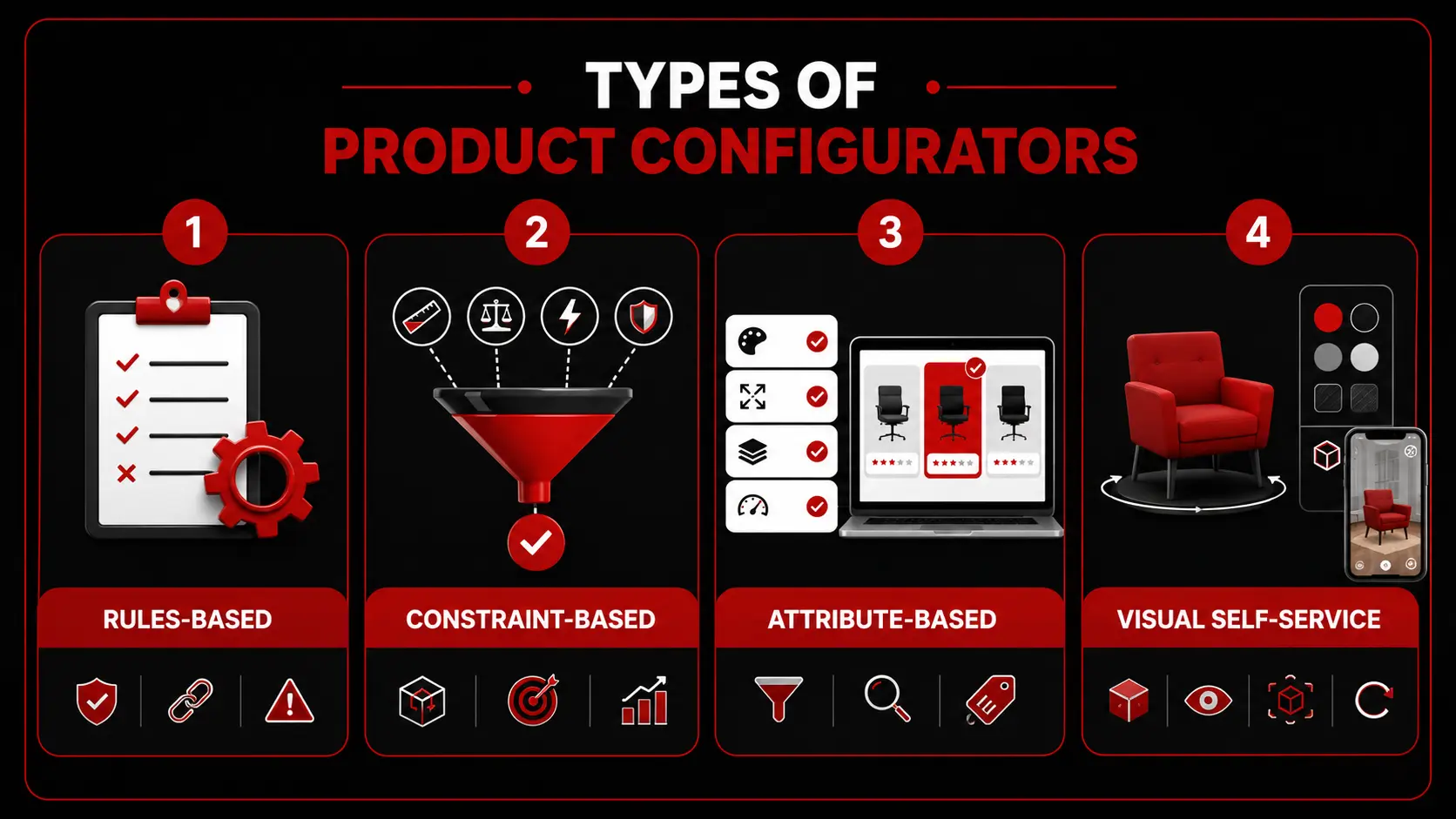
What Are the Different Types of Product Configurators?

Product configurators can be classified based on their method of handling choices, handling product logic, and presenting the customization experience. 
Types of Product Configurators-EuphoriaXR

Rules-Based Product Configurators

A rules-based product configurator is a product configurator that operates based on some set of rules.

For instance, if you opt for a greater engine, you need a more powerful power system. You may also find that you are unable to achieve various finishes with a different material.

The configurator can:

  • Require compatible components

  • Block invalid combinations

  • Add necessary parts

  • Remove unavailable options

  • Apply pricing conditions

  • Present warnings or recommendations.

For products whose options are well connected, rules-based configurators do the job. These are often related to cars, machines, electronics, technical equipment, and package bundles of products.

Constraint-Based Product Configurators

A constraint-based configurator performs a multi-constraint product validation to find a valid product configuration.

Include the following requirements:

  • Size

  • Weight

  • Capacity

  • Power

  • Performance

  • Budget

  • Safety

  • Available space

For example, an industrial machine is required to operate within a specified weight, range of power, and production level. The configurator then looks for combinations that satisfy all these things.

This is useful for products with various degrees of connectedness and many parts involved. It’s frequently employed in engineering, manufacturing, construction, telecommunications, and industrial sales. 

Attribute-Based Product Configurators

An attribute-based configurator groups together the products based on some features like colour, size, material, capacity, style, or performance level.

Students choose which attributes are important to them. It then shows the matching products or configurations.

A computer configurator can enable a user to select, for instance:

  • Processor

  • Memory

  • Storage

  • Screen size

  • Graphics capability

  • Operating system

If you have a huge product line and an e-commerce store, attribute-based configurators are suitable. They assist customers in getting down to business without having to read the technical product codes.

Visual Self-Service Configurators

This is a visual self-service configurator, which lets users customize a product by using an interactive graphic 2D or 3D interface.

Their users can easily navigate by product area, alter parts, materials, and accessories, and view the changes in real time. Some configurators enable users to get a product in a real environment via augmented reality, zoom in, open components, or rotate the product.

These are often employed to treat:

  • Cars

  • Furniture

  • Kitchens

  • Shoes

  • Clothing

  • Jewellery

  • Storage systems

  • Consumer electronics

The visual self-service configurators are best used when an appearance, layout, materials, or placement of components is a factor in the buying decision. 


2D Product Customizer vs 3D Product Configurator

A 2D product customizer displays the changes in a flat image, graphic layers, and fixed viewing angles. A 3D product configurator is an interactive rotating, zooming, and viewing model for the 3D product that customers can use to look at it from various sides. 

A 2D customizer is suitable for simple changes involving colours, text, logos, prints, and patterns. A 3D configurator is more beneficial when a customer needs to grasp the shape, dimension, material, moving parts, or placement of the parts.

Feature AR Doodle App AR Zone
Main Purpose Create Virtual Drawings Access Several AR Tools
App Type Individual Creative Tool AR Feature Hub
Main Tools Face and Space Doodles Doodles, Avatars, Stickers, Effects
Video Recording Yes Depends on the Selected Tool
Older One UI Versions Often Opened Through AR Zone Available Inside Camera or Apps
Newer One UI Versions Available Separately on Supported Devices Removed or Reorganized on Some Devices

Use your 2D product customizer for products where the shape remains unchanged, and where the customization is primarily in terms of colour, text, prints, patterns, or graphics

Use a 3D product configurator if the structure, dimensions, materials, or components of the product or its viewing angles impact the customer’s decision. 

Learn how an interactive solution can make product selection easier and support more informed purchasing decisions. Take a virtual tour of our Product Configurator Solutions. 

What Are the Benefits of Product Configurators?

A business can use a product configurator to streamline the process of customising products for customers, while customers can use one to make the process easier, faster, and more accurate. You can rest assured that customers are able to create products that satisfy their needs, and businesses decrease manual tasks, help prevent configuration mistakes, and enhance the overall buying experience.

To sum up all the advantages, here are some of the key benefits:

  • Make complex products easier to understand: Breaks complicated products into simple, guided choices.

  • Prevent invalid product configurations: Ensures customers can only select compatible options.

  • Accurate pricing and quotes: Prices automatically update as features and components are selected on the quote.

  • Shorten the sales process: Allows customers to configure products independently before contacting sales.

  • Minimize returns and order mistakes: Provides the customer with a better picture of what they are buying.

  • Improve manufacturing and inventory planning: Sends accurate configuration data directly to production and inventory systems.

  • Collect useful customer preference data: Reveals popular product combinations, customer preferences, and buying trends that support future product development and marketing. 


Product Configurator Applications Across Industries

Product configurators are utilized in numerous industries that cater to customer customization requirements or involve product options. They make products easier to select, are more accurate, and provide customer and sales teams with a more pleasant shopping experience.

Problem Quick Fix
App Is Missing Search for It in the Galaxy Store
Camera Does Not Open Allow Camera Permission
Face Is Not Detected Improve Lighting and Face the Camera
Doodle Moves Out of Place Move the Phone More Slowly
App Keeps Closing Update the App and Clear Its Cache
Video Does Not Save Check Available Storage
No Sound in Recordings Allow Microphone Permission
Phone Becomes Warm Stop Recording and Let It Cool

What Features Should a Product Configurator Include?

A good product configurator will do more than just show the different options for modification. It should be able to lead the customer through the purchase process, substantiate the selection, deliver precise pricing, and link with systems required to complete the purchase. 

Product Customization and Visualization

The configurator should enable every modification to be seen in real time in 2D images or using an interactive 3D model, and it should be able to be personalized through the use of an intuitive interface. Customers should get to know colours, materials and components, sizes, finishes and accessories before buying, before any commitment is made. 

Configuration Rules and Guided Selling

All selections must be automatically checked for better product combinations as per requirement and should not be displayed otherwise if there is any incompatible product. Guided selling with features can also provide appropriate product recommendations through easy questions regarding customer needs, budget, or intended use. 

Pricing, Inventory, and Order Management

Prices should be calculated on the spot by a product configurator when the consumer is building his/her product. It should also help evaluate stock availability and provide accurate quotes, prepare a bill of materials, and compile information for orders to be fulfilled or manufactured. 

Business System Integrations

The configurator needs to connect with e-commerce, CRM, ERP, inventory, payment gateways, analytics, manufacturing, and other tools, so that all the information flows easily throughout the business. 


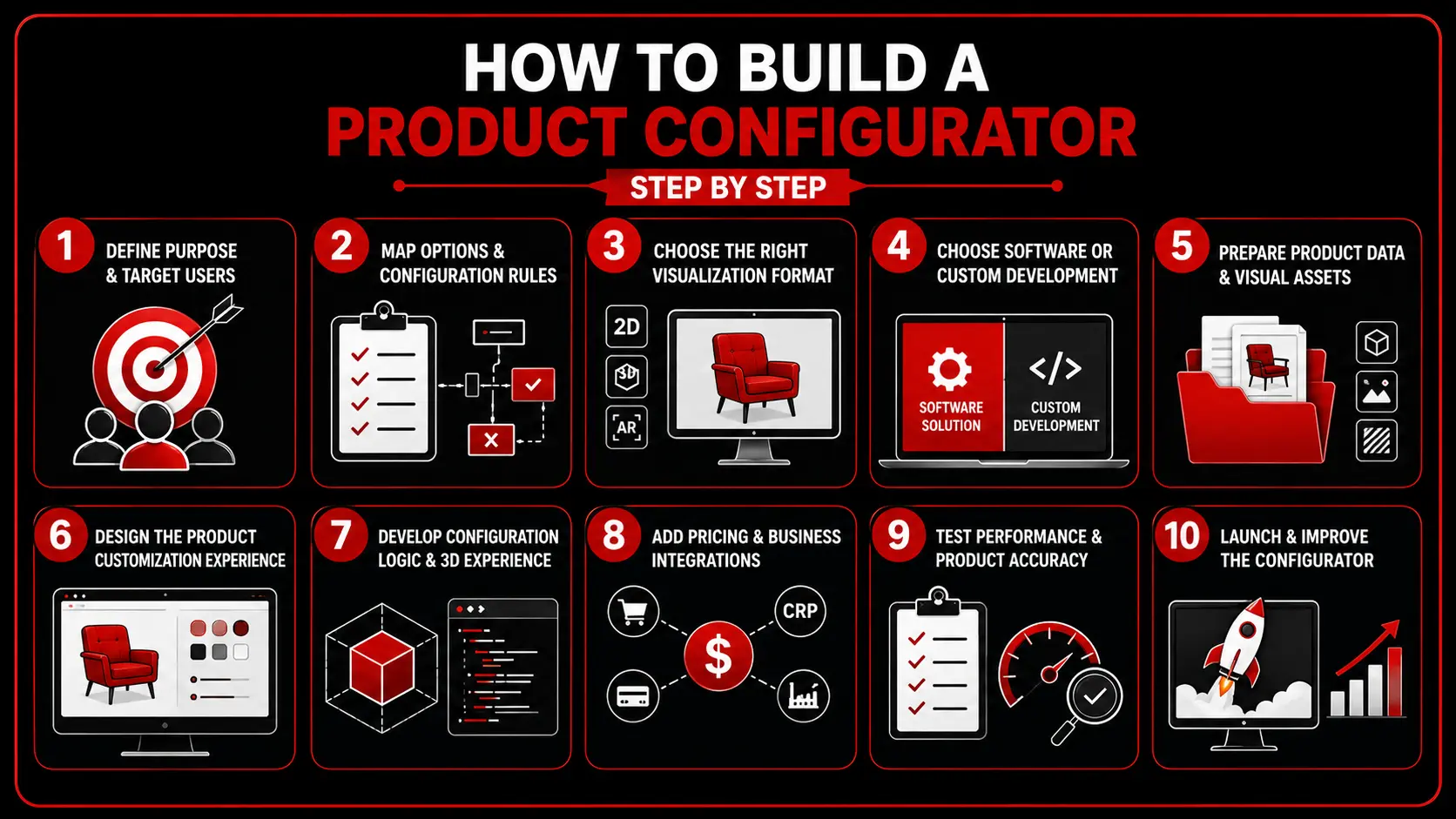
How to Build a Product Configurator Step by Step?

Building a product configurator begins with understanding your products and customer needs. Using a structured development process makes sure that the configurator is to be retained, scalable, and accurate. 
How To Build A Product Configurator-EuphoriaXR

1. Define the Purpose and Target Users

Define the business challenge you are addressing, who your customers will be, and what they want to achieve. This helps to clarify the project’s aims and user experience. 

2. Map Product Options and Configuration Rules

Record all product options, attributes, dependencies, pricing rules, and product compatibility. This information is used to build the configurator. 

3. Choose the Right Visualization Format

Depending on the complexity of products and customer needs, your project might need a 2D product customizer, a 3D product configurator, augmented reality, or a mix of these. 

4. Choose Between Software and Custom Development

Assess if the current product configuration capability is adequate or if a bespoke configured software solution is necessary to enhance flexible configuration, branding, and integrations with systems. 

5. Prepare Product Data and Visual Assets

Collect product data and pricing, CAD, 3D modeling, images, textures, materials, and more, to create a realistic configuration experience. 

6. Design the Product Customization Experience

Design a streamlined and user-friendly user interface that navigates customers through product options, provides live updates, and facilitates complex customization options. 

7. Develop the Configuration Logic and 3D Experience

Implement the rules engine, user interface, product visualization, pricing logic, and back-end capability behind the configurator and product combinations’ validations. 

8. Add Pricing and Business Integrations

Integrate the configurator to e-commerce, CRM, ERP systems, inventory management, payment gateways, and manufacturing systems to automate the whole sales process. 

9. Test Performance and Product Accuracy

Test each product combination, pricing, integration, browser compatibility, load times, mobile experience, and visual detail before going live with the configurator. 

10. Launch and Improve the Configurator

Configure, track customer activity, audit configurator information, gather customer feedback, and continually evolve the experience by enhancing product offerings, improving rules, and optimizing performance. 

Provide customers with a more interactive way to customize models, features, colours, and interiors before purchase. Build a Car Configurator and Vehicle Personalization Experience.

What Do You Need to Build a 3D Product Configurator?

Interactive 3D models are just the beginning of creating a 3D product configurator. It blends correct product information, configuration logic, optimised visual aspects, and business system integrations and delivers a seamless customisation experience. Doing all these things in advance minimizes delays and keeps your configurator scalable with the product catalog.

They consist of:

  • Product information: Specification, dimensions, product codes, price, and customisation options.

  • Configuration rules: Rules that determine compatible, required, and restricted product combinations.

  • 3D models: Optimized product models that contain realistic material and colours to ensure very fast rendering.

  • Visualization engine: Technology that creates and updates a product in real-time.

  • User interface: User-friendliness with clear instructions for customers to understand.

  • Backend integrations: Integration with e-commerce, CRM, ERP, inventory, pricing, and manufacturing systems.

  • Analytics and maintenance tools: Solutions for monitoring customer behaviour, product management, and refreshing configuration rules after launch. 


Common Product Configurator Development Challenges

Although product configurators improve the buying experience, developing one comes with technical and operational challenges. If this challenge is addressed at an early stage, it helps to minimize development costs and make the solution more reliable. 

Product Data and Configuration Complexity

Most businesses have thousands of product options, technical requirements, and compatibilities that exist on several systems. Structuring the information into a structured product model is often one of the greatest undertakings in the project. 

3D Model Optimization and Performance

Engineering CAD models are typically very complex and are not ideal for web applications. They should be optimized for size, bearing in mind high visual standards, so that the configurator loads fast on a desktop and mobile device. 

Pricing and System Integrations

A product configurator will normally require integration with pricing engines, inventories, CRM, ERP, and e-commerce platforms. It is important that the necessary planning and testing are carried out to ensure that these systems can be maintained in sync. 

Maintenance and Scalability

Specific products, prices, and options for customization may vary. A good configurator should enable the business to add new products, change configuration rules, and grow its product catalog in the system without the need for a system rebuild. 


Product Configurator Trends to Watch in 2026

With growing customer demands and the rise in technology, product configurators are evolving every day. For businesses, the number of investments that are going into more interactive, accurate, and attainable customization of their products is rising.

Some of the largest trends are:

  • Real-time 3D available product visualization.

  • Augmented reality product placement

  • AI-powered product recommendations

  • Omnichannel product configuration across web, mobile, and retail stores

  • Co-operative setup for customers and sales technicians

  • Faster browser-based 3D rendering

  • Sustainable information in the product customization.

  • Cloud-based product configuration platforms 


How to Prepare for a Product Configurator Development Project?

Selling should be based on good planning for a successful product configurator. Businesses need to structure their product data and outline project objectives along with any data systems they wish to integrate with the configurator before development.

The following is a list of the components of a good preparation checklist:

  • Establish goals and target users for the project.

  • Record all product options, attributes, and configuration rules.

  • Collect product information, pictures, CAD files, and 3D files.

  • Determine needed integrations with inventory and e-commerce, CRM, and pricing systems.

  • Specify performance, security, and scalability needs.

  • Set up an achievable schedule and budget for your project.

  • Schedule the launch of products and responsibilities for keeping rules configured after that. 

Discuss product portfolio, customization options, and required integration with our team.

Key Takeaways

  • A product configurator aids in the customization of products for the customer and also ensures that all combinations are valid.

  • 3D product configurators offer more realism, making them a more interactive buying experience as compared to product pages.

  • The key to a successful project is to have accurate product data, clearly defined configuration rules, and optimized 3D assets.

  • When pricing, inventory, CRM, ERP, and e-commerce systems are integrated, you have a fully connected sales process.

  • Long-term success is dependent on careful planning, testing, and continual maintenance. 

Conclusion

A product configurator provides a way to seamlessly configure products, while improving the customer buying process, which helps increase customer confidence in shopping faster. Whether you are developing a simple product customizer or a fully interactive 3D product configurator, success depends on accurate product data, well-defined configuration rules, optimized 3D assets, and seamless business integrations. When it comes to customer satisfaction, minimizing order possibilities and helping long-lasting business growth, a product configurator can be of help with the right technique and development strategy. 


Frequently Asked Questions (FAQs)

Development timeline varies based on product complexity, customization options, integrations that need to be implemented, and whether the solution is created from scratch or assembly existing software. The configurator, whether it is simple or a custom 3D product configurator, might take several weeks or months. 

For the first release, it’s best to have full product specifications, price feeds, product customizations, product configuration rules, and product visual assets. Once the configurator expands further, additional products can be added.

Yes. Existing CAD files are commonly used as the starting point for creating 3D models. Typically, they must, however, be optimized for the web to reduce unnecessary geometry, add materials, and break out configurable components. 

Yes. A product configurator can be a standalone web application, a sales tool, a quotation system, a showroom display, or even an ordering system. It can produce quotations or let product configuration be sent directly to the selling groups without any online checkout.

Product options are usually handled by product managers, ecommerce, sales operations, or an administrator via a content management interface. The products, prices, rules, and customization features can be updated without changing the application’s source code. 

Yes. Many businesses use a single configurator for both audiences. The simplified buying experience delivers to customers while sales teams enjoy added functionality like special pricing, technical specifications, saved configurations, and quotation tools. 

No. The vast majority of product configurators are browser-based, which means they run straight on both desktops and mobile devices without ever requiring installation. Customers only need to go to the configurator via a web browser; sophisticated features can leverage existing capabilities of supported devices, including augmented reality. 

Get Started With Euphoria XR
• Award-Winning AR/VR/AI Development & Consulting Services
• Flexible Business Models – Project Based or Dedicated Hiring
• 10+ Years of Industry Experience with Global Clientele
• Globally Recognized by Clutch, GoodFirms & DesignRush

Recent Posts

10 Real-World Examples of Spatial Computing - Euphoria XR

10 Real-World Examples of Spatial Computing

TL;DR Spatial computing immerses digital content within physical environments and enables individuals to interact with them via their movement, gestures, voice, or eye-tracking. Some practical

Company's Stats

Successful Projects
0 +
Success Rate
0 %
Pro Team Members
0 +
Years of Experience
0 +

Let's talk about your project

We are here to turn your ideas into reality