














How to Make the Meta Quest 3 Camera Better?
When the camera appears to be blurry or grainy, minor adjustments can lead to significant improvements. The goal is simple. Turn on additional lighting in the cameras, clear any obstacles in the way of the cameras, and ensure that the headset is properly configured. These steps can help improve the Meta Quest 3 camera in the real world.
Improve Your Lighting Setup
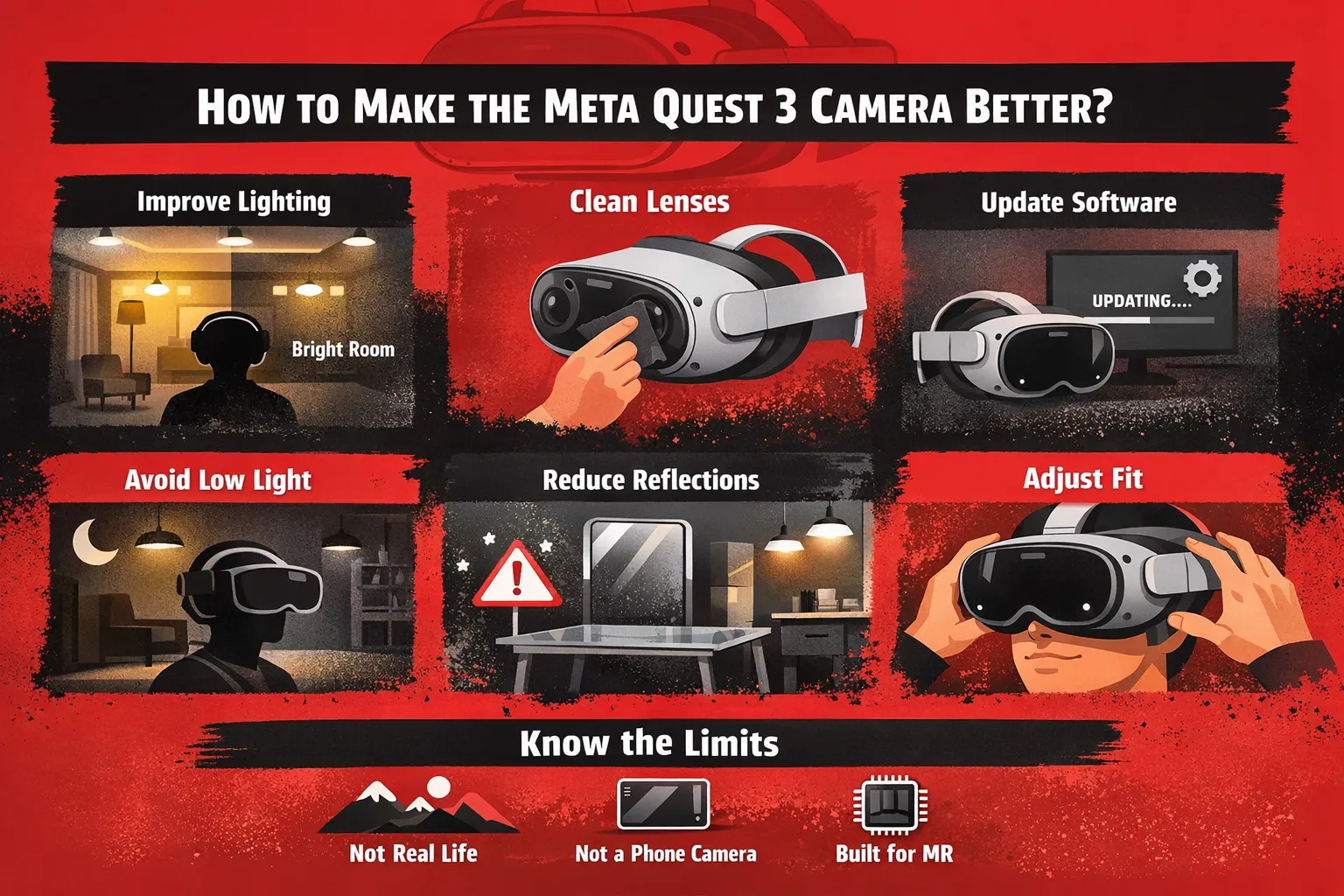
The greatest improvement is made by lighting. The cameras require good and clear light to give clarity on the details. A dark room causes the sensor to strain more, and this generates grain and noise. Bright white lights in the entire room assist the system in seeing better. The light is supposed to be in front of or above rather than behind, so shadows do not influence the picture.
Clean the Camera Lenses
A dust or a fingerprint can even cause the image to appear soft. The cameras are located on the front of the Meta Quest 3, thus being easily contaminated. Smudges can be removed by wiping a clean microfiber cloth gently and making the object clear again. The lenses should not be subjected to harsh materials or liquids, which can harm them.
Update Your Meta Quest 3 Software
The processing of images by the camera is usually enhanced by software updates. This system is regularly enhanced with noise reduction and improved passthrough quality. The settings check will also keep the headset up to date with the most recent version. This is a basic measure that can be taken to enhance clarity without altering anything.
Avoid Low-Light Environments
One of the largest contributors to poor camera quality is low light. In case of insufficiency of light, the image becomes noisy and hazy. Dark rooms, using at night without lights, or warm, dim lighting, all decrease quality. The light environment enables the cameras to record more detail, and grain is eliminated immediately.
Reduce Reflective Surfaces
The cameras can be confused by reflective objects in the room. Light reflects off surfaces with mirrors, glass, and surfaces that are shiny. This may result in distortion or unstable images in passthrough mode. A cleaner environment with fewer reflections is beneficial to the system to process the environment more accurately.
Adjust Headset Fit and Position
How the headset is positioned on the face influences the appearance of the image. It may appear blurred in case it is loose or slightly out of place. The right fit ensures that the lenses are positioned correctly and aligned to the eyes and stabilize the image. A closer fit of the straps and alignment of the position can be used to get a better and more consistent view.
Understand the Limits
The camera is not intended to be like a real-life or a smartphone camera. It is constructed on tracking and mixed reality that need speed over visual finesse. The image will still have some grain or softness even with the best setup. Embracing this limit can result in realistic expectations, and it enhances the overall experience.
Related: https://euphoriaxr.com/meta-quest-3-ar-vr-mr-headset-technology/
Quick Checklist to Improve Camera Quality
In case the camera remains blurred, this short list will repair the most frequent issues within a few minutes. These are the very changes that produce the most significant improvement in actual use.
Turn on the bright white lights throughout the room and minimize grain and noise.
Wipe out the camera lenses and blur due to dust or fingerprints.
Install the newest enhancements on your Meta Quest 3 software.
There should be no dark or darkish spots and dim places that make the image less detailed.
Eliminate distorting objects such as mirrors or glass.
Use the adjustment screw to get the headset to fit the lenses to your eyes.
What Does NOT Fix Meta Quest 3 Camera?
Numerous users experiment with the random solutions, yet there are certain actions that merely fail to enhance the quality of the cameras. This is helpful to know, and time is saved.
Recurring, turning the headset on and off does not enhance clarity.
The factory reset will hardly be useful since the problem is not a software one.
Passthrough does not change when switching between apps.
It is impractical to expect HD or phone-like clarity.
Hardware and real-time processing restrict the camera, rather than small settings.
Why Meta Quest 3 Camera Looks Worse Than Videos?
Most confusion occurs here. The camera appears to be of lower quality within the headset in comparison to the tape recordings.
After recording, videos are processed, and this enhances quality.
Subsequent steps of noise reduction and color correction are added.
Live picture displays the crude image without any improvements.
Instant processing does not allow much detail to be carried over.
Due to this, recordings appear cleaner as compared to live passthrough, which looks grainy.
Can Meta Quest 3 Camera Improve in the Future?
The camera is able to get better, but to a certain limit. There are those that can be done using software, and some require hardware.
Noise and stability can be enhanced by updating the software.
Improved algorithms can be used to improve passthrough clarity.
Image reconstruction might be enhanced with the help of AI processing.
Nonetheless, there will be certain boundaries:
Camera sensors do not represent a high-end imaging camera.
Real-time processing is a speed and not a quality requirement.
With existing hardware, full real-world clarity cannot be achieved.