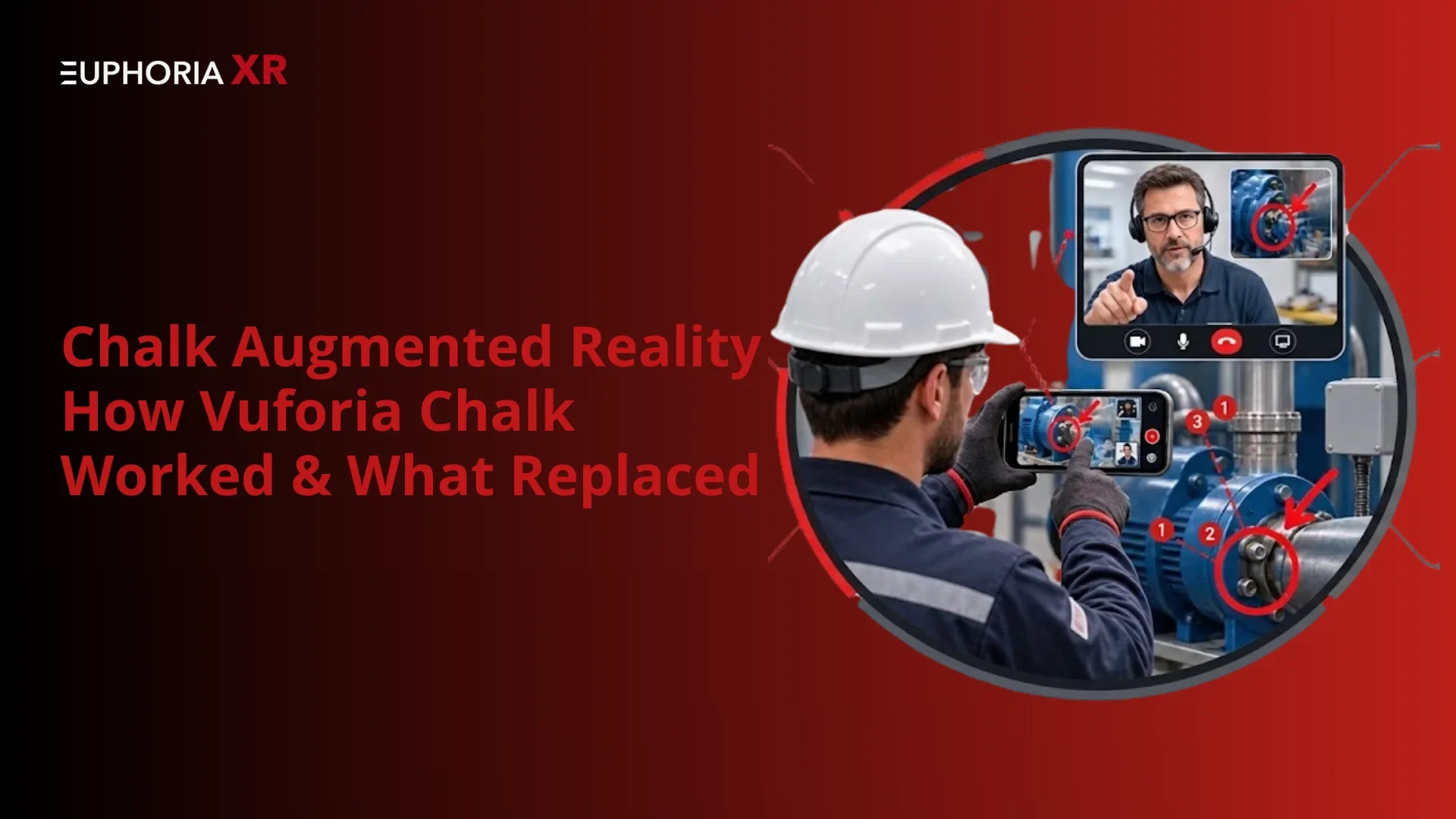
Chalk augmented reality is a PTC Vuforia Chalk AR remote-assistance tool that brings remote experts and on-site techs together. Sharing could be accomplished using live video, and Chalk Mark could be drawn digitally and remain attached to the real-life object as the camera moves. Companies utilized it for equipment repairs/inspections, training, manufacturing, and field service. On 31st October 2025, PTC announced the retirement of PTC Vuforia Chalk and recommended PTC ServiceMax Zinc as a replacement. Today, businesses can switch to another AR remote support solution or create a custom one based on similar features, which is more affordable.
A technician finds a problem inside an expensive machine. The company’s professionals are hundreds of miles away. A normal video call allows the expert to view the machine, but it will be inconvenient to point to the right wire/switch/component etc.
Chalk augmented reality aims to tackle this challenge. On-site technicians were put in touch with remote experts via live video via PTC Vuforia Chalk. Both could make digital marks on the screen. These marks remained on the real objects even as the camera moved.
Therefore, the instructions were easier to understand than met through the regular video chat. A repairman or expert could draw an arrow to indicate a damaged area, or he could use a marker to note the next repair process. Companies have applied Vuforia Chalk for maintenance and inspections, training, customer support, and industrial troubleshooting.
Vuforia Chalk is, however, no longer available. On October 31, 2025, PTC officially decommissioned this service and offered ServiceMax Zinc as a replacement. Those who have been using Chalk need to switch to another remote assistance software or create their own remote assistance solution.
What is Chalk Augmented Reality?
Chalk augmented reality is for the remote assistance app named PTC Vuforia Chalk that sent real-time video to on-site workers and experts. A digital Chalk Mark was available for users to draw on the shared screen. As the camera moved, these AR annotations remained on the actual equipment.
The primary applications of Vuforia Chalk were for equipment repairs, inspections, maintenance, training, and technical support. It provided a clear picture of the surrounding area for workers without the need for an expert to be present at the scene.
Substitute an out-of-date remote support solution with one that is tailored to your workflow.
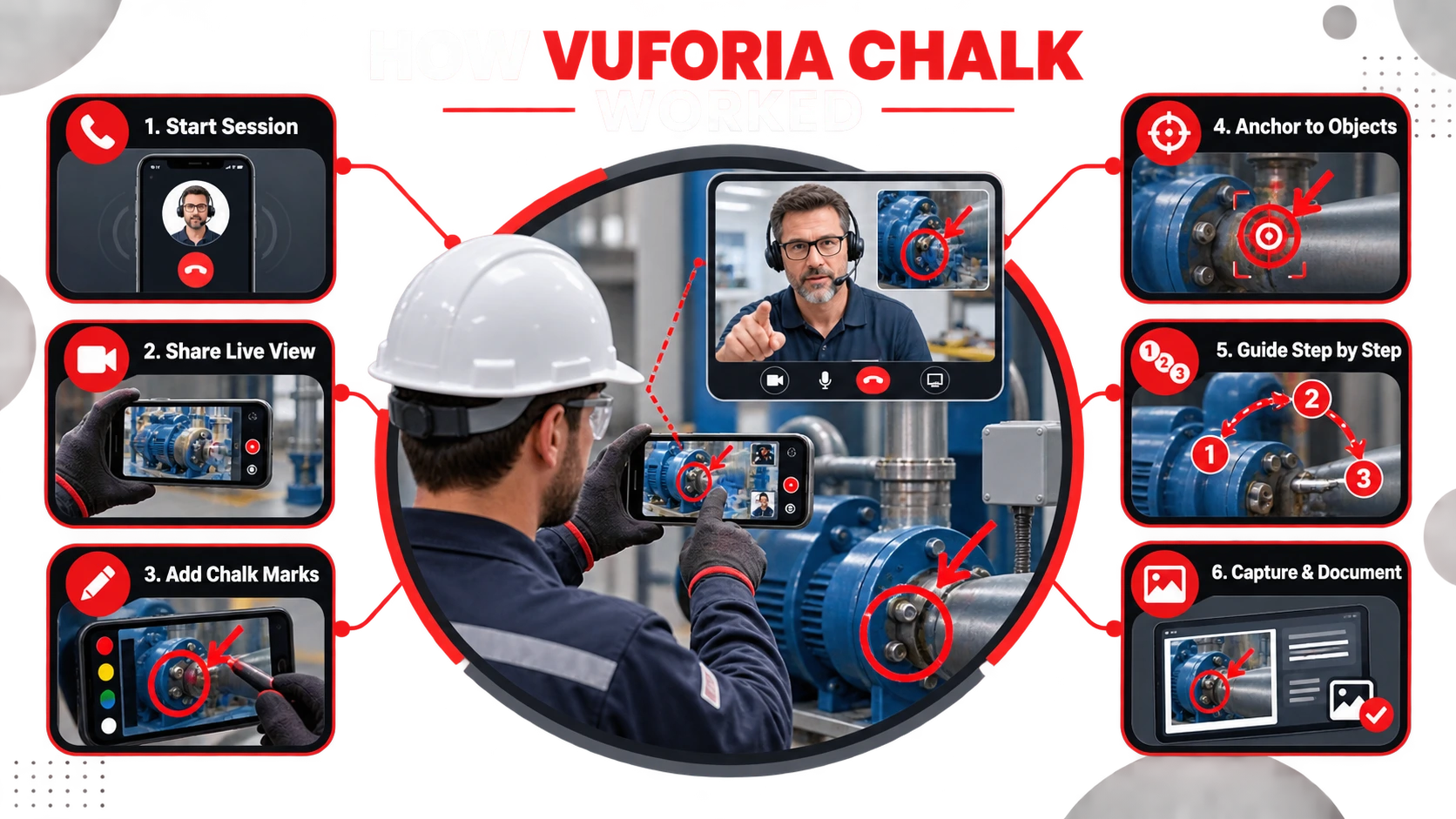
Vuforia Chalk combined live video feedback, voice communication, computer vision, and spatial AR annotations. The issue was illustrated for the technician by a mobile camera. Finally, digital marks were superimposed on the video by a distance expert, who described each movement and its components.
Starting a Remote Assistance Session
The technician launched the Vuforia Chalk app and called on an available expert. The expert would be able to join from their iPhone, iPad, or supported browser. The user and the host may talk during the session.
Sharing the Technician’s Live Camera View
The technician took the camera on the device and directed it toward the equipment or work area. The remote expert viewed the live view and was able to review the issue without having to go physically to the site.
Adding Digital Chalk Marks
Both users had the power to draw circles, lines, and arrows on the common video. These Chalk Marks assisted in identifying repair areas, specific parts, wires, and buttons.
Anchoring Annotations to Physical Objects
Vuforia Chalk introduced computer vision and spatial tracking and gained the ability to place annotations on real objects. As the technician maneuvered the camera, the marks stayed consistent with the part that was selected.
Guiding the Technician Step by Step
The expert guided by voice text and visual markers explained each action. The technician could guide, make sure the result is correct, and ask for additional assistance when necessary.
Capturing Images and Session Information
In a session, users would be able to take annotated pictures. The screenshots enabled service records, training material, internal communications, and post-service work.
Technology Behind Vuforia Chalk
Vuforia Chalk merged both augmented reality and real-time communication. Its tech enabled remote specialists to insert instructions in the eyes of the techs and not in words.
It had the feature of many key technologies:
Computer Vision: The vision of computer detections the surfaces, objects, and movement of the camera in physical space.
Spatial tracking: Followed the camera position at different positions of the technician.
AR anchoring to physical locations: Preserved AR annotation anchoring to selected physical areas.
Live video streaming: Sent the technicians’ camera view to the remote expert.
Two-way audio: Provided two parties with the ability to talk to each other during the call.
Cloud communication: Users connected across various factories, offices, or service locations.
Mobile AR processing: Used supported device cameras and sensors to track the surrounding space.
Desktop connectivity: Enabled an expert to participate via desktop, without on-site presence.
Vuforia Chalk was NOT Vuforia Engine. Chalk was an out-of-box resource that offered teachers assistance remotely. Vuforia Engine (VU) is a software development kit for developing a custom augmented reality application.
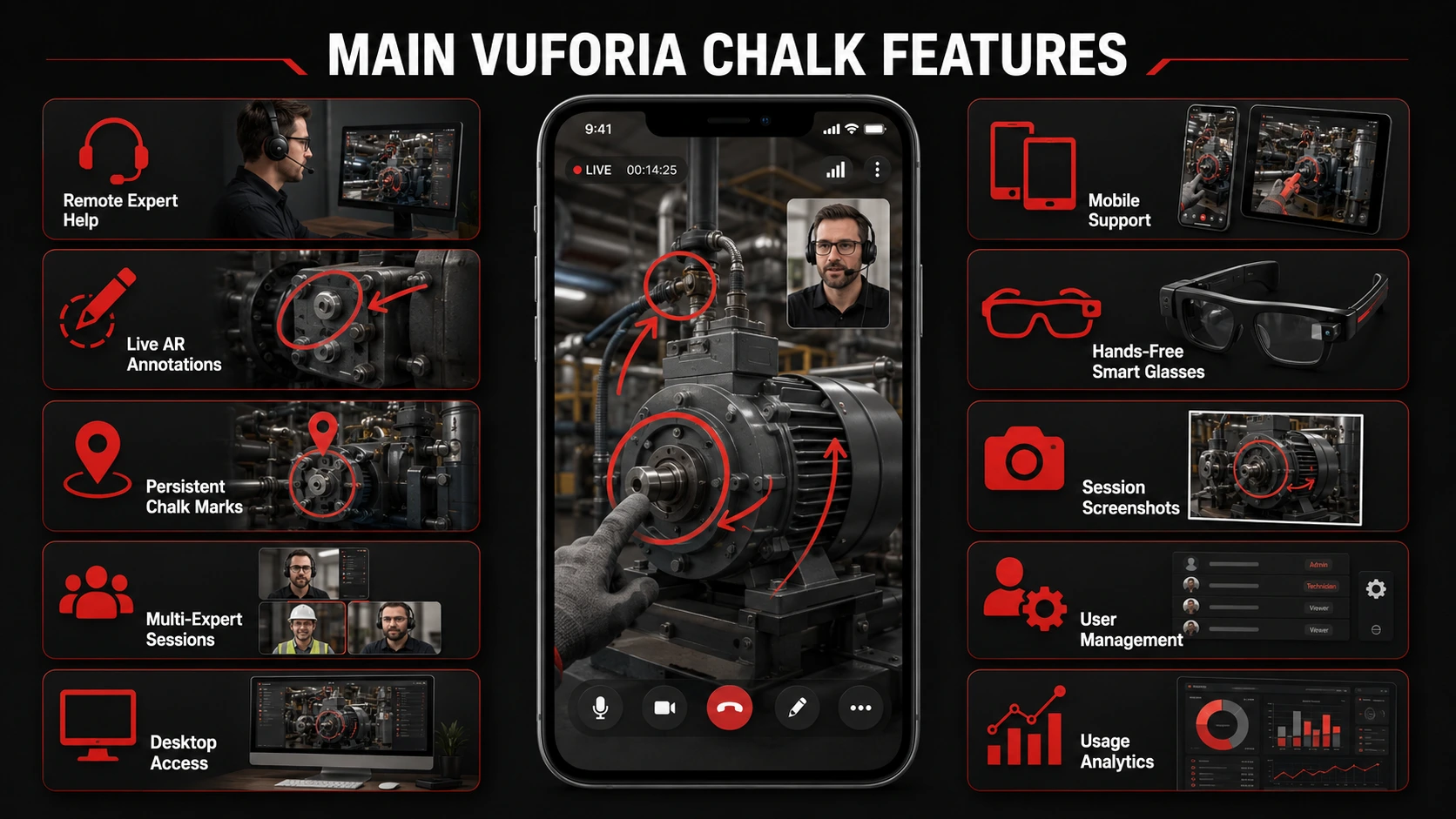
Main Vuforia Chalk Features
PTC Vuforia Chalk focused on simple visual communication. The features proved beneficial to the technicians in terms of them receiving clearer instructions when they used less familiar and complex equipment.
Live Remote Expert Assistance
Technicians can reach veterans in the field. Technicians have the ability to call on experienced team members from the worksite. Experts could observe the problem, ask questions, and advise in real time.
Real-Time AR Annotations
The users would be allowed to draw directly at the live camera view. Circles, arrows, and lines helped identify the right components or actions to be identified.
Persistent Chalk Marks
Digital Chalk Marks remained in the physical spaces while the camera walked and talked. This made it easier to reduce confusion when repair, inspection, and installation work is carried out.
Multi-Expert Collaboration
A complex support situation could require more than one expert to be involved. This gave the opportunity for experts across teams to look at the same playground and offer recommendations.
Desktop Access for Remote Experts
A supported desktop experience would be used to allow remote experts to participate in a Chalk session. This supported the office-based engineers and support people to guide onsite workers.
Mobile Device Support
Vuforia Chalk was compatible with smartphones and tablets. Companies can utilize existing devices that can be deployed with their techs/field personnel rather than adopting specialized AR devices.
Hands-Free Smart Glasses Support
Chalk provided support for realwear-compatible devices. Ease of access facilitated hands-free instructions and tools/equipment use by technicians.
Session Screenshots and Documentation
Users would be able to take a picture of something that includes AR annotations. These records can be used for service reports, training, quality control, and troubleshooting in the future.
Centralized User Management
Managing users would be done in a central system for enterprise administrators. They might have the power to grant access to teams and to arrange remote help from other departments or locations.
Usage Analytics and Administration
Platform activities were reviewed and managed using enterprise tools. This information may help to be used in adoption checks, resource planning, or internal reporting.
Utilize a skilled AR development company to create precise AR instructions for field teams and technicians.
Vuforia Chalk Devices and System Requirements
Vuforia Chalk is designed for mobile and desktop. They required some form of internet connection, an operating computer system with a camera, and a microphone so that they could provide efficient remote help.
The following table provides information on how the service supported devices. Do not consider this as the current compatibility list.
Device or Requirement
How Vuforia Chalk Used It
iPhone and iPad
Allowed Technicians and Experts to Join Calls, Share Video, and Add Annotations
Android Phones and Tablets
Supported Mobile Remote Assistance on Compatible Android Devices
Desktop Computer
Allowed Remote Experts to View the Technician's Camera and Provide Guidance
RealWear Device
Provided Hands-Free Support for Technicians Working with Tools or Machinery
Rear-Facing Camera
Captured Equipment, Components, and the Surrounding Work Area
Microphone and Speaker
Supported Two-Way Voice Communication During the Session
Motion Sensors
Helped Track Device Position and Camera Movement
Internet Connection
Carried Live Video, Audio, and AR Annotation Data Between Users
Suitable Lighting
Helped the Camera and Computer Vision System Identify Surfaces and Details
Administrative Account
Supported Enterprise User Management, Access Control, and Reporting
Video quality and accuracy of annotations were constrained by network speed. The lighting, reflective surfaces, speed of travel, or poor internet may compromise tracking visibility and communications.
Industrial Applications of Chalk Augmented Reality
Chalk augmented reality enhanced scenarios in which a worker required expert assistance that was slow, expensive, or unavailable onsite. For users with difficult equipment requirements in multiple sites, it was very helpful.
Common uses in industries that were currently in effect included:
Equipment maintenance: Professionals took people through checks, adjustments, and repairs of equipment.
Production support: Engineers assisted production staff with machine and assembly issues.
Field service: Technicians provided visual support when servicing equipment at the customer’s locations.
Live video remote inspection: Specialists inspected parts, installations, and work areas through live video.
Quality control: The teams indicated any defects and identified what corrective action is needed.
Assistance in assembly: Experts identified components and led the workers along new and strange assembly steps.
Installation support: Remote teams conducted site inspections and walked through installation with the client to review placement, connections, and procedures.
Technician training: Senior technicians mentored newer technicians while performing actual work.
Knowledge transfer: Senior experts passed on practical expertise without moving between locations.
Customer support: Services teams assisted customers to find the issue and to perform quick fixes.
Collaboration with suppliers: Companies delivered flaws or installation mistakes to external partners.
Safety support: Work areas could be reviewed by experts and procedures approved prior to work being carried out.
For instance, if the control panel fails, a factory tech might present this failure to an engineer across the country. The engineer could then swivel around the appropriate switch and then record the cable that needed an inspection. This was made evident more than directions by voice.
Benefits of Vuforia Chalk Remote Assistance
Vuforia Chalk remote assistance assisted their teams in sharing visual knowledge over distance. It had the most significant benefit in pointing workers with very pinpoint accuracy about where to look and find the solution to the problem.
It was expected that it would be useful in the following ways:
Shorter problem resolution times: Experts were able to view problems without the time delays inherent with travel.
Lower expert travel: Specialists may be able to work from an office or remote location to support multiple sites.
Fewer equipment downtimes: Quicker guidance can contribute to getting equipment back into service.
Increased first-time fix rate: Visual instructions decreased the risk of selecting the wrong fix.
Less repeat visits: A more complete set of knowledge was available for the next service visit.
Better communication: Anchored annotations took away the vague instructions like “the part on the left.”
Improved technicians’ accuracy: Marks made visually assisted the worker with an indication of which object and action they needed.
Accelerated training: New staff could be trained with support from older members of staff.
Improved knowledge sharing: Highly qualified staff would be able to assist others without being in the room.
Reduced service costs: Companies may be able to decrease travel, delays, and multiple field visits.
Better Customer Support: Customers would have less need to wait for an on-site tech to provide visual guidance.
Improved documentation: Annotated screenshots might be used to explain how to make repairs and identify problems during the inspection.
These benefits were dependent upon the use case, network quality, technical skills, and internal support process. Unfortunately, Vuforia Chalk is no longer available for use, leaving businesses to rely on the other AR remote assistance solution, ServiceMax Zinc, or a custom-built solution to achieve similar benefits.
Vuforia Chalk Vs. Traditional Video Calls
Vuforia Chalk provided additional visual feedback compared to a video call. Both lived videos and voice, but with Chalk, augmented reality annotations are thrown in. The camera can move, and these digital features might stick to flesh objects.
Capability
Vuforia Chalk
Traditional Video Calls
Live Video Communication
Yes
Yes
Two-Way Voice Communication
Yes
Yes
On-Screen Drawing
Yes
Available in Some Platforms
Spatially Anchored Annotations
Yes
Usually Not Available
Marks Follow Physical Objects
Yes
No
Mobile Device Support
Yes
Yes
Hands-Free Device Support
Available on Compatible Devices
Limited or Platform-Dependent
Multi-Expert Support
Yes
Usually Available
Annotated Screenshots
Yes
Basic Screenshots May Be Available
Equipment-Focused Guidance
Designed for This Purpose
Not Specifically Designed for It
Enterprise User Management
Available
Depends on the Platform
Current Product Support
Discontinued
Depends on the Selected Platform
A normal video call may be able to reveal the problem to an expert. The technician, however, had to know what the service man said, like “check the wire next to the blue one (switch)”.
Vuforia Chalk took away this confusion. The expert could either draw a circle over the right wire or use an arrow next to the right switch.
Need system integrations, live video, and custom annotations for your application?
PTC Vuforia Chalk was used to provide remote visual guidance. It enabled an expert to visualise an issue at the works and instruct a worker where there was an issue or what to do.
Common uses included:
Troubleshooting remotely: Experts assisted the techs in diagnosing the issue without being there.
Equipment maintenance: Visual guidance was provided to workers when checking and repairing equipment.
Field service support: Service technicians visited customers and contacted other specialists.
Remote inspections: Engineers examined equipment, installations, and damaged components through live video.
Assembly guidance: Experts marked parts and explained the correct assembly order.
Remote installation support: A team of experts verified installation, connection, and assembly procedures remotely.
Quality control: Defects were identified, and corrective actions were explained.
Employee training: Participants received instruction from other trained employees in actual work scenarios.
Knowledge transfer: Knowledge was passed on from expert older experienced employees to other locations.
Customer support: Customer support teams assisted customers in doing some easy troubleshooting.
Supplier communication: Companies exhibited damaged parts to suppliers or delivered incorrect parts.
Factory collaboration: Engineers assisted production teams at other factories.
When they weren’t able to get across a lot of information verbally, the application was most beneficial. It put location and context on every direction with its AR annotations.
Limitations of Vuforia Chalk
Vuforia Chalk clearly made remote support easier and clearer to use, but some support issues remained. The performance relied on network quality, device compatibility, general working conditions, and the organization’s broader service process.
Dependence on Network Quality
Vuforia Chalk required a stable Internet connection for live video, audio, and annotations. Low video quality, delays, frozen pictures, or dropped sessions may result from a weak connection.
This would be a problem for service points that were far away, construction sites, mines, and factories. There are some places where there is not great Wi-Fi or mobile coverage.
Limited Workflow Management
Vuforia Chalk required a stable Internet connection for live video, audio, and annotations. The low video quality, delay, frozen pictures, or dropped sessions may result from a weak connection.
This would be a problem for service points that were far away, construction sites, mines, and factories. There are some places where there is not great Wi-Fi or mobile coverage.
Camera and Environmental Tracking Challenges
AR tracking worked best when the camera could clearly see the surrounding area. The lighting, glare, plain surfaces, speed of movement, and blocked objects may have an impact on tracking.
When equipment was reflective, very small, or moving, or when lighting was poor, placing the marks became more difficult.
Data Security and Privacy Requirements
Access to remote sessions may reveal the machines or equipment, employees, documents, or private customer information. Having clear access and rules, screenshots, video recordings, storage, and sharing of data were all necessary for businesses.
Compliant businesses, in particular, had to carefully evaluate their security, compliance, and data-location needs before deployment.
Device Compatibility Considerations
Not all of the wearables, tablets, phones, or browsers were created equal. Not all live AR functions are available on some devices, but they may be able to handle video.
Businesses are required to test cameras, operating systems, sensors, battery life, microphones, and protective cases before being deployed widely.
Lack of Continued Product Support
The biggest of the current restrictions is that Vuforia Chalk has been discontinued. No longer active feature development, security, or normal updates.
Chalk is not intended for businesses to plan a new deployment on! They require a viable alternative that is supported now or a personalized AR remote support option.
Vuforia Chalk Alternatives After Discontinuation
Several platforms offer remote visual assistance, AR annotations, and connected-worker tools. The selection will rely on device support, the available integrations, security, workflow requirements, and whether spatially anchored annotations are required.
Other solutions for possible Vuforia Chalk include:
ServiceMax Zinc: PTC’s recommended communication and remote service collaboration migration solution. This should be compared effectively with Chalk’s sticky marks.
Zoho Lens: Browser support for remote assistance, AR tools, session recording, integration, and smart-glasses support.
Help Lightning: A live video and annotations coupled with merged reality guidance. Hand gestures can be used with the shared view by remote experts.
CareAR Assist: Provides remote visual assistance, annotations, field service workflows and enterprise integration.
TeamViewer Frontline: Provides remote support and connected worker solutions for mobile devices and wearable tech.
Microsoft Dynamics 365 Remote Assist: Brings remote experts and field workers together, particularly those using Microsoft-based business applications.
VSight Remote: Live remote assistance, visual annotations, recorded models and support for industrial operations.
ContinuumAR: Headset-based AR support with annotations, tickets, checklists and recording as well as AI-assisted tools.
SightCall: Provides remote visual assistance, real-time guidance, electronic processes and system integrations with service platforms.
TechSee: An integrated visual assistance and computer vision and AI-powered customer service solution.
Here are several criteria businesses should consider before deciding which one to use:
Spatial annotation accuracy
Mobile and smart-glasses support
Low-bandwidth performance
Session recording and storage
Security and access controls
Work order and CRM integrations
User management
Analytics and reporting
Licensing and implementation costs
Vendor support and product roadmap
Having a range of features doesn’t necessarily make a product the best. The platform chosen should address the team’s support problem, but in a way that is not unnecessarily complex.
Future of Augmented Reality Remote Assistance
AR remote assistance is expanding from video calls and digital drawing. Increased use of artificial intelligence, connected equipment data, automated documentation, and hands-free guidance are being introduced on new systems.
AI-Assisted Equipment Recognition
Computer vision can be used for machine, component, label, and control panel identification. The system could then show manuals, service history, or approved instructions for the detected equipment.
Automated Fault Detection
AI-enabled cameras can identify leaks, faulty equipment, abnormal readings, and missing equipment. The result would still be confirmed by a technician/expert, and action would not be taken until it was verified.
Real-Time Language Translation
Live translation can aid personnel and experts who speak different languages. Later, written documents, captions, labels, and speech could be translated in the same session.
AR Guidance Through Smart Glasses
Smart glasses are capable of displaying instructions in the line of sight of a worker while maintaining a free hand. This might become more feasible with lighter instruments, more powerful batteries, and improved cameras.
Digital Twin Integration
A digital twin can offer a simulated model of a physical machine or plant. Linking it to AR can benefit experts when making comparisons to the current state of equipment and settings as well as performance.
Automated Session Summaries
AI can generate summaries of support session recordings. It might include reported problem, corrective action, replaced parts, result, and follow-up work.
Predictive Maintenance Support
Sensors can be connected to detect any changes before the equipment breaks. AR systems can help identify the impacted part and direct workers towards preventive maintenance or repairs.
The important thing is that human review will still be a necessary component. Production, equipment, and safety are all vulnerable to industrial mishaps. AI suggestions should complement overworked professionals, not supplant the procedures.
Got any ideas for an AR remote assistance project?
Chalk augmented reality usually refers to PTC Vuforia Chalk.
Vuforia Chalk enabled on-site experts to reach remote experts.
Digital Chalk Marks can be drawn on a shared live view for users.
These marks were maintained in a spatial tracking system.
Chalk was used for repairing, inspecting, training, and field service with companies.
Vuforia Chalk is a retired offering that was originally launched by PTC.
PTC has officially endorsed ServiceMax Zinc for migration.
Zinc didn’t start out copying Chalk’s sticky annotation feature.
Businesses should compare annotation accuracy, devices, security, and integrations.
Specialized workflows can be handled with custom software for AR remote assistance.
Conclusion
Chalk augmented reality enabled technicians to receive support remotely via live video, with spatial annotations added to physical objects. While Vuforia Chalk is no longer available for use, businesses can achieve similar benefits with ServiceMax Zinc, with another solution supported in AR remote assistance, or via their own custom solution. The answer should coincide with the devices, network conditions, security requirements, integration, and workflows that fall under the purview of the company’s field service.
No. Chalk was a remote assistance app. Vuforia Engine is an Application Development Architecture (ADA) that lets developers create their own AR applications.
Yes, but quality of the video and tracking might be reduced. Weaker connections and platforms with adaptive video or still-image annotation are better.
All products are custom solutions with features-and-platform-dependent costs between $25,000 and $250,000 or more, depending on features, platforms, security, etc., and integrations to other solutions available.
It needs image tracking, digital content, a smartphone or tablet camera, and an AR platform (one of WebAR or Vuforia Engine).
Get Started With Euphoria XR • Award-Winning AR/VR/AI Development & Consulting Services • Flexible Business Models – Project Based or Dedicated Hiring • 10+ Years of Industry Experience with Global Clientele • Globally Recognized by Clutch, GoodFirms & DesignRush
I’m Amelia Rose, a Content Writer and Copywriter with 7+ years of experience creating research-driven, SEO-focused content. I stay updated with Google algorithm changes, search intent trends, and E-E-A-T principles to ensure my content remains useful, credible, and search-friendly. I specialize in simplifying complex topics across AR, VR, AI, software development, and emerging technologies for both readers and search engines.