TL;DR
The AR Zone app is Samsung’s collection of augmented reality tools. It applies digital content to faces, objects, and real spaces using your phone’s camera.
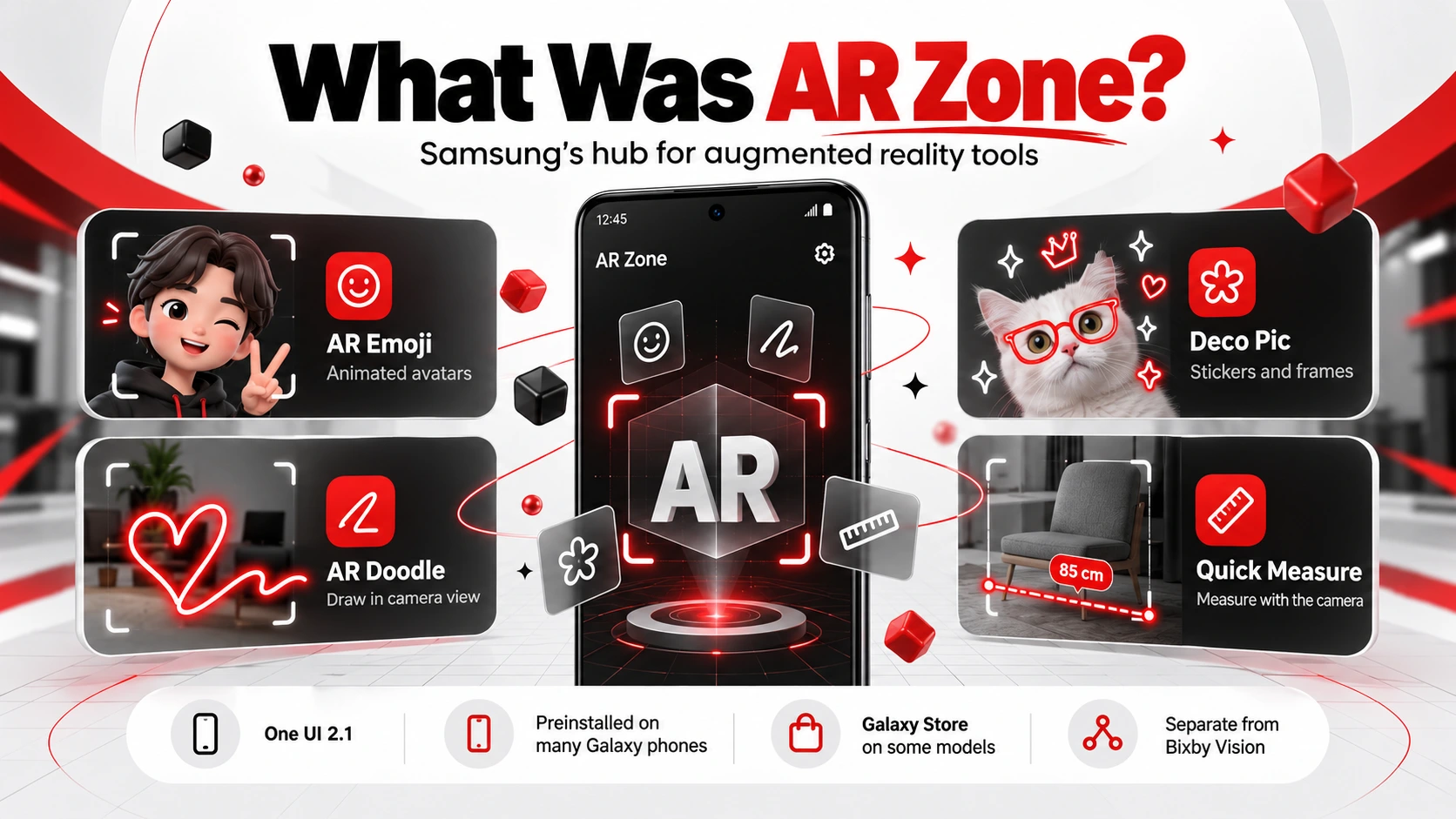
Depending on your Samsung device, the app may include AR Emoji Camera, AR Emoji Studio, AR Emoji Stickers, AR Doodle, Deco Pic, camera effects, photo and video tools, and Quick Measure
AR Zone is not AR Doodle. AR Doodle provides all the AR features of Samsung in one place; AR Zone is another tool to draw virtual lines, words, and objects on people or real space.
The app can be primarily used to build custom avatars, stickers, photos, videos, and social media posts. These features may differ depending on the Samsung model, region, and software versions.Â
Ever noticed an AR Zone app on your Samsung phone and wondered why it is there?
The name sounds technical. The app, however, is easy to comprehend. It enables you to place digital images, sketches, logos, and characters into the real world using the camera on your phone.
You can create an avatar that resembles you, a cartoon character. Draw in the air, put masks on your face, make videos, and make stickers with messages.
Some Samsung phones also feature real-world object measurement features.
This is because the features offered may vary depending on the Galaxy model, region, and software version. Other sampling phones, such as Samsung, might display some of the tools separately from the AR Zone menu.Â
Â
What Is the AR Zone App on Samsung?
Samsung’s AR Zone app is a suite of augmented reality tools. It integrates text, drawings, stickers, masks, or effects to characters, objects, and real locations using the Galaxy phone’s camera.
AR stands for Augmented Reality. AR is different from virtual reality, which does not replace the environment. It superimposes digital images onto the live camera image. Samsung AR Zone can feature an AR emoji camera, AR emoji studio, AR emoji stickers, AR doodle, deco pic, and quick measure. The tools that are available may vary according to the device model and software version.
Basically, the AR Zone Samsung meaning is an inbuilt region designed for the AR features from Samsung. It is supported on Galaxy phones and Galaxy tablets, but not all Android devices. Samsung has dubbed its AR Emoji capabilities as Google’s ‘Galaxy Avatar’ on newer, compatible devices with Android 15 and One UI 7 or above.Â
Show customers how your AR idea will look and work before development begins!
What Does the AR Zone App Do?
The AR Zone application allows users to easily create and interact with digital content by using the Samsung phone camera. It’s primarily utilized for customized avatars, stickers, camera impacts, virtual drawings, innovative photographs, and brief videos.
Based on Samsung’s models, the AR Zone Android app will enable users to:
 Make a personalized digital avatar.
 Make an avatar copy facial expressions and body movements.
 Create personalized characters and reactions for design.
 Draw virtual words, lines and shapes on people or spaces.
 Include masks, frames, filters, GIFs, and decorations.
 Take AR-enhanced photos and videos.
 Measure objects and distances using supported devices.
 Store and share AR content via compatible apps.
The tools used might vary from Galaxy to Galaxy. Some features might also be part of individual applications rather than collated in a single AR Zone menu.Â
Â
How to Use the AR Zone App?
The AR Zone app can generally be accessed from the Samsung Camera. The location might change depending on the phone model and version of One UI.
To access and use AR Zone:
Open the Camera app on your Samsung phone.
Swipe through the camera modes and select More.
Tap AR Zone.
Choose the tool that you will work with.
Grant camera, microphone, or media permissions as required.
Follow the directions as provided on the screen.
Take pictures, record videos, or make your AR content.
Save the result or share in another app.
Another way to get to AR Zone, AR Doodle, Deco Pic, Quick Measure, or Galaxy Avatar is to swipe up from the Home screen and type in the name of the app. Samsung also has a way to launch Galaxy Avatar from Settings>Advanced features>Galaxy Avatar, which is supported on the devices.
Get the latest versions of your phone and Samsung apps if the missing feature is present. Menus, names, and tools may change after you upgrade to a new version of Android or One UI.Â
Â
AR Zone App Features
The AR Zone app combines creative camera effects along with basic augmented reality capabilities. Not all of these features will be on every Samsung phone, and newer software versions might change the names of and reorganize some of these features.Â
AR Emoji Camera
AR emoji camera allows you to create personalized digital images, take photos, and record video with a digital figure. Real-time avatar duplication of some facial expressions and body movements. Users can select one of various modes that bring the avatar into a real-world scene or may display the avatar’s face as a mask or match the user’s movements. In newer Galaxy phones, it’s possible this feature may be called Galaxy Avatar Camera.Â
AR Emoji Studio
AR Emoji Studio is used to create and customize a digital avatar. Individuals can change the appearance of their face, hair, makeup, clothing, body shape, and effects. They can make themselves up by taking a selfie, using a photo, or using one they have pre-prepared in the form of an avatar. On all compatible devices with Android 15 and One UI 7 or higher, Samsung has renamed this function Galaxy Avatar.Â
AR Emoji Stickers
AR Emoji Stickers is a new way to make tailor-made stickers with an avatar’s actions and expressions. The user can customize wallpaper, write a message, decorate it with various choices, and save the sticker. The stickers can then be included in messages, social media posts, or other supported apps. Samsung can refer to them as Galaxy Avatar Stickers.
AR Doodle
Using AR Doodle, users can draw virtual lines, words, and objects over faces and real spaces. The drawing may either remain in the body of the detected face or move to a selected area as the camera moves. Can be used to put a floating message, do a virtual hat, or adorn a room while taking a video.Â
Masks and Camera Effects
Masks and camera effects are digital elements layered on top of the live camera footage. They can be virtual glasses, hats, animation, facial effects, frames or filters, for example. Face tracking makes the effect follow the user’s face or expressions, although the effect will not always be as accurate in lower light levels or when the user moves too quickly.Â
Deco Pic
Deco Pic is a Samsung camera accessory for creating decoration images and videos. It has filters, masks, frames, stamps, GIFs, and stickers that can be used before capturing content. Is helpful for rapid visual impacts if customers do not wish to create an entire avatar or AR drawing.Â
Photo and Video Capture
The majority of AR Zone tools are compatible with direct photo or videography. Users can record an animated avatar, or film an animated AR Doodle, create a decorated picture using Deco Pic, or take a picture with an AR mask. You will typically be able to open and share completed snapshots and videos from Samsung Gallery.Â
Quick Measure
The camera and AR technology are used to estimate the size, dimensions, and/or distances of an object using Quick Measure. Users can take a scan of a region and display measurements on the screen on compatible Samsung devices. It’s best used in a well-lit open area away from clutter, but is not meant to be a substitute for accurate measuring devices where precise measurements are needed.Â
AR Zone Gallery
In some cases, AR Zone may not have a brand-new feature called AR Zone Gallery. In most cases, however, photos and video captured using AR Zone are typically displayed within Samsung Gallery. The stickers can be placed in AR Emoji or Galaxy Avatar sticker space, and any saved versions can be added to Gallery for sharing.Â
Model-Dependent AR Features
The features used in some AR Zones require the phone to be equipped with a camera, sensors, processor region, and software versions. While 3D Scanner was previously usable on only certain Galaxy devices, including some Galaxy Note10 and S20 devices, Quick Measure is only available on supported devices. For devices compatible with Android 15, One UI 7 or higher, AR Emoji has also been renamed to Galaxy Avatar.Â
Collaborate with an Award-Winning AR development company to create a compelling and functional AR solution.Â
AR Zone vs. AR Doodle: What Is the Difference?
The Samsung AR Zone app is a bundle of Samsung Augmented Reality tools. One of the AR Doodle features is for the addition of virtual drawings and personal handwriting to faces or real spaces during video recording.Â
| Feature | AR Zone | AR Doodle |
|---|---|---|
| What It Is | A Collection of Samsung AR Tools | A Single AR Drawing Feature |
| Main Purpose | Provides Access to Emojis, Stickers, Effects, Doodles, and Other AR Tools | Adds Virtual Drawings and Handwriting to Camera Scenes |
| Content Options | Photos, Videos, Avatars, Stickers, Effects, and Drawings | Drawings, Text, Shapes, and Decorative Lines |
| Face Tracking | Available Through Selected Features | Drawings Can Follow a Detected Face |
| Space Tracking | Depends on the Selected AR Tool | Drawings Can Remain Fixed Within a Real Space |
| Best For | Exploring Different Samsung AR Experiences | Creating Videos with Virtual Drawings |
| Availability | Varies by Samsung Model, Region, and Software Version | May Appear Inside AR Zone or as a Separate Camera Feature |
How to Develop a Mobile AR App Like AR Zone?
The mobile app nature of AR Zone necessitates access to the camera, motion tracking, face and/or surface detection, digital content placement, and media controls. Begin with one learning experience to build up AR usage, and implement more advanced features later.Â
Define the Main AR Use Case
Determine the problem that the AR app will help solve. It could be anything relating to filtering faces, virtual try-on, AR drawing, uses of products, measurement, education, or entertainment.
A clear use case clarifies what technology is needed, what it will cost to develop, and the user journey.Â
Select the Target Devices and Platforms
Decide whether the app will be available for Android, iOS, tablet, or multiple platforms. Review the features of the camera, sensors, processor, OS, and AR functionality for each device.
Devices that are ARCore certified meet specific requirements for camera, sensor, design, and processor hardware capabilities. Not all phones have the same features with regard to tracking and depth.Â
Choose the AR Development Technology
Utilize technologies appropriate to the platform and features needed. There’s ARCore that can be used across Android, ARKit for iPhone and iPad apps, and AR for the web, with AR running in both the Unity and web versions. In addition to Apple providing ARKit for iPhone and iPad apps, there’s ARCore for Android, AR Unity, and AR on the web.Â
Common options include:
ARCore for Android and cross-platform AR
ARKit for iPhone and iPad
Unity for cross-platform 3D experiences
Unreal Engine for detailed graphical effects.
MobileAR for mobile devices
Face and object tracking using computer vision algorithms.Â
Design the Core Features
Write down all the features that are important for the first iteration. They can be features such as camera control, face tracking, detection of surfaces, placing digital objects, stickers, drawing tools, making avatars, capturing photos, recording videos, saving and sharing.
Don’t put in optional features yet, just for later. A small first design is much more easily tried and changed.Â
Build a Simple User Interface
Try to keep buttons and menus clear of the primary viewing area of the camera. Users should have the ability to choose an effect, record a clip, redo the last action, save it, and share with an easy workflow.
Include brief instructions if users must scan a surface, move the camera, adjust light, move the user’s face, etc.Â
Test Across Devices and Environments
Try the application on various phones, screen sizes, cameras, and operating system versions. Also test indoors and outdoors, in bright light, dim rooms, and moving people/or objects.
Monitor tracking, load time, battery consumption, battery temperature, battery permissions, video quality, storage space, as well as app crashes.Â
Launch and Improve the Application
Update the stable version including the most essential features. Take what users are saying and what’s happening in the apps and look for areas where people may have difficulties, lose tracking, withdraw permissions, or discontinue use of the app.
It is important to have more information and show it more accurately before adding effects or tools.Â
Â
What Makes the AR Zone App Stand Out?
The AR Zone app provides several convenient augmented reality functions to Samsung’s camera suite. It helps users to create AR content without having any need for professional experience with editing or any paid software.Â
Personalized AR Content
Users create profiles of their looks/preferences that can be transformed into avatars, emojis, stickers, and camera effects. They can make changes to hair, clothes, facial details, expression, and accessories.
As a result, the content is more personalized than regular filters and ready-made sticker packs.Â
Real-Time Camera Interaction
Elements of the user’s world interact with AR elements depending on what the camera sees. Digital masks can follow a face, avatars can move in response to human motion, and AR doodling can be left on a face or even a static space.
This helps to engage the user and make the content feel real.Â
Creative Photo and Video Tools
Avatars, drawings, stickers and masks, filters, and decorative effects can be overlapped in photos and videos. The AR features with Samsung AR Zone provide the ability to capture images and to record content.
These materials may be utilized in social media or greetings, messages, or short videos.Â
Practical Measurement Features
The AR function for measurement may be available to indicate the size or distance of real objects on supported Samsung models. These features not only provide a practical use beyond the avatars and camera effects, but they also offer several benefits.
Lighting, camera angle, and the shape of the object can influence the results, as can the sensors of the phone.Â
Easy Social Sharing
Users are also able to save AR photos, videos, emojis, and stickers and send them via the supported messaging and social media apps. This way you don’t have to transfer the content to another editing software.
Options for sharing may be different on different devices and applications.Â
Simple Built-In Interface
Many tools are bundled together in Samsung’s camera and software world as AR Zone. The effects can be pre-selected, content can be created, and saved through well-known controls.
Menus may differ depending on model and software versions, with some newer Samsung devices splitting or renaming certain features.Â
Free Built-In Access
Many AR zone features are available on the Samsung Galaxy devices that are supported, typically without any additional fees. Users can easily draw, create emojis, doodles, photos, and videos without having to pay for professional Augmented Reality applications.
Online access might continue to be necessary for updates, further downloads, online sharing, or certain content.Â
Looking for project-specific technical support? Hire Certified AR developer talent for a custom AR application.Â
Business Applications and Market Potential of AR Zone
The AR Zone app is primarily used for personal use. Yet, the camera tracking, digital objects, avatars, and interactive effects demonstrate the added value augmented reality can bring to businesses.
Businesses can do the same with AR technology by enabling their customers to learn about products, get a preview of options, follow instructions, or engage with branded AR content.
| Industry | Possible AR Application | Business Benefit |
|---|---|---|
| Retail and E-Commerce | Virtual Product Previews and Try-Ons | Reduces Uncertainty Before Purchase |
| Furniture and Interior Design | Placing Digital Furniture Inside a Room | Helps Customers Compare Size and Style |
| Beauty and Fashion | Trying Makeup, Glasses, Clothing, or Accessories | Makes Online Shopping More Interactive |
| Real Estate | Virtual Staging and Property Information | Helps Buyers Understand a Space |
| Education | Interactive Models and Visual Lessons | Makes Difficult Topics Easier to Explain |
| Training | Step-by-Step Instructions Over Real Equipment | Supports Practical Learning |
| Entertainment | Avatars, Filters, Stickers, and Interactive Characters | Encourages Users to Create and Share Content |
| Marketing | Branded Effects, Games, and Social Filters | Increases Campaign Participation |
| Tourism | Location-Based Facts and Visual Guides | Adds Useful Information to Real Places |
This is what makes the wider market potential come with solving real customer problems. Ideally, a good AR experience will make users visualize an object, its placement, its functioning, or top actions they need to take.
There isn’t a need to implement AR just because it demonstrates impressive visuals. This experience should stay quick, valuable, and comprehensible.Â
Â
Limitations of the AR Zone App
AR Zone is an AR application with low-cost and fun tools, but it’s not a full-fledged AR app. It may be available, perform, and have different capabilities depending on Samsung’s device.Â
Primarily Limited to Samsung Devices
The application of AR Zone is primarily designed only for Samsung Galaxy gadgets. Other Android brands may offer their own AR functionality, but they typically don’t come with Samsung’s full library of emoji, stickers, doodles, and camera effects.
This restricts the use of the app to Samsung users only.Â
Features Vary Between Samsung Models
The AR Zone features aren’t necessarily available on all Galaxy phones. It varies depending on the phone, the year of release, the type of camera, the type of sensors, the version of Android OS and its firmware One UI, region, and service provider.
Additionally, Samsung says it may not be possible to use all AR features depending on the device and software version. Press the button on other devices, and they may change their names or partition features within the AR Zone.
Performance Can Vary
The phone must deal with the camera view, movement, lighting, and digital effects simultaneously, as AR features demand.
Older and weaker phones might suffer from:
Slow loading
Unstable tracking
Reduced video quality
Faster battery use
Increased device temperature
Delayed camera effects
The performance might also be affected under dark room conditions, fast motion, or if the camera does not see a face or surface clearly.Â
Limited Advanced Customization
AR Zone is for everyone from day-to-day users down to those who can create more complex designs and programs.
It offers intuitive controls for avatars, stickers, doodles, and effects. Advanced 3D models, animations, lights, textures, tracking, and export formats, however, are not easily controlled by the user.
To create branded AR experiences and/or make them highly customizable, companies are generally required to create their own app.
Limited Third-Party Integration
Users can save and share AR Zone content using supported apps. Outside developers are not allowed to be able to add custom business tools or branded experiences inside AR Zone, however.
If your company is interested in creating a product for AR, you might have to choose ARCore, ARKit, Unity, or Android XR. Google states that ARCore is the platform that “provides an Android application with access to motion tracking and other AR capabilities.Â
Regional and Language Differences
Certain features, downloads, menus, and language options are subject to change from country to country.
The tool in the online guide might not exist, have been renamed, or is possible to be found on a separate device. Availability of the AR features varies by region, provider, device, and software version, says Samsung.
Button users should note that instructions written for Samsung Support are for the specific Galaxy model and country, so users should check for their specific device and country.Â
Â
Is the AR Zone App Worth Using?
Yes, if you have a Samsung phone and the AR Zone app is already available, then it is worth giving a try.
It allows you to create avatars, stickers, drawings, and short videos on camera and to transform the image into an avatar without requiring specialized video editing software. The supported phones can also provide useful features like Quick Measure.
The app will be most useful for:
Samsung enthusiasts who use camera effects
People creating social media content
Families making playful photos and videos
Users seeking customized emojis and stickers.
Covering the fundamentals for newcomers to the field of mobile augmented reality
Not as beneficial for users who keep to regular photography, who don’t use stickers that often, or users who require the professional AR design tools.
The app is completely free for users to try the general public based on supported systems. If not, you can choose just to ignore these shortcuts, or even hide them away as they will simply be hidden.Â
Â
Future of Samsung AR Zone and Mobile Augmented Reality
Samsung AR Technology is not limited to putting effects on your phone’s camera. It may also be possible to tie Galaxy AI, One UI, xR devices, smart glasses, and other Samsung devices in the future.Â
Integration With Galaxy AI and One UI
Galaxy AI might bring advancements in avatar creation, face tracking, object recognition, photo editing, and voice control features. Other AR features may also transition to AR Camera, Gallery, or Galaxy Avatar itself instead of in the AR Zone menu.Â
Wearable AR Devices and Smart Glasses
The insight Samsung brings to the table with its work on Galaxy XR and intelligent (AR) eyewear seems to indicate a more hands-free approach to AR. Users can look for directions, information, and digital information without having to hold their phone.Â
Cross-Device AR Experiences
Future AR content could be supported on screen sizes such as phones, tablets, smart glasses, headsets, and larger screens. A user might make a creation on one device and view and edit it on another device.Â
More Practical AR Applications
Other useful AR applications that can be close to reality with the help of mobile AR might include navigation, translation, shopping, training, education, accessibility, equipment repair, and interior planning. A successful AR solution adds value; it’s not just about adding AR visuals.Â
Bring your immersive idea to life with the right technical plan.
Key Takeaways
The AR Zone App allows you to browse Samsung’s AR-related products in one place.
It supports avatar, sticker, drawing, photos, and videos.
Most of AR Zone is available for Samsung Galaxy devices only.
AR Doodle is an AR Zone feature, not a separate AR platform.
Tools that are available will differ, depending on the phone model and the software versions.
For some new devices, AR Emoji may not be used and will be replaced with Galaxy Avatar.
AR Doodle may require a separate Galaxy Store download on One UI 7.
Quick Measure is supported on specific devices and cannot be downloaded on other devices.
Simple AR tools are accessible, with no design needs.
AR Zone is good for casual content, but it lacks some professional controls.Â
End Note
The AR Zone application is an easy-to-use tool for Samsung users to produce avatars, stickers, virtual drawings, camera effects, photos, and videos. Note that the AR Zone consists of all the Samsung AR tools, whereas AR Doodle is just the one dedicated to drawing on faces and real areas. Features available will vary by model and software version, but for those interested in augmented reality in the mobile space, the app is a great place to start.Â
Â
Frequently Asked Questions (FAQs)
Does the AR Zone App Require an Internet Connection?
You can use AR Zone with most installed devices without an Internet connection. It may be required for downloading the AR Doodle, installing stickers, updating apps, backups, etc., or for posting content online.Â
Can I Uninstall or Disable the AR Zone App?
It depends on the model and software version of Samsung. Look in Settings > Apps > AR Zone for removal or deactivation links. You can try hiding the app if removal doesn’t work.Â
Is the AR Zone App Safe, and What Permissions Does It Use?
Yes, AR Zone is an official Samsung feature. It can ask for camera, microphone, photo, video, and storage permissions to generate, save, and share AR content.Â
These can be regulated from Settings > Security and privacy > Permission manager.Â
Why Can’t I Find the AR Zone App on My Samsung Phone?
There may be several reasons your phone doesn’t work with it; the app might not be available, or its functions might change after the app update. On the App Menu of its Camera app, look for Galaxy Avatar and in the Galaxy Store.Â
Where Are AR Zone Photos, Videos, and Stickers Saved?
Most commonly, AR photos and videos can be found in the Samsung Gallery album in the Camera, AR Doodle, Deco Pic, AR Emoji, or Galaxy Avatar.
Â
Stickers can be kept in Galaxy Avatar, Samsung Keyboard, or supported messaging apps.Â
Can I Try Meta Quest 3 Before Buying It?
Yes. The Meta Lab locations have VR product demos and guided tours to tour their space to experience games, entertainment, fitness apps, and headset controls before buying, for visitors interested in acquiring the new headset.Â
Does Meta Lab Sell Ray-Ban Meta Glasses?
Yes. Stores that participate in the event are selling Ray-Ban Meta glasses with some hands-on demos. Participating stores are selling Ray-Ban Meta glasses as well as some hands-on demos. Frame style, color, and lens styles are subject to change by location.Â
Are Meta Lab Demonstrations Free?
Yes. Visitors can see a demo of the Meta Lab for free. A list of the products is available for exploration, a set of questions so you can ask, and a list of supported devices so you can try without paying for the demo.Â
Are Appointments Required for Meta Lab Demos?
Most demonstrations are non-appointment-based. The availability could change according to locations, though it is advisable to contact the store before travelling, particularly in peak seasons.Â
Are There Meta Lab Locations in Canada?
Yes. Meta’s expansion includes Canada, even though the current list of publicly announced places is generally inside the United States. Additional Canadian locations are predicted as the rollout continues.Â
Where Can I See Meta Lab Photos?
You can find Meta Lab images on Meta’s official announcements, Best Buy’s Meta Lab pages, news articles protecting the release, and client posts shared on social media after visiting taking part places.Â