














VR Sanitisation How to Safely Clean Shared VR Headsets (Complete Guide) -

VR Sanitisation: How to Safely Clean Shared VR Headsets (Complete Guide)

Picture of Aliza kelly
Aliza kelly

Content Writer

Share Article:
VR Sanitisation How to Safely Clean Shared VR Headsets (Complete Guide) -
Written By : Amelia Rose
Summarize with:
Table of Contents
Table of Contents
Share Article:

VR headsets are a promising technology. Training simulations, gaming experiences, simulated reviews, and experiential learning are driven by them. However, there is an issue that most people do not pay attention to.

The VR headsets are shared, which contacts the skin, face, and eyes of all users. The device may easily get laden with sweat, skin oils, and bacteria. A headset will transmit germs to different users unless properly cleaned.

Studies on common electronics indicate that highly touched items are capable of transmitting a lot of microbial contamination. Research on healthcare hygiene journals discovered that high-touch devices have the potential to harbor hundreds of bacterial colonies per unit area when not cleaned regularly.

That is why VR sanitisation is important.

This comprehensive VR headset cleaning instructional manual summarizes and describes how to clean VR Headsets properly when using a shared device, and the best way to clean VR headsets in a training laboratory, VR arcade, school, and the workplace.


Why VR Headset Sanitisation Is Important?

The VR headsets are placed directly over the face. They are touching their foreheads, cheeks, and noses. The foam facial interface takes up sweat and oils. Bacteria are collected by controllers on their hands.

Hygiene risks get high when more than one individual is using the same headset.

The common situations that include the use of shared VR equipment are usually in environments like.

  • Training centers

  • Educational institutions

  • VR gaming arcades

  • Design and industrial design studios.

  • Healthcare simulations

According to a study conducted by the National Institutes of Health, devices that are in contact with the skin have the ability to transmit bacteria and viruses to users, provided they are not disinfected appropriately.

This renders cleaning a crucial procedure in the operation of VR.


Key hygiene risks in shared VR systems

Risk Why It Happens
Sweat buildup
Foam padding absorbs moisture
Skin oil accumulation
Repeated facial contact
Bacteria transfer
Multiple users share equipment
Odor development
Sweat trapped in the facial interface

These problems can be prevented by sanitisation and increasing the comfort of users.


Common Hygiene Risks in Shared VR Devices
Common Hygiene Risks in Shared VR Devices - Euphoria XR


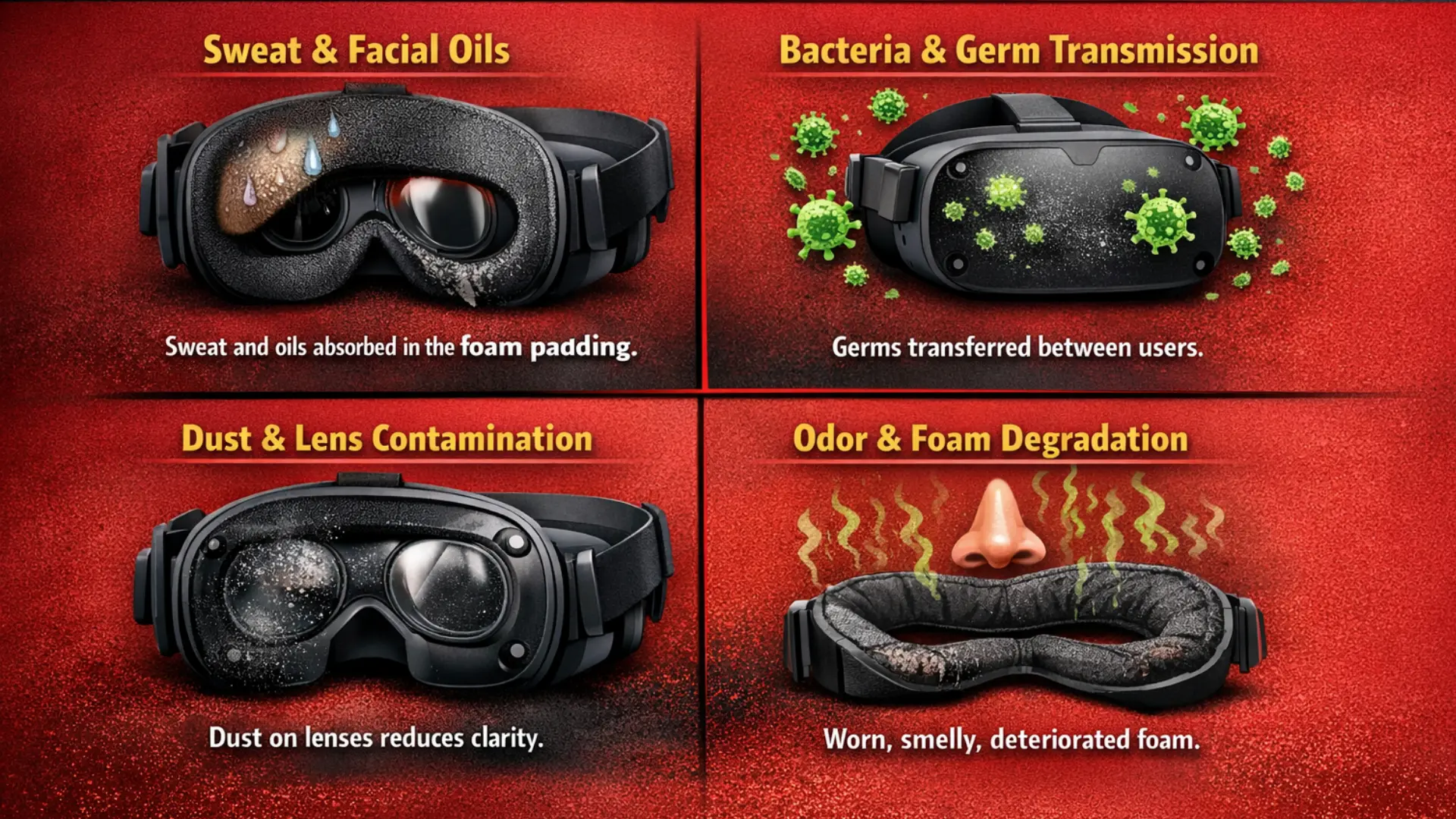
Shared VR headsets are transferred between users. The result of every session is sweat, skin oils, dust, and, at times, bacteria. With time, the effectiveness of these contaminants influences hygiene as well as the functioning of the devices. The awareness of these dangers helps organizations to come up with appropriate cleaning habits.

Sweat and Facial Oils

VR headsets apply their pressure to the forehead and cheeks. The body also secretes skin oils and sweat in the process of use. These substances are absorbed by the foam face interface.

Sweat buildup is also a common problem when more than one user is using a single headset. Bacteria can grow in foam cushions since they cannot dry out due to the presence of moisture in them. It is also capable of causing discomfort to the next user of the headset.

Bacteria and Germ Transmission

Microorganisms can be transmitted among users using shared devices. The face and nose are some of the touch-sensitive regions on VR headsets. Unless headsets are adequately disinfected, bacteria and viruses are likely to be transported due to repeated use.

This is the reason why hygiene in VR headsets, when a shared device is needed, is important in training services like laboratories, VR arcades, and classrooms.

Due to a lack of regular cleaning, high-touch electronics are usually contaminated with microbes. These risks can be mitigated by proper sanitisation.

Dust and Lens Contamination

The particles of dust cling to the surfaces of VR lenses and headsets very easily. A dusty surface is enough to decrease the visual clarity.

Smooky lens can result in straining eyes and blurred vision. This has an influence on the whole VR experience. Frequent cleaning of optics makes them clear and enhances the immersion.

Odor and Foam Cushion Degradation

Skin oils and sweat are absorbed by foam facial interfaces. In the long run, this gives negative smell.

The foam material is also vulnerable because of constant exposure to moisture. The cushion can become timid and/or deformed. It is advisable to replace with foam pads or apply wipeable PU leather faces interfaces to keep a higher level of hygiene.

Essential Tools for Cleaning VR Headsets

When working out a VR headset cleaning guide, it is significant that it is performed with the appropriate tools. The VR headsets have fragile optics and vulnerable electronics. The device is liable to damage from harsh materials or tough chemicals.

The best way to do it is to clean electronics and optical equipment with tools that are intended to be used on such objects.

Basic Cleaning Tools

VR headset cleaning is generally suggested to include the following.

  • Lensclean Microfiber Cleaner and Remover.

  • The antibacterial wipes to disinfect the headset surfaces.

  • Hard external component alcohol based hard surface disinfectant.

  • Shared disposable hygienic face coverings.

  • Long-term hygiene replacement of facial interfaces.

  • High volume VR UV sanitisation cabinets.


Tools Cleaning and their Purposes

Tool Purpose
Microfiber cloth
Safe lens cleaning
Antibacterial wipes
Surface disinfection
Alcohol solution
Hard surface sanitation
Hygiene covers
Prevent direct facial contact
UV C sanitiser
Automated germ elimination

These tools are the background of the most appropriate method of disinfecting VR headsets safely

Need professional advice on the implementation of VR and the management of the hardware?

How to Clean a VR Headset Safely (Step-by-Step)?

The VR headset needs attention in cleaning. These devices have sensitive lenses, sensors, and electronics. Applying the inappropriate technique may destroy the optics or influence performance.
How to Clean a VR Headset Safely (Step-by-Step) - Euphoria XR


The best solution is to engage in a clean routine after use. The process enhances the hygiene of the headset and increases its life.

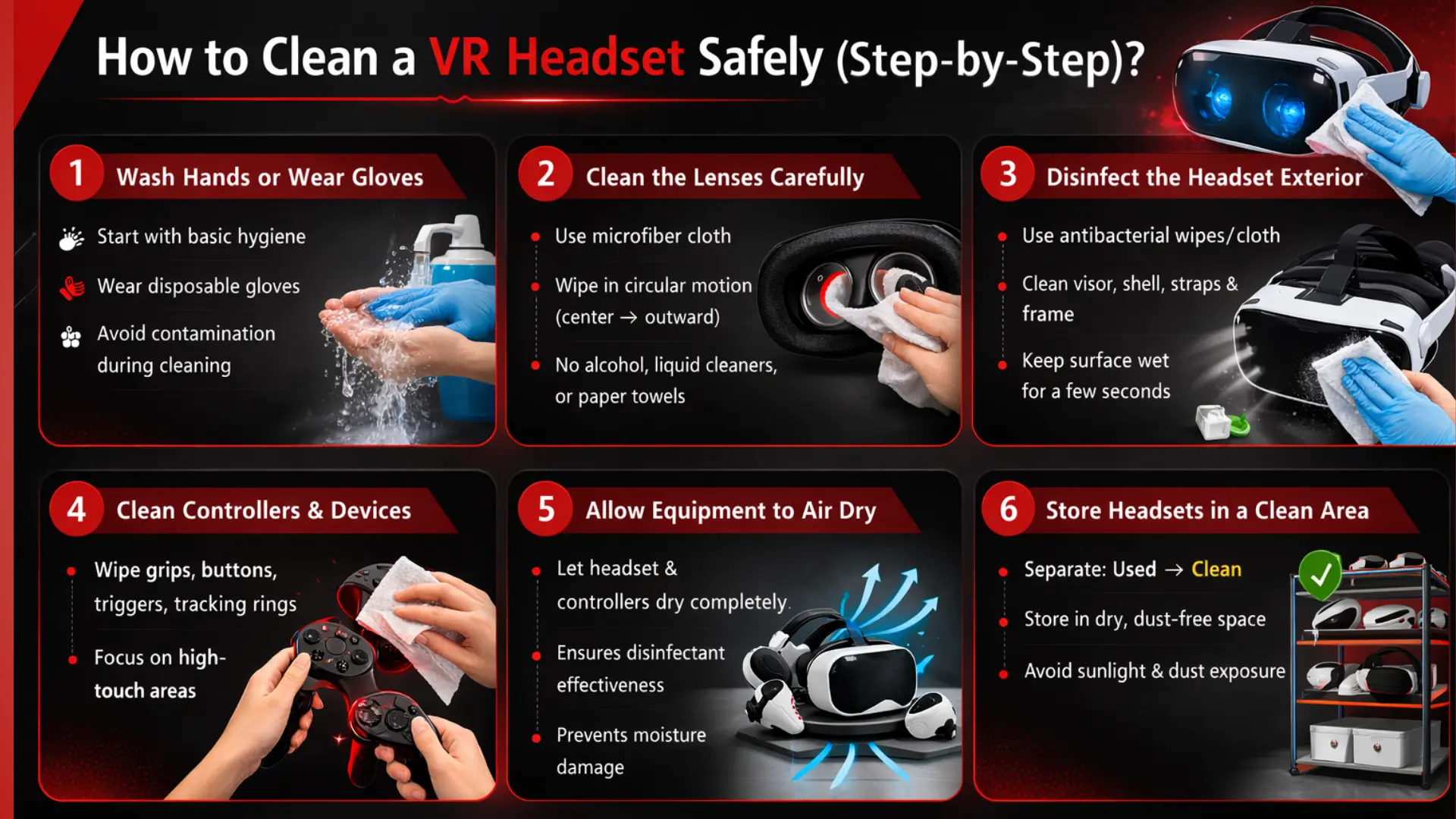
The following is a rudimentary step-by-step procedure that adheres to the best practices of VR training laboratories, classroom settings, and shared VR settings.


Step 1: Wash Hands or Wear Gloves

Start with basic hygiene. Washing hands lowers the chances of contracting bacteria in the headset during cleaning of the set.

Disposable gloves are encouraged in a common area. The gloves save the user and the equipment when cleaning.

Initial hygiene will mean preventing contamination in the rest of the cleaning process.


Step 2: Clean the Lenses Carefully

The most sensitive component of a VR headset is the lenses. Visual clarity is affected even by the slightest scratches.

A clean microfiber cloth that suits optical surfaces is used. Use a gentle wipe on the lenses in small circular movements. Starting with the center of the lens, proceed outwards.

Safety guidelines for lens cleaning

  • Alcohol/liquid cleaners should not be applied to the lenses.

  • Do not take paper towels and tissues.

  • When wiping, no pressure is to be applied.

It is a microfiber cloth that is used to clean dust and fingerprints without damaging the lens coating.


Step 3: Disinfect the Headset Exterior

Wipe off the outer parts of the headset after washing the lenses.

Apply an antibacterial wipe/ cloth with approved disinfectant, which is lightly moist. Pay attention to those areas that touch the face of the user.

Key areas to clean include

  • The visor and headset shell

  • Adjustment straps

  • Side panel and frame of the headset.

It is important to keep the area a little wet for a few seconds to ensure the disinfectant works.

This will be a required step towards keeping VR headsets hygienic when using shared devices.


Step 4: Clean Controllers and Handheld Devices

The VR controllers gather bacteria on the hands during gameplay or training.

Apply disinfectant wipes to all covered surfaces of controllers, including

  • Grips

  • Buttons

  • Triggers

  • Tracking rings

Be particularly attentive to those places that are most often touched with fingers.

Their cleaning is a significant issue in any VR headset cleaning guide since the controllers have to be touched all the time during VR wear.


Step 5: Allow Equipment to Air Dry

After disinfection, the headset and controllers can be left to air dry fully.

It takes some time to kill microorganisms with disinfectants. The cleaning process could be compromised by using the device before it dries.

Air drying also avoids the moisture getting inside the electronic components.


Step 6: Store Headsets in a Clean Area

After the equipment is dry, put it in the right place.

Most VR laboratories divide storage into two sections.

  • Soiled headsets are in the queue for cleaning.

  • Cleaned headphones to be used.

This system ensures that the reuse is accidental before the sanitisation process.

The adequate storage also shields the headset against dust and sunshine, which can destroy the internal displays.

This method of cleaning VR headsets is the safest; the procedure will guarantee that the devices remain operational and the user is clean.


Best Way to Disinfect VR Headsets in Shared Environments

For Shared VR, facilities like training centers, schools, and VR arcades need consistent sanitisation of their facilities. In the daily usage of dozens of users, it is not always sufficient to wipe the headset.

Disinfection of the VR headsets is best achieved based on the frequency and number of users who share the devices. The two major methods of sanitisation that are applicable in most organizations are the same.


Chemical Disinfection (Manual Cleaning)

The most widespread type of small VR deployments is chemical disinfection. It entails wiping down of cleaning machines with disinfectant wipes or alcohol based solutions.

The technique is effective in situations with limited equipment and smaller user populations.

The main actions in cleaning by hand involve:

  • Clean the outside of the headset with antibacterial cleaning wipes.

  • Cleanse the surfaces and buttons of the disinfect controller.

  • Wipe the facial interface thoroughly.

  • Engage surfaces in short-term wetness to have it properly disinfected.

  • Allow the device to dry up and then use it again.

Benefits of hand cleaning

  • Inexpensive and not complex to apply.

  • Requires minimal equipment

  • Professional in size and content.

Limitations

  • Requires staff supervision

  • Users may have different attitudes towards cleaning.

  • The headset may have some areas that are hard to reach.

Although these are the weak aspects, manual disinfection is still a useful part of any VR headset cleaning tutorial.


UV-C Sanitisation Systems

Enterprise VR systems commonly use UV-C sanitisation systems. These systems operate on the principle of destroying bacteria and viruses by damaging their DNA with a light of ultraviolet light.

The headset is put into a sanitisation cabinet in which UV light destroys all the equipment.

Advantages of UV C disinfection are:

  • Fast cleaning cycles

  • No exposure to electronics of a liquid nature.

  • Regular sanitisation leads to regular results.

  • Suitable in large scale VR.

UV cabinets are used to sanitize various headsets in many VR arcades and training centers. This approach can be deemed as the most effective means to clean the VR headsets in those cases when devices are frequently used by more than one person.

Seeking interactive training, education, or VR solutions? Collaborate with a reliable VR Development Company to develop scalable and high-performance virtual reality experiences.

VR Headset Hygiene for Shared Devices

Disinfecting VR headsets in the service of multiple users needs to be unambiguous and under routine service. And basic cleaning techniques significantly minimise the chances of contamination.

There are a number of hygiene practices that organizations that share VR equipment use.


Critical hygienic measures

  • Wash the headset after each user’s usage is complete.

  • Spray down controllers and hand straps.

  • Wear disposable hygienic face dresses where feasible.

  • Changing the foam facial interfaces on a regular basis.

  • Train operators and patrons on methods of cleaning.


Hygiene improvements for shared VR systems

Hygiene Upgrade Benefit
PU leather facial interfaces
Easy to wipe and disinfect
Disposable face covers
Reduce skin contact
UV sanitisation cabinets
Faster device turnover
Storage systems
Prevent mixing clean and used devices

All these measures will make VR safer and more comfortable for every user.


VR Cleaning Mistakes That Can Damage Headsets

The VR headset can be broken and shortened in terms of lifespan due to improper cleaning. Avoidable errors in the course of maintenance affect a very large number of devices.

The following are some of the mistakes that should be kept at bay.

Using alcohol on VR lenses

Lens coating can be destroyed by alcohol based cleaners. Use of a dry microfiber cloth should be used to clean lenses.

Spraying the liquid directly on the headset

Liquid can get into internal parts and destroy electronics. The cloth should always be sprayed first before applying cleaning solutions.

Washing of lenses using paper towels or tissues

The materials made of paper are coarse and can scratch nice lenses.

Cleaning it with a rough chemical wash

VR headsets contain strong chemicals that degrade plastics and glues.

Exposing headsets to direct sunlight

VR glasses resemble sweeping glasses. The internal display panels can be burned in a few seconds by direct sunlight.

These common pitfalls prevent such devices from functioning and achieving the most safety when cleaning and sanitising VR headsets.


Recommended VR Cleaning Routine for Training Labs and VR Arcades

VR arcades and training labs usually have to run several headsets in a day. In such settings, a large number of users get access to the same equipment. An organized cleaning schedule allows taking care of the hygiene and maintaining the order of devices in order.

With the help of a basic routine, the contamination can be minimized, and devices can get a longer life.

Before Each Session

The equipment must be inspected promptly before initiating the VR session by a user.

Tasks to complete:

  • Check the lenses for either dust or fingerprints.

  • Make sure that the facial interface is at its cleanest.

  • Make sure the outside of the headset is cleansed.

  • Dirt or residue check controllers.

This brief check allows for avoiding hygienic problems when it is used.

After Each User

Interim intervention between sessions is considered one of the most significant aspects of VR headset disinfection when using communal devices.

Steps to follow:

  • Clean the external part of the headset using disinfectant wipes.

  • Wash the facial cover or hygiene cover.

  • Cleanse the controller lever, rips, and buttons.

  • Check the lenses and wipe them using a microfiber cloth where necessary.

  • Do not leave the device to dry off in the hands of the next person.

Most VR establishments even drop used VRs in a specific cleaning place and then sanitize them.

End of Day Maintenance

A more thorough cleaning schedule towards the end of the day would maintain devices in fine shape.

End-of-day tasks include:

  • Complete cleaning of headset surfaces.

  • Examining the facial interfaces of wear or smell.

  • Straps and other adjusting parts cleaning.

  • Checking the lenses to see whether they are scratched or damaged.

  • Placing devices in security storage containers.

A regular schedule keeps VR equipment in common operation and clean.

Thinking of introducing VR in your company? We can discuss the VR custom solutions, deployment plans, and long-term support.

Maintenance Tips to Extend VR Headset Lifespan

The hygiene is enhanced by proper maintenance, as well as hardware life. Simple routines can avoid expensive breakages and keep the VR systems running smoothly.


Practical maintenance tips

  • Change dull facial interfaces on a frequency basis.

  • Protective cases should be placed on store headsets when not used.

  • However, cover the lenses as much as possible.

  • Lenses should not be exposed to the sun.

  • Continuously examine locking straps, cords, and attachers.

  • Wearable button controllers are prevented by clean controllers.


Device protection checklist

Maintenance Action Benefit
Regular cleaning
Prevents bacteria buildup
Lens protection
Maintains visual clarity
Proper storage
Reduces dust and damage
Cushion replacement
Improves comfort and hygiene
Equipment inspection
Detects issues early

These easy ways contribute to increasing the life of VR equipment and guide to proper cleaning of a VR headset.


Final Thoughts

The sharing of devices requires following a correct VR headset cleaning guide. The understanding of how to clean the VR headset properly assists in cleaning dust, sweat, and bacteria, and keeps vulnerable parts safe. Having excellent VR headset care on shared items and the most appropriate method of cleaning VR headsets can guarantee safer workplaces, the ability to extend equipment lifespan, and an enjoyable VR experience for each user.


Frequently Asked Questions (FAQs)

VR headsets must be cleaned after each use. The personal headsets should be wiped down to eliminate sweat and dust as well as fingerprints.

The hard exterior surfaces, including controllers, headset shells, etc., can be wiped using alcohol wipes. They should not be applied directly to VR lenses.

The most suitable way is to clean with a microfiber cloth. Wipe in circular movements with a cloth until you get rid of dust and smudges.

Yes. The UV-C sanitisation systems utilize ultraviolet light to kill microorganisms through the degradation of their DNA. A large number of VR arcades and enterprise laboratories provide the use of UV-C cabinets to clean the headsets effectively.

Get Started With Euphoria XR

• Award-Winning AR/VR/AI Development & Consulting Services
• Flexible Business Models – Project Based or Dedicated Hiring
• 10+ Years of Industry Experience with Global Clientele
• Globally Recognized by Clutch, GoodFirms & DesignRush

Recent Posts

Company's Stats

Successful Projects
0 +
Success Rate
0 %
Pro Team Members
0 +
Years of Experience
0 +

Let's talk about your project

We are here to turn your ideas into reality