Think of a company in possession of 300 VR headsets. The devices need to be configured, maintained, secured, and tracked. So now consider that all of the above is done manually.
It would take weeks.
This is the issue most organizations face today. Virtual reality is not experimental anymore. It is used in training, education, product design simulation, healthcare simulation, and remote collaboration.
According to PwC research, VR Training can help employees learn four times faster than classroom training. Another estimate from IDC is that global spending on AR and VR solutions will reach the billions in the near future.
As the use of VR increases, it becomes harder to regulate such devices.
This is where VR device management is needed.
Management systems enable organisations to manage VR headsets from a single dashboard. The systems are useful for assisting businesses in implementing applications, upgrading software, implementing security policies, and monitoring device usage.
This guide will teach you the working principle of the VR device management solutions, their purposes, and why organizations employ this type of solution, and what tools, such as ArborXR and ManageXR, are the most popular in the market.
What is Mobile Device Management (MDM)?
Mobile Device Management (MDM) is a technology that enables organizations to manage digital devices through a central platform.
Originally, MDM platforms were used to manage smartphones and tablets used by workers. Over time, the technology has expanded to support laptops, the Internet of Things, and, currently, VR headsets.
In essence, MDM provides administrators with physical control of devices.
A typical MDM platform can:
MDM also saves time and reduces risk when applied to large fleets of devices managed by the organization.
Currently, VR device management solutions operate on the same idea.
What is VR Device Management?
VR device management is the process of remotely operating and monitoring VR headsets through centralized software.
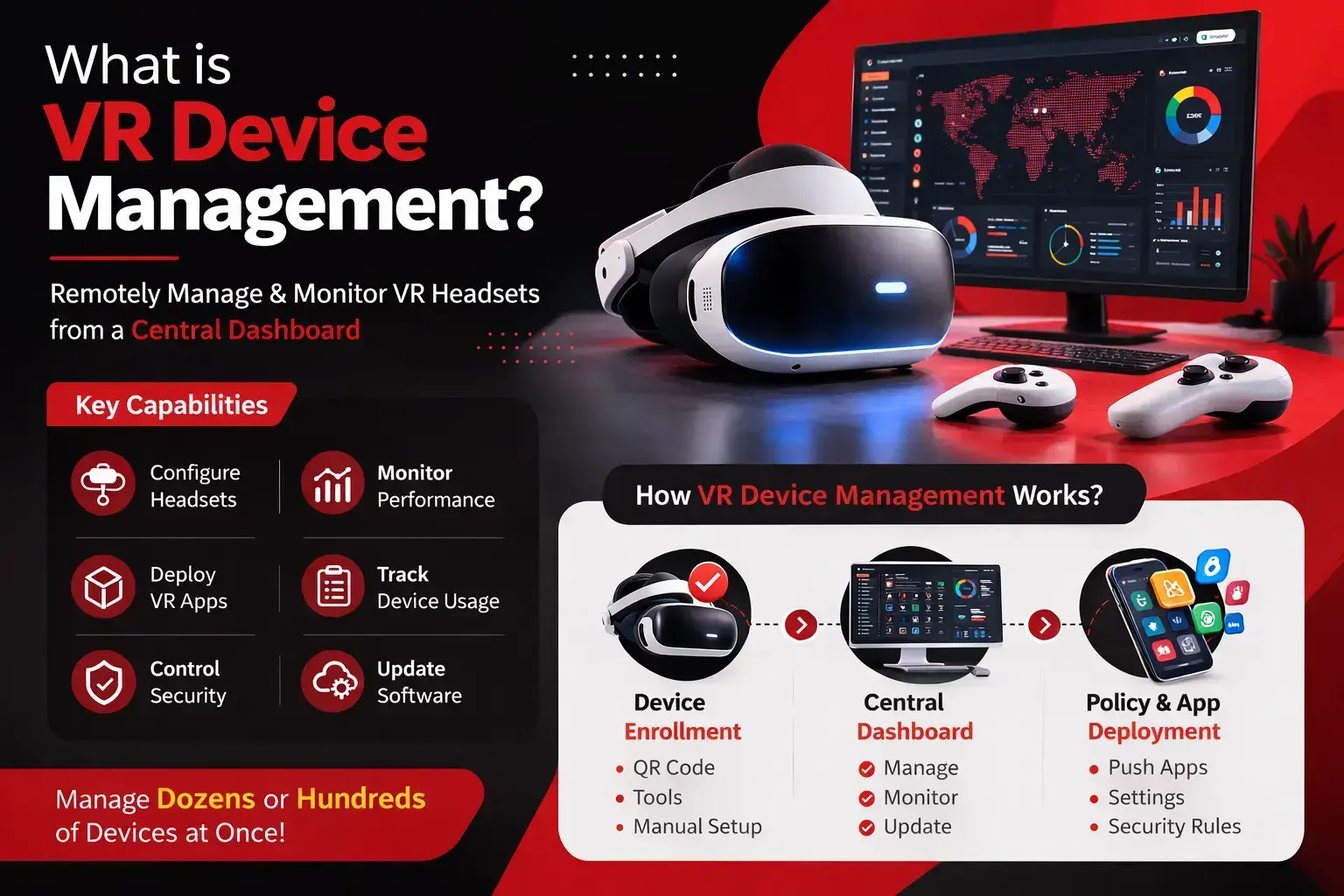
These systems assist the organizations in operating large VR deployments.
Administrators can manage all headsets from a single dashboard without having to set them up individually.
The VR device management platforms enable the teams to:
Headset remotely configured.
Deploy VR applications
Monitor device performance
Control security settings
Track device usage
The strategy is particularly valuable for industries that deploy dozens or hundreds of VR devices.
How VR Device Management Works?
The VR device management is performed based on three straightforward elements.
Device Enrollment
All headsets should be registered initially by the management platform.
When enrolled, the device connects to the organization’s management system.
Enrollment methods include:
Central Management Dashboard
Administrators manage all the devices in a central dashboard.
From here, they can:
Install applications
Change device settings
Monitor usage
Update software
Policy and App Deployment
It is possible to push policies and apps to all devices.
For example:
Installing a new simulation of training.
Limiting unauthorized applications.
Implementation of WiFi settings.
Enforcing security rules
Through this process, organizations will be able to control hundreds of VR headsets simultaneously.
Why Businesses Need VR Device Management Solutions?
As companies adopt VR for training, education, and simulations, the number of headsets in organizations is increasing rapidly. These devices are hard to manage and time-consuming to manage manually. The headsets require apps, updates, security options, and tracking.
VR device management solutions help companies manage all VR devices on a single platform. This makes large-scale deployments easier, safer, and more efficient.
Centralized Device Control
VR device management systems enable the administrative team to manage all headsets from a single dashboard.
IT teams can monitor and control the entire fleet of VRs from a single location, rather than doing so one device at a time.
This includes:
Status and health of the devices.
Scheduling system updates remotely.
Arranging devices either in groups or localities.
Monitoring headsets that are in use and those that are not.
The centralized control philosophy helps companies manage hundreds of devices with ease.
Remote App Deployment
VR technologies are based on specialized applications, such as training simulators or laboratories.
The manual installation of apps on numerous devices is time-consuming. Management systems for VR devices enable remote deployment of apps.
Typical process:
Websites like ArborXR and ManageXR offer powerful remote access and simplify how apps are distributed.
Operational Efficiency
The management of VR hardware is a burden for IT staff.
VR device management is automated and covers numerous activities, including configuration, updates, and monitoring.
Benefits include:
More expedited setup of devices.
Mass updating of various headsets.
Reduced manual work
Rapid problem solving using monitoring tools.
Automation helps companies scale VR deployments without increasing operational complexity.
Security and Compliance
VR devices can store sensitive information, such as training and activity data. Organizations should protect themselves against this information.
Security is offered in VR device management solutions as follows:
The tools enable organizations to experience secure VR environments and adhere to the internal security policies.
Core Features of VR Device Management Platforms
Current VR device management systems offer tools that help organizations manage large fleets of VR devices effectively.
Device Provisioning and Deployment
Provisioning involves preparing VR headsets for use and then offering them to individuals.
Key capabilities include:
This enables the organizations to install multiple devices instantly.
Application Management
Application management determines which VR applications run on each device.
Administrators can:
App management systems, such as those provided by ManageXR and ArborXR, are designed to run VR deployments.
Inventory and Lifecycle Management
Companies should have visibility regarding their VR gadgets.
The management of inventory assists in monitoring:
This fact assists in arranging upgrades and the replacement of devices.
Usage Analytics and Monitoring
Device usage data is presented using analytics tools.
Administrators can monitor:
Application usage
Session duration
Device performance
User engagement
These lessons help organizations improve VR program development and resource planning.
Privacy and Security Controls
There are security services that serve the devices and user data.
Common security measures are:
Defensive login authentication.
Device-level encryption
Restricted access controls
Remote device lock and wipe
These measures provide safe, compliant VR activities.
VR Headset Management Strategy
To be successful in VR implementation, one cannot simply buy headsets. There should be a clear implementation plan for devices, users, and applications in the organization. An organized VR headset management plan helps businesses ensure efficiency, security, and smooth operation.
Defining Objectives and Use Cases
Organizations are expected to set their lead goals before implementing VR devices. Other firms employ VR to train their employees, whereas others use it for education, to visualize their designs, or to simulate.
The example of these cases assists in determining:
Which requirements must exist?
How many devices are needed?
What security policies are to be employed?
A clear purpose enhances the use of VR deployments.
Deployment and Provisioning Process
Once the objectives are formulated, the devices to be used are prepared. This is referred to as provisioning.
In general fields of deployment, the common sequences of deployment are:
Enrolling gadgets on the management platform.
Setting up network parameters.
Installing the necessary programs.
Applying security policies
With the automation of the provisioning process, numerous devices can be configured simultaneously, saving significant setup time.
User Onboarding and Training
Surprisingly, users require simple instructions for using VR devices. An easy onboarding process will help employees learn how to use the headset and access applications.
Training usually covers:
Effective user onboarding enhances a sense of security and leads to higher VR usage among employees.
Maintenance and Updates
VR devices must be serviced frequently to be safe and efficient.
Regularly replaced parts of maintenance are:
Updates are released regularly to keep the VR environment stable and secure.
Support and Troubleshooting Workflows
In VR deployments, technical problems might arise. Support processes in companies need to be clear.
Such typical troubleshooting procedures are:
An organized support process also helps IT teams resolve issues quickly and minimize downtime.
Top VR Device Management Platforms in 2026
Several platforms can be used to scale VR management. The platforms assist organizations in managing devices, deploying applications, and effectively monitoring the VR environment.
ArborXR
ArborXR is a platform that is aimed at controlling AR and VR devices in particular. It enables organizations to remotely deploy applications, manage device settings, and monitor the performance of multiple devices across large VR fleets.
Key capabilities include:
Remote device management
VR app deployment
Device monitoring
Kiosk mode support
ArborXR is typically used in enterprise VR applications and education and training.
ManageXR
Another platform, ManageXR, is designed to handle large VR and XR deployments. It is concerned with scalability and the ease of controlling devices.
Key capabilities include:
Distant machine set-up.
Mass application deployment.
Monitoring and analytics of gadgets.
Grouping and management of the devices.
Organizations with numerous VR fleets across many destinations use ManageXR.
42Gears SureMDM
SureMDM is a single endpoint management solution from 42Gears that also supports VR devices. It will enable organizations to operate various devices using a single system.
Common features include:
The solution platform applies to organizations dealing with mixed-device environments.
VMware Workspace ONE
VMware Workspace ONE is a single endpoint management platform commonly used in enterprise IT settings. It enables a centralization of control over the management of a variety of devices by an organizational system.
Key capabilities include:
User identity management.
Enterprise security policies.
Monitoring broken devices centrally.
VR devices can be integrated into broader enterprise device management systems with Workspace ONE.
Microsoft Intune
Microsoft Intune is a cloud-based device management system used by a wide range of organizations that depend on Microsoft platforms.
Key capabilities include:
It is usually used in organizations that already use other gadgets through Microsoft corporate tools.
ArborXR vs ManageXR
Both ArborXR and ManageXR are industry-leading VR device management technologies designed to help organizations manage and monitor large fleets of VR devices. These enable businesses to implement applications, control headset settings, and monitor device performance on a centralized platform.
The major difference lies in their areas of interest, such as control device features, deployment processes, and analytics.
| Feature | ArborXR | ManageXR |
|---|
| Platform focus | XR device management platform designed specifically for AR and VR deployments | XR management platform focused on scalable device control and monitoring |
| Primary use case | Training programs, education environments, enterprise XR deployments | Large-scale VR fleet management across multiple locations |
| Device management | Centralized dashboard to monitor and control VR devices | Centralized device control with detailed device visibility |
| App deployment | Remote installation of VR apps, videos, and WebXR content | Remote app deployment and file distribution across device groups |
| Kiosk mode | Supports single-app kiosk and multi-app launcher environments | Provides a secure single-app kiosk mode to restrict device access |
| Device grouping | Devices can be organized into groups for easier management | Supports device grouping for bulk management and policy control |
| Analytics | Provides usage analytics and learning insights | Provides operational analytics and device monitoring tools |
| Security controls | Device restrictions, access control, and content moderation | Device lockdown, settings control, and security policies |
| Supported hardware | Supports many Android-based standalone VR and AR headsets | Supports Meta, Pico, HTC, Lenovo, DPVR, RealWear, and other XR devices |
| Deployment scale | Suitable for organizations managing medium to large XR deployments | Designed for large enterprise XR deployments |
| Ease of use | Known for a user-friendly XR-focused interface | Known for strong operational device control features |
| Pricing structure | Device-based pricing plans depending on deployment size | Device-based pricing with multiple enterprise tiers |
The two platforms offer extensive management services for VR devices and are widely used by companies that use VR in training and education, as well as in enterprise settings.
Benefits of XR Management Tools
VR deployments gain order and management with XR devices. In the absence of such platforms, managing large numbers of devices will be time-consuming and error-prone.
By opting for VR services to manage VR devices, organizations will gain greater visibility, automation, and security for their VR systems.
Improved Device Management
Managers of XR can operate all the headsets using web-based management tools.
This implies that organizations will be able to:
Centralized management will simplify the management of big fleets of VR.
Efficient App Management
The VR experiences rely on programs like learning environments or training simulations.
These apps can be managed through XR management platforms by the administrators.
There are shared capabilities such as:
This makes certain that all the headsets are running the proper software.
Enhanced Operational Efficiency
Automation is important in enhancing operational effectiveness.
Administrators are able to update and set up numerous devices simultaneously in comparison to configuring cameras and devices individually.
Benefits include:
Faster implementation of new equipment.
Reduced manual setup work
Faster problem-solving with monitoring software.
This will enable the IT teams to work on huge VR settings at a lower effort.
Scalable VR Deployment
New adopters tend to increase the number of devices as VR is being used.
XR management systems simplify the process of expansion.
They support:
The companies are able to expand their VR programs with the help of the correct management system without adding complexity to their operations.
Security and Privacy in VR Device Management
Any VR device management system is highly dependent on security and privacy. VR headsets are capable of holding sensitive information like training content, the activities of the user, and business information. This data might be lost in the hands of unauthorized persons without appropriate measures.
The management of modern VR devices has inbuilt security solutions that secure devices, users, and organizational data.
Access Controls
Access control helps in keeping the use of VR devices and applications restricted to authorized users. Administrators are also able to set up permissions according to user roles.
Examples of common access control measures are:
Authentication when a device is being logged in by the user.
Role-based access permission.
Limited access to some applications.
Locking of the device: unauthorized use.
These can restrict the misuse of VR devices within organizations.
Data Protection
VR machines typically deal with useful digital data. Enterprise environments should protect this information.
The VR device management platforms facilitate data protection by:
Shipment of coded information.
Secure application access
Controlled data storage
Wipe the secrecy of the remote device in case of loss.
The features are useful in deterring data leaks and illegal access.
Network Security
VR headsets have access to enterprise networks, and this poses a security risk unless the devices are managed in the appropriate way.
The network security can involve:
Secure WiFi configurations
Firewall protections
Authentication protocols in the network.
Limited access to unknown devices on the net.
The correct protection of networks keeps VR equipment secure in company systems.
Compliance
Numerous industries have to obey the data and security policies. Internal compliance with policies and regulatory measures is often a product of the healthcare, finance, and government sectors.
The management tools provided by the VR devices assist organizations in enforcing the security rules, maintaining the activity of the device, and registering the audit records.
Future of VR Device Management
The future of VR device management services will take a new trend with more industries using immersive technology.
There are some trends anticipated to influence this field:
Implementation of AI-based analytics that track device usage and performance.
XR management platforms that allow easier software control of devices are available in the cloud.
Interaction with internal IT systems, including identity management and security solutions.
Better automation of large-scale VR deployments.
With the further development of VR usage, companies will be heavily dependent on sophisticated management tools in order to keep their virtual worlds under control.
Conclusion
Virtual reality is quickly emerging as a useful aid in training, education, and collaboration in enterprise, with several headsets; however, controlling them without the appropriate system might be cumbersome. VR device management solutions assist organisations in managing devices, deploying applications, tracking performance, and ensuring security is maintained through a centralised platform. ArborXR and ManageXR are some of the tools that enable companies to effectively oversee VR fleets, besides enabling scalable and secure deployments. With the increasing use of immersive technology in more industries, proper services for managing VR devices will become a prerequisite to ensure that the VR ecosystems are organized, reliable, and safe.