

Detailed Comparison: Unity vs Unreal
Speaking of the XR development, it is indeed a matter of what is more important to you in the matter, be it performance, visuals, or workflow, which will lead you to the decision between Unity and Unreal Engine. The two engines are powerful as well and are used in gaming and simulation, and enterprise industries. They nevertheless serve somewhat diverse audiences. Unity is rather accessibility-based, faster, and multi-platform-supported, whereas Unreal is focused on cinematic quality and high-performance. Their comparison is discussed in the following in the most important aspects.
Performance and Graphics
Unreal Engine boasts of visual fidelity. It is able to produce effects of real-world lighting, reflections, and textures that could be compared to the movie world using advanced technology like Nanite and Lumen. Oneness is concerned, however, with the effectiveness of performance.
Its URP (Universal Render Pipeline) and HDRP (High Definition Render Pipeline) offer universal rendering solutions, which are quality and speed. In other words, Unreal would triumph over the elements of realism, and Unity would win the elements of optimization for mobile and lightweight XR devices.
User Interface and Learning Curve
Unity is a simple and user-friendly interface, as it can be mastered by non-specialists, and is thus appropriate to small studios, students, and indie developers. The Unreal Engine interface is more complex, and it may be cumbersome the first time one comes across it, but when mastered, it gives it more creative potential. Unity is more user-friendly, as if you need to get going on, and reiterate the same. Unreal is preferable in case you want to go deeper, customize, and are more film-like in the accuracy.
Scripting and Application Logic
Unity is written in C#, an easy and popular language, and C# is an easy environment that provides an excellent introduction to the system to a first-time programmer. Unreal Engine uses C++, which is more unfriendly and flexible but with a very high cost of being more complex to learn. The Unreal Engine, called Blueprint, however, bridges the opportunity between the two in that developers are allowed to build sophisticated logic in a code-free manner in a visual way. The two engines offer robust scripting engines, Unity due to its simplistic and quick development, and Unreal due to its sophisticated and manageable development.
Platform Support
Unity is the most covered of the platforms. It can support Android, iOS, Meta Quest, HoloLens, Magic Leap, WebXR, and Apple Experience Pro, and so on. Unreal Engine, too, is compatible with any significant platform, though it is tuned to high-end hardware like PC, console, and higher-quality VR headsets. The developers of lightweight AR or mobile XR experiences use Unity, and the software used by large-scale or cinematic VR applications is Unreal.
Pricing and Subscription Models
Unity offers a free option to users working on small-scale projects and upgrades to premium and enterprise users. It is very basic and predictable regarding pricing, which is appropriate when an individual is dealing with small teams. Unreal Engine, though, is free till your project earns over a million dollars in revenue, at which point Epic Games will receive a small royalty. According to this model, Unreal is desirable in cases of startups and in experimentation projects, but highly expensive in large commercial projects.
Community and Ecosystem
The community of sharing the unity is among the biggest in the world. It has its Asset Store that has thousands of ready-to-use models, scripts, and plugins, and it is easy to prototype and scale the projects. Unreal community is not as big, more professional, and it sells high-quality assets and production-level tools that can be found in the Epic Marketplace. Unity is winning in the accessibility and volumes, and Unreal is winning in the polish and high-quality of support.
Suggested Read: https://euphoriaxr.com/digital-twin-environment-in-robotics-training/
Use Cases for Unity vs Unreal in XR
Both Unity and Unreal Engine are employed to take control over the XR development, though they are dissimilar in terms of the demands that they can meet according to the project goals and scope. Unity is smart in lightweight and portable applications, which need to operate on multiple platforms, whereas Unreal is smart in a high-fidelity and highly detailed environment. This is the one in major XR with respect to performance.
Gaming
The mobile and indie XR games can be solved by Unity because it is efficient, fast, and has a broad range of devices. The creation of prototypes followed by testing, publishing to other platforms can be exceptionally easy and requires very little optimization for the developers. Unreal is, however, used with AAA quality games and cinematic games that require realistic lighting, complex textures, and advanced physics. Its engine can handle complex conditions and movie scenes, which will offer immersive gameplay.
Education and Training
Unity has also become a rather widespread instrument to create interactive simulations and VR classrooms in education and training of corporations. It can be used in institutions of training and colleges due to its easy interface, which can be iterated and deployed in minutes. Unreal Engine has found extensive application in serious and professional-grade training simulations (especially those that require realism and accuracy), e.g., in the aviation, defense, or medical visualization.
Industrial and Enterprise Simulations
Unity is also used in AR-based product demos, 3D design configurators, and collaborative design applications in the construction, automotive sectors and real estate sectors. Interactive visualization can be processed using it because of its linkage with the IoT and CAD tools. Unreal Engine is used on large industrial twins, architectural walkthroughs, and projects in high-quality visualization projects that need the materials of real life and superior lighting.
Pros and Cons of Unity and Unreal
Unity and Unreal Engine are the two XR development leaders that are applied to satisfy various requirements of creativity and technical needs. Here is the approximate list of their strengths and weaknesses to help you make the correct choice depending on the project being conducted.
Unity: Pros
It can be used by small developers and small teams since it is simple to learn and easy to use.
Excellent mobile, Web, and XR platforms.
It is not heavy and consumes less power, and this is the reason why it is easy to run on less powerful computers.
A large community with much documentation, tutorials, and assets available to them.
AR Foundation, MARS, and XR Interaction Toolkit may be adopted through strong adoption.
Unity: Cons
The visuals are not as realistic as the cinema in Unreal.
It also has certain high-tech features (like MARS and Pro rendering) that can only be found on paid upgrades.
May require further optimization of premium VR and big simulations.
Unreal Engine: Pros
Creates very photorealistic graphics through the application of the Nanite and Lumens technology.
Virtual production and film XR experiences are attributed to AAA games.
It has the Blueprints, a visual scripting, which attempts to reduce the use of code.
None before the project can earn a revenue of one million dollars.
Physics is as powerful as particle and realistic environment lighting systems.
Unreal Engine: Cons
Learning curve is not easy, especially among beginners.
Slower construction that builds more powerful hard equipment.
Royalty payment of 5 percent after receipt of the first million dollars of revenue.
This is less efficient with mobile and lightweight XR applications due to big file sizes.
Comparison Table of Unity vs Unreal
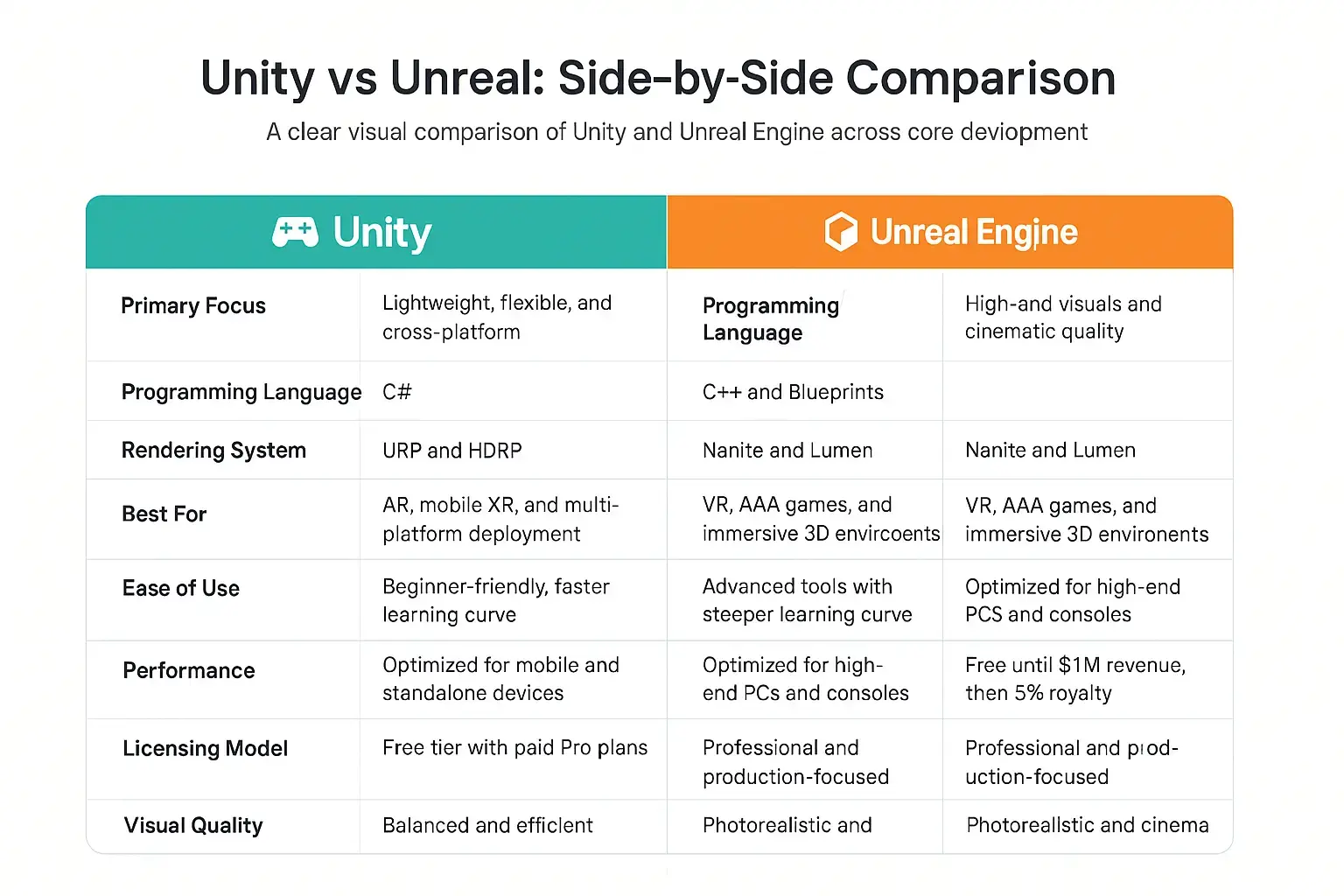
Unity vs Unreal in XR Development
The decision between Unity and Unreal to develop an XR concept is based on the size of the project, the visual objective, and the targeted device. Unity would be a good choice where applications have to be compatible with a variety of devices, and Unreal would be more appropriate when it comes to a cinematic experience or a simulation worthy of a business application.
Rendering and Visual Fidelity
Based on their Nanite virtualized geometry and Lumens lighting systems, Unreal Engine is the pioneer in providing almost Photoreal rendering. It is the one that will be used to do projects that require visual accuracy, including architecture or VR-high-end. The HDRP and URP pipelines provided by Unity provide great visuals and give it greater control over how performance can be optimized to be used in mobile and AR applications.
Real-Time Cinematics and VFX
The unreal has found its way into the hearts of film and virtual production due to its real-time cinematic tools. It is applied to generate virtual environments, dramatic lighting, as well as realistic surroundings that are found in large productions. Unity is also on par with such features as Cinemachine and Timeline, where developers can produce cutscenes and camera control systems directly in the editor.
XR Toolkits and Frameworks
Unity offers powerful XR creation frameworks such as AR Foundation, MARS, and XR Interaction Toolkit. Cross-platform XR creation has become more rapid and easier. Unreal Engine also has its own XR template and input systems, and has flexibility, allowing developers to add their own hardware or high-end physics.
Multiplayer and Cloud Integration
Unity is seamlessly compatible with Photon, Mirror, and Unity Multiplayer Services, and provides scalability when it comes to online XR collaboration or online gaming. Unreal Engine has in-house multiplayer capabilities using Epic Online Services, which enables developers to manage very large multiplayer games with real-time syncing.