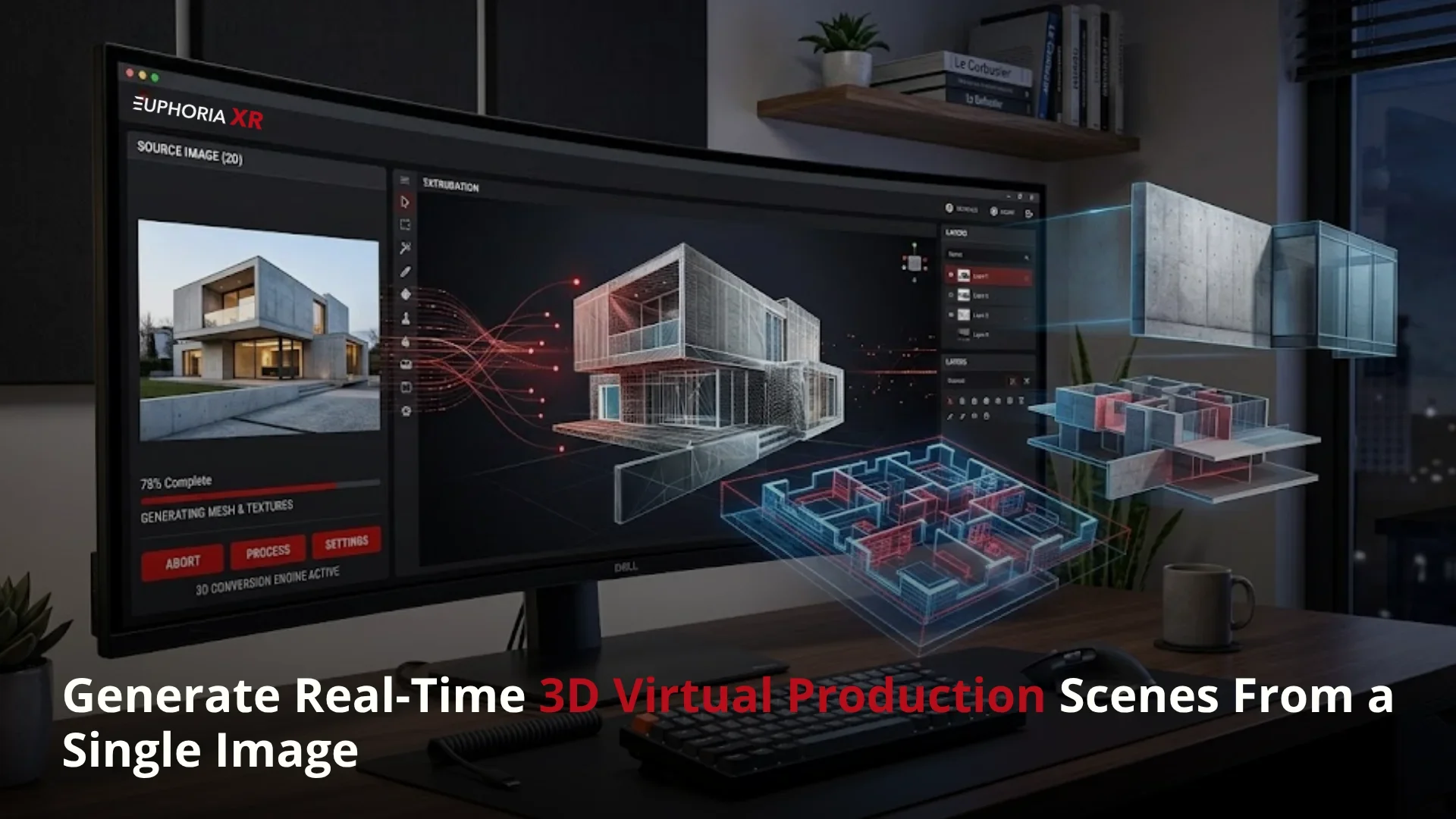
What if one picture could be a location?
Not just a plain background! Not only a mood board! A true 3D environment that the camera can walk through, the director can look around in, and the production team can work within a virtual production environment.
It’s where virtual production is going.
For many years, it has taken 3D artists, time-intensive modding, light setup, a game engine, and lengthy review time to make 3D virtual production scenes. The starting point is changing with the advent of AI tools. A single image or prompt can be a fully experienced 3D world, with depth, space, and camera movement
This is important because virtual production is rapidly increasing. Autodesk says the 360iResearch forecast estimates the virtual production market at $2.55 billion in 2023 and will grow to $8.42 billion by 2030. The market also experienced a healthy growth as per more recent market research studies, which estimate the market to reach $8.76 billion by 2030, up from $2.10 billion in 2025.
The great turnaround is easy.
Now we can generate real-time 3D virtual production scenes from a single image. This provides a quicker method for creating digital environments for filmmakers, brands, educators, and studios.
What is Single-Image 3D Virtual Production Scene Generation?
Single-image 3D scene generation is the conversion of a 2D image into a 3D scene to utilize in virtual production, real-time previews, camera tracking, green screen compositing, and LED wall workflows.
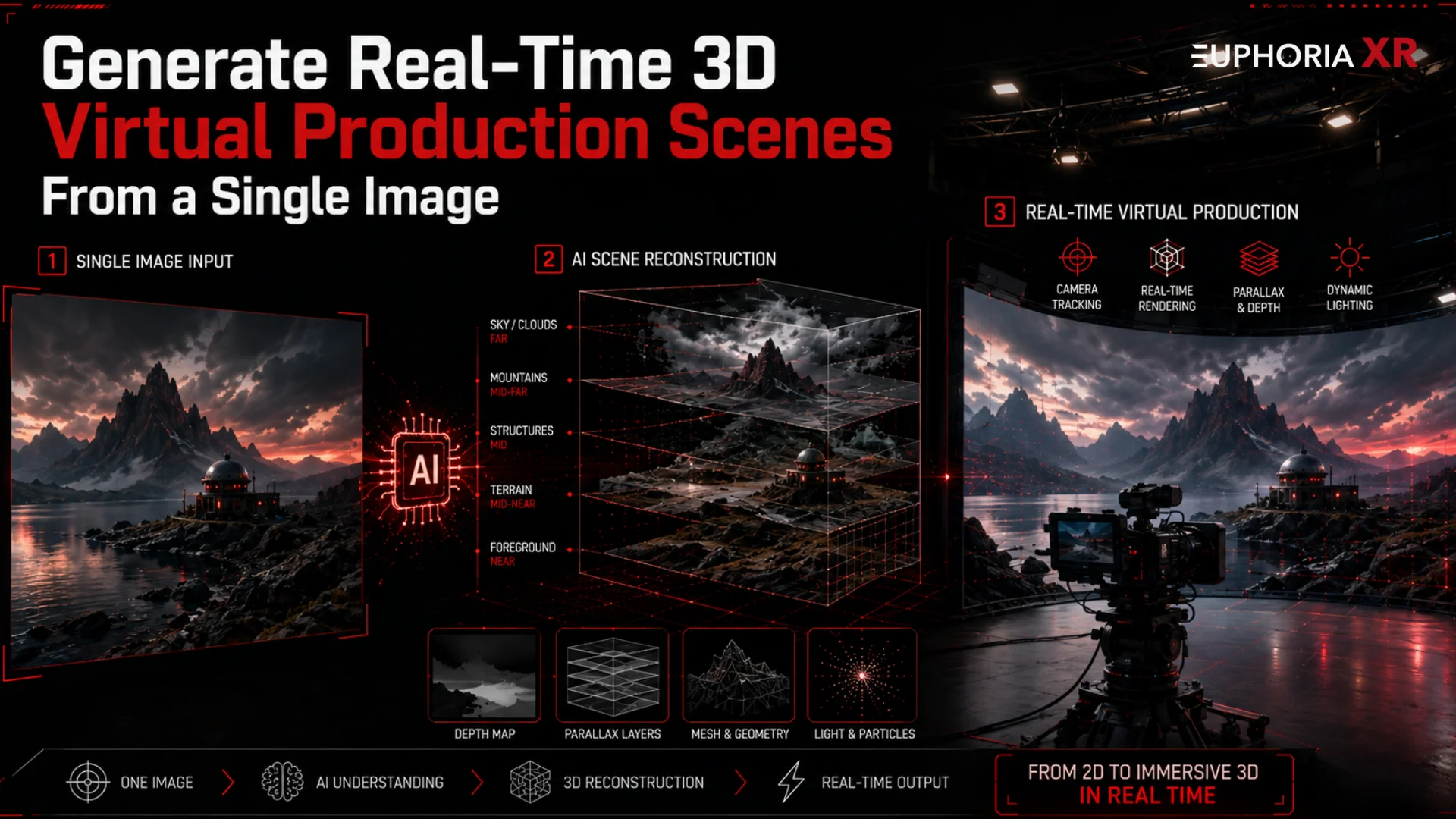
The image can be:
A concept image
A location photo
A film reference
An image created using an AI algorithm.
Sketch of a production design
Environment mockup for testing the brand.
The AI analyses the picture. The focus is on perspective, lighting, objects, depth, walls, and floors. It then creates a 3D scene that appears more three-dimensional than the typical 2D background.
This workflow is explained by World Labs with the aid of Marble, which can turn a single image or text prompt into an explorable 3D environment using Gaussian Splatting and spatial generation powered by AI.
How AI Generates a 3D Virtual Production Scene From One Image?
AI isn’t just about making an image a background. It examines the image, grasps the inner space of the image, and creates the space within the image as a 3D space. This can be helpful for previews, green screen production, LED wall, or real-time camera tracking.
Here are the steps in the process.
Step 1: Upload or Select a Reference Image
The process begins with one picture.
This picture serves as a visual reference for the scene. Can be in the form of a location photo, concept art, AI-generated image, room design, outdoor setting, or film background.
The image will clearly display:
The main environment
The ground, walls, road, or open area
The lighting direction
The front and back of the object
The general attitude of the scene
The clearer the image, the more useful information it provides the AI. However, in most cases, the final 3D creation becomes easier and more visual when the image is well-lit and has sufficient depth.
Step 2: AI Analyzes Scene Depth and Layout
Once the image is submitted, AI analyzes the scene.
It attempts to comprehend near, far, and spatial organisation. This is referred to as depth analysis.
If the image contains a room, the AI can identify various elements such as the floor, ceiling, walls, furniture, windows, and background objects. The image might identify a street, buildings, signs, vehicles, and sky if it is a street image.
The goal is simple:
AI attempts to interpret how the 2D image would appear if it were actually a real 3D environment.
It looks at:
This step will contribute to the AI to build a more natural spatial environment.
Step 3: The Image Becomes a Spatial 3D Environment
When the AI has identified the image, it begins creating a 3D model of the image.
Here comes the image into the third dimension and becomes a spatial environment. The depth, shape, and camera movement possibilities have now been added to the scene.
This image can only be used as a background, but can also be used as a 3D space, around which the camera can move slightly and display perspective changes.
This can be a way for production teams to test:
Camera angles
Scene framing
Actor placement
Background depth
Virtual set composition
Lighting direction
The result can not always be the final production quality at the moment. However, it provides teams with a quick start to virtual production.
Step 4: The Scene Is Exported for Virtual Production Use
Once the 3D environment is created, it must be set up for the production tools.
It can be exported as a 3D model, as a Gaussian Splat scene, in PLY format, or any other format that is compatible with the software used.
The scene might need some tidying up before it is made usable in production.
This can include:
This is important as it could be a great scene in preview, but needs optimization for real-time use.
Step 5: The 3D Scene Is Used in a Real-Time Production Setup
When set up, the scene can be employed in the real-time virtual production setup.
This may include:
Green screen compositing
LED wall production
Real-time rendering
Camera tracking
Virtual scouting
Previs
Live scene preview
A green screen setup involves the actor being shot on a green screen, which is then replaced with the 3D scene created by the AI.
Core Technologies Behind Image-to-3D Virtual Production
The image-to-3D virtual production is achieved through a combination of AI, 3D reconstruction, 3D rendering, and camera systems. These technologies combined allow the creation of one flat image that can be rendered in a real-time production environment as a scene.
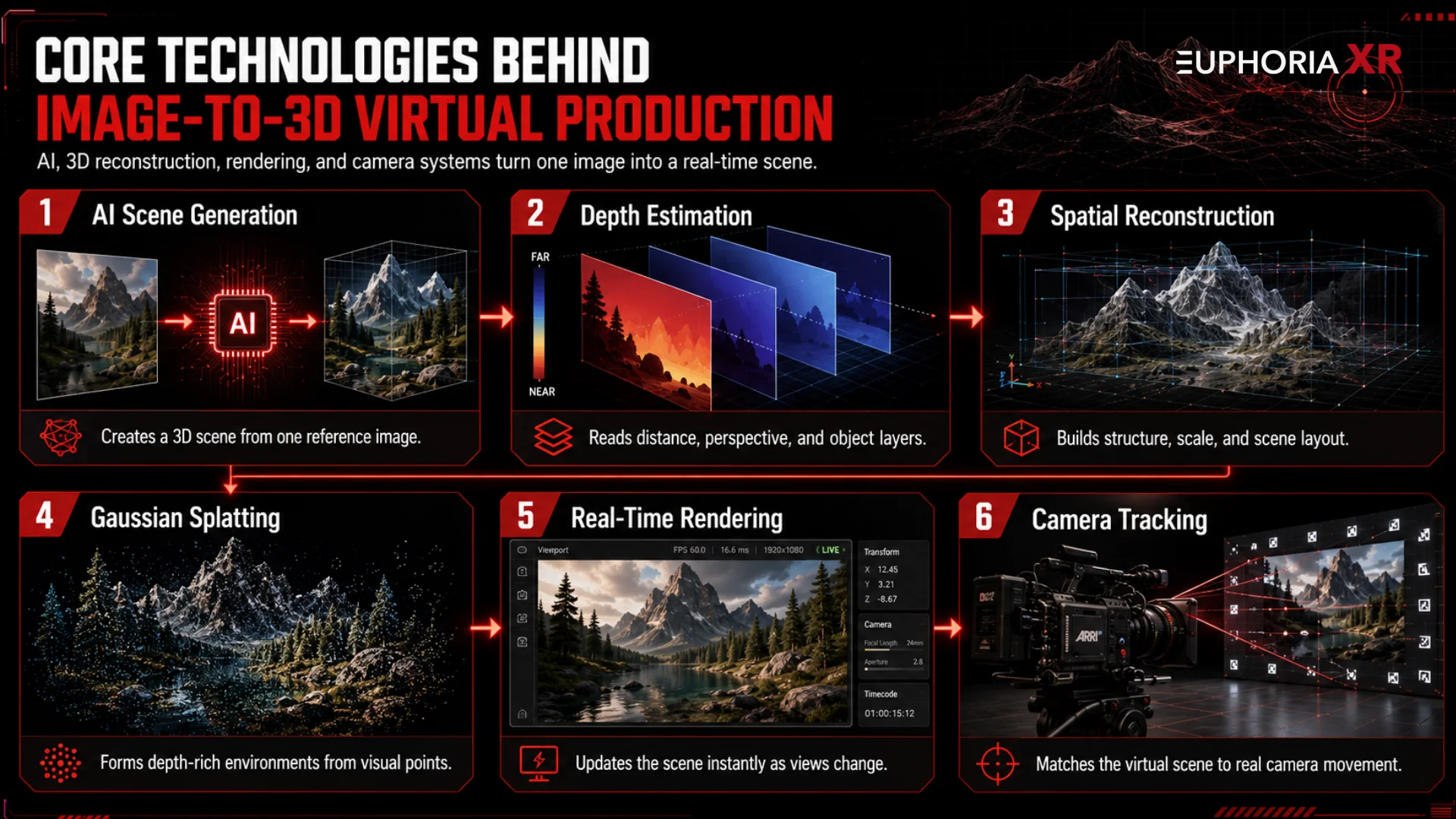
AI Scene Generation
AI scene generation is a process of creating a digital 3D environment from a reference image using AI. It provides teams with a quick versus manual starting point for creating the initial version.
It assists filmmakers, brands, and virtual production teams to evaluate their scene concepts quickly and then develop them to be utilized in the show.
Depth Estimation
The AI is able to understand the distance inside the image with the help of depth estimation. It uses visual features such as perspective, shadows, object size, and overlap to determine distance.
This will enable you to transform a simple two-dimensional (2D) photograph into a 3D scene with a foreground, midground, and background.
Spatial Reconstruction
Spatial reconstruction is a reconstruction of the image as a space. Utilizes depth information to form structure, scale, and layout.
This results in a more “environment” oriented output, rather than a static image. It also facilitates basic camera motion and virtual production previews for the scene.
Gaussian Splatting
By using a large number of small visual points, each with color, light, and shape information, Gaussian Splatting can be used to produce a detailed 3D scene.
In the case of virtual production, it can make virtual environments feel deeper and camera-aware, even though they don’t feature every object.
Real-Time Rendering
When the 3D scene changes as the camera or viewpoint changes, the changes are shown in real-time, thus the term real-time rendering.
This is crucial as directors and production teams must do a live preview of the scene, test the frame, adjust the shot, and make quicker creative decisions.
Camera Tracking
Camera tracking is used to link the real camera with the virtual scene. The real camera moves, the digital scene moves.
This results in improved depth, perspective, and parallax, and makes the 3D virtual production scene more realistic.
Single Image to 3D Scene vs Traditional Virtual Set Creation
Typical production of a virtual set begins with a complete 3D production process. Artists create the models, add textures, set up lighting, scale them, and set up the scene for the real-time engine. This provides greater creative control, but may require more technical time and effort.
The 3D scene generation with only a single image is different. It begins with one image as a reference. AI analyzes the photo and generates a 3D space model from it. This allows teams to quickly test virtual production scenes without going through the process of creating a full custom build.
Single-image 3D generation is not a complete substitute for the traditional virtual set creation. Use as a quicker beginning. It can be used by teams to rough out ideas, create shot lists, and sketch out early versions of scenes before the artist finalizes the environment.
Benefits of Generating Virtual Production Scenes From a Single Image
Creating virtual production scenes with just one image can streamline the process of transitions from concept to visual scene. It saves from scratch, starting each environment, and provides developers with an easy tool to preview scenes before the development process.
Quickly generating a 3D environment: AI can generate the initial version of a 3D environment much faster by using a single image for modeling instead of manual modeling. When a team wants to quickly test out multiple concepts for a scene before embarking on a virtual set build.
Faster virtual set prototyping: Teams can refer to an image to make a quick prototype of the scene. This will help you to see the layout, camera angle, background style, and the overall feel before investing in the final production.
Entry barrier is low for small teams: For small teams, the barrier to entry is low, as they may not have large 3D departments or expensive virtual production setups. Single-image 3D scene generation allows them to explore 3D virtual production and only further develop the more worthy scenes.
Better visual direction comparison: AI creates scenes, allowing for easier comparison of the various visual directions (studio, city, showroom, warehouse, outdoor location). This is to make sure that the teams select the best scene before the production starts.
Real-time scene preview: After setting up the scene for real-time use, teams can preview the scene with camera movement and green screen workflows, or LED walls. This allows the directors and the client to see the framing, depth, and composition earlier.
Less manual 3D modeling: AI can generate the base scene from a single image, which means that artists may not always have to manually sketch the rough model. Artists continue to tweak scale, lighting, clean up, and end quality, but the beginning is quicker.
How These 3D Scenes Fit Into a Real-Time Virtual Production Workflow?
In the real world, single-image 3D scenes begin to have meaning when fed into a full virtual production system. The image is just the beginning. The overall workflow relies on the generation, optimization, import, real-time tracking, and preview of the scene.
Image-Based Scene Generation
One reference picture is used to initiate the workflow. AI reads the picture and comes up with a 3D environment from it. This means that the production team will have a quick starting point to test, review, and refine the scene.
Scene Export and Optimization
Once the scene has been created, it’s necessary to export it in a usable format. It may also require some cleaning before real-time applications.
This could involve cleaning up the scale, optimizing the file size, ensuring the scene looks good, lighting it up, or assessing the performance during camera movements.
Import Into Virtual Production Tools
An optimized scene is then uploaded to virtual production, real-time production engines, or compositing systems. Here, the scene will play a role in the production process rather than as a 3D standalone product.
Real-Time Camera Tracking
In camera tracking, the real camera is linked to the virtual scene. Any movement in the actual camera is reflected in the digital scene.
This will give it more depth, perspective, and parallax, and make the AI-generated environment more believable.
Green Screen or LED Wall Integration
The 3D scene can be coupled with a green screen or LED wall.
For green screen shots, the actor is shot on a green screen, and the green screen footage is composited into the background scene. LED wall workflow can provide more natural lighting and reflections in an LED wall workflow behind the talent in large LED panels.
Live Compositing and Scene Preview
The live compositing allows the team to see what the real subject and virtual environment will look like during production. It allows the director, client, and production team to check the framing, lighting, movement, and depth of the scenes before the final product.
Where Can Single-Image 3D Virtual Production Scenes Be Used?
Single-image 3D virtual production scenes are available for teams to use anywhere they need a digital environment quickly for filming, previews, or immersive content creation. When speed, flexibility, and visual testing are crucial, they are particularly useful.
Virtual production studios: Studios can leverage AI-generated scenes to draft environments rapidly, conduct test shots, preview productions for clients, and use them in early levels of virtual set planning.
Film scenes and commercial shoots: Directors and production teams can use these scenes as a means for them to test out locations, camera angles, mood, and background style before the final shoot.
Green screen backgrounds: A 3D scene gives more depth than a flat 2D background. This allows green screen compositing to be more intuitive when using camera moves.
Single-image 3D scenes: Single-image 3D scenes can be optimized for LED wall workflows that show the virtual environment behind the talent in real-time.
Previs and scene blocking: Pre-production teams can utilize created scenes to arrange the movement of the actors, camera framing, shot flow, and scene composition.
Product and brand visuals: Brands can utilize these visuals in product videos, product launches, virtual showrooms, brand campaigns, and immersive brand stories.
What Makes a Good Image for 3D Scene Generation?
AI has sufficient visual data to interpret the scene from a good image. The clearer the space and lighting, and the clearer the perspective, the better the 3D output will be.
Clear Perspective
The image must be a good shot with space visible. Typically, rooms, streets, corridors, stages, and open environments are good since the AI can get the necessary information regarding the starting point of the scene and the scene’s length.
Visible Depth
The distance should be easily readable from the image. AI can more accurately determine the distance of the scene if there are items in the foreground and others in the background.
Strong Foreground, Midground, and Background
Layers are essential to a good image. For instance, a foreground item, the main scene in the middle, and walls, buildings, sky, or scenery in the background. This will help to produce a more natural 3D space.
Balanced Lighting
The image shouldn’t be too dark or too bright. Balanced lighting will help AI to better understand the edges, surfaces, shadows, and depth of objects.
High Image Quality
A clear, detailed image provides more information for the AI to analyze. Sloppy or poor-quality picture results in lower scene results.
Minimal Visual Clutter
There should not be too many items in the photo. Too many random objects, reflections, or messy details can make it difficult for AI to comprehend the scene structure.
Is Single-Image 3D Scene Generation Replacing Virtual Set Artists?
No, single-image 3D scene generation is not taking the place of virtual set artists. Helping to alter the early stages of the scene creation process.Affecting the early stages of scene creation.
AI is able to generate an initial prototype of a 3D environment from a single photograph in a matter of seconds. This speeds up teams to test out ideas. However, it’s still a scene that requires human direction, review, and technical fixes before it can be put to use in something serious.
That does not mean that there’s no need for virtual set artists to work to make the environment production-ready: scale, lighting, clean-up, optimize, switch up the composition, etc.
It’s the simple way to say it:
AI sets the foundation. Artists turn it into a usable, smooth, and ready-to-go production.
Limitations of Single-Image 3D Virtual Production Scenes
Single-image 3D generation is a useful thing, but it has its limits. It can accelerate the process, but it is important to have a proper production plan.
Not all images produce a good-looking preview that is ready for use in a production: Some images may produce good-looking preview images that require cleanup. The finished product may be poorly formed, have odd edges, lack detail, or have parts that do not survive when the camera moves.
Excessive camera motion might require further refinement: Wide camera movements, close-ups, and full 360-degree camera movements may reveal weak elements of the generated scene and require extra refinement.
Manual review of scene scale and geometry might be required: AI might not always get the scale and geometry of a scene right. Adjustments to doors, roads, furniture, walls, or background objects may be needed to feel natural.
Optimization is required for real-time use: A scene can be great in preview, but it should be fine in real-time use as well. The size of files, loading time for rendering, lighting, and performance should be examined.
The full production pipeline: The AI-generated scene is just one aspect of the process. The final result will depend on the camera tracking, lighting, compositing, color matching, quality of the green screen, LED wall setup, and the artists’ skill refinement.
Future of Image-to-3D Virtual Production
Image-to-3D virtual production is still in its infancy, but it is clearly heading in a new direction. The process will be accelerated, more accurate, and convenient to integrate with live production equipment.
Faster AI Scene Generation
AI tools will keep on creating 3D scenes and environments faster based on images, prompts, and visual references.
This will enable the teams to create and test more ideas within a short period of time. Of course, creating the 3D environment for a scene will not be possible until the entire build, but since the creators will be able to make early versions of their scenes, they can make the decision about what suits the direction they wish to go in best.
More Camera-Aware 3D Environments
3D scenes will perform better in the future with camera motion.
This is important because virtual production isn’t merely about making a cool background. The scene should move naturally when the camera is moving. Improvements in camera-aware environments will help with depth, perspective, and parallax.
Better Real-Time Rendering Integration
Scenes created with the help of AI will be simpler and more intuitive within real-time production tools.
This results in smoother previews, improved performance, and quicker scene testing. It will also facilitate teams to transition the scenes they create to green screen, LED wall, and virtual production environments with less technical overhead.
Wider Use in Virtual Production Studios
Virtual production studios will increase in number, which will employ image-to-3D workflows for initial scene planning, concept testing, previs, product visuals, and quick environment construction.
This will not eliminate the need for virtual production teams. It will assist them in speeding up their work. Artist and technical teams can edit the scene to achieve the final product, while AI can help to develop the initial version.
Final Thoughts
Creating real-time 3D virtual production scenes from a single image provides a quicker method for transforming visual ideas into usable virtual environments. AI can generate the initial image of a scene based on depth, layout, and perspective captured from a single image, and then artists and production teams can fine-tune the image for real use. This allows for virtual production to be in addition to, but not instead of, the use of human creativity, technical review, and final production polishing.
Frequently Asked Questions